Before You Build AI Features Yourself: Let Customers Use Your Service Inside ChatGPT and Claude with MCP
Instead of building AI features into your own product, you can expose your service through an MCP server for use inside ChatGPT and Claude. This guide explains the architecture, LLM cost model, OAuth, directory review, MCP Apps, and the 2026-07-28 specification.

On this page
You want to add AI features to your service. But AI API fees grow the more people use them, so if you offer the feature for free, you cannot predict what it will cost. We hear this concern often when companies plan AI features.
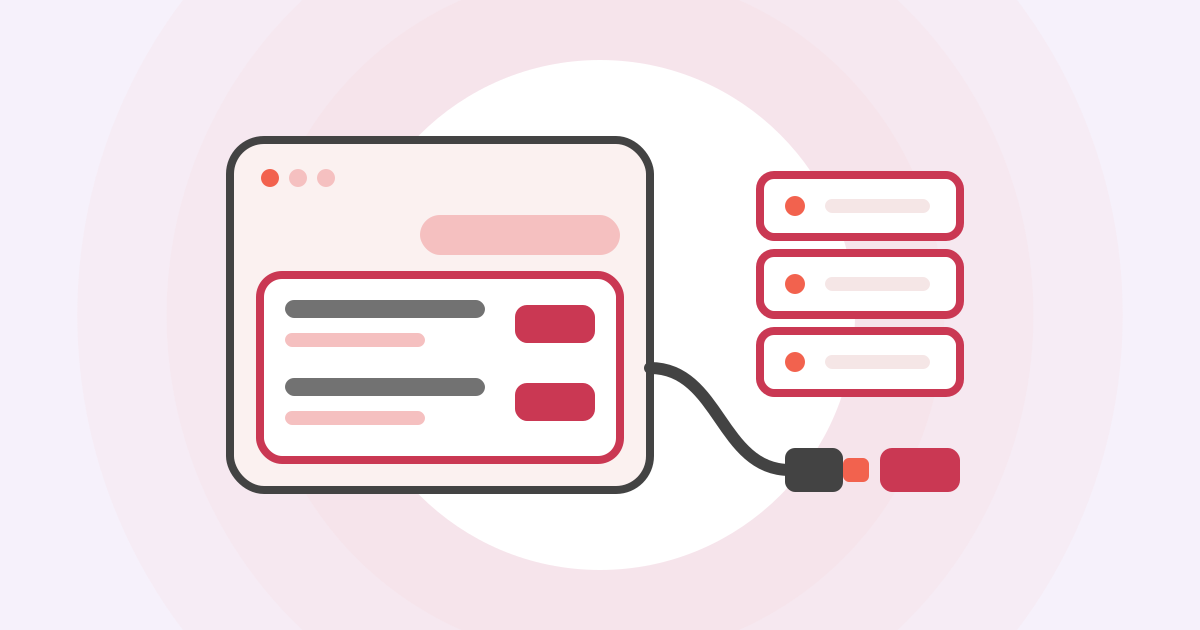
One option is to offer your service to ChatGPT and Claude as an MCP server. Users can then search and book through your service from inside the ChatGPT or Claude conversations they already use. The conversation and inference run on the AI the user subscribes to, so even as users grow, you are not billed for the LLM.
Using a fictional reservation service as an example, this article explains, from a product planner's point of view, how your service works through MCP, how the costs are split, and what review is needed to make it available to everyone. The second half covers the steps from planning to launch, plus specification notes for developers.
The content is based on the MCP specification (2026-07-28 version) and the official documentation of OpenAI and Anthropic as of November 17, 2026.
Key points
- When you offer your service as an MCP server, AI inference counts against the user's ChatGPT or Claude plan, and you are not billed for the LLM. You still pay to run the server.
- To let any ChatGPT or Claude user add it, you need to submit to each directory and pass review. Much like an app store, you are asked for a privacy policy and a test account for reviewers.
- What you build are "tools" that reshape your API into units that AI can use easily, and, if needed, screens shown inside the conversation. You do not build the chat screen or the AI inference.
How your service runs inside ChatGPT
Take a company that runs a restaurant reservation service. If it offers the service as an MCP server, users can find and book restaurants just by talking to ChatGPT or Claude.
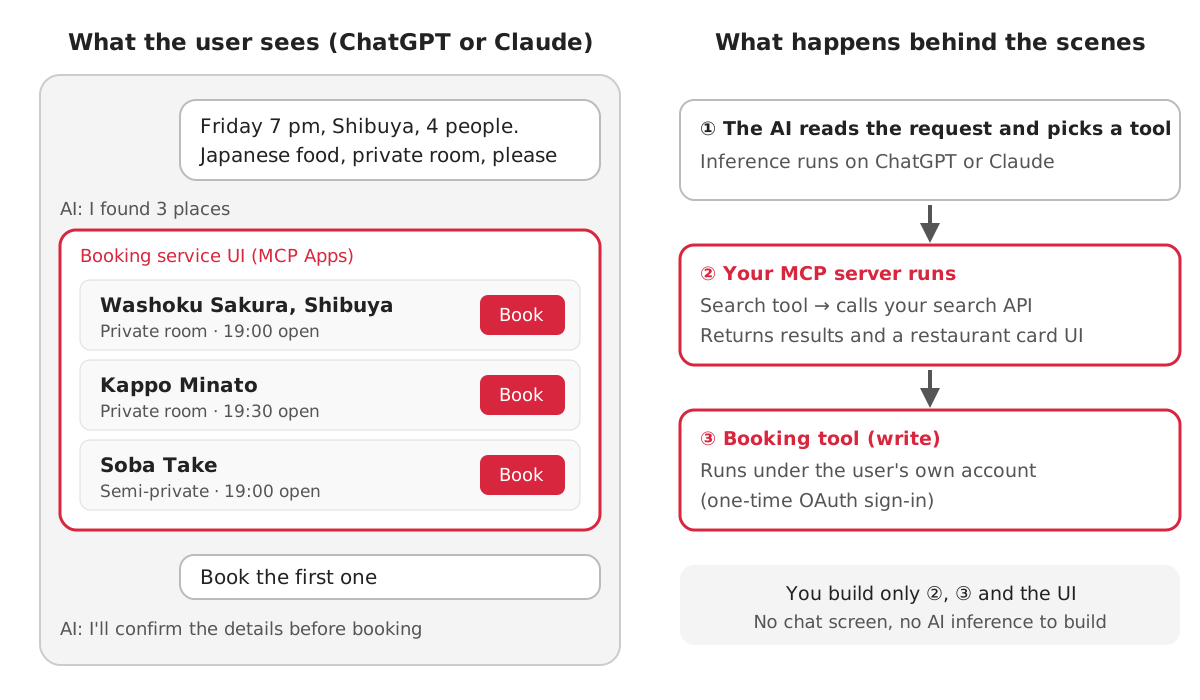
When a user asks, "Find a Japanese restaurant with a private room in Shibuya for four on Friday at 7 p.m.," the AI reads the request and calls the reservation service's "find restaurants" tool. The service's MCP server calls the company's search API and returns the results. The results can include screens the company built, such as restaurant cards and a booking button (an extension called MCP Apps). When the user continues with "Book the first one," the AI calls the "make a reservation" tool, and the booking is made under the user's own account. The user only has to log in once with their reservation service account (OAuth).
What the company builds are the tools in steps ② and ③ of the diagram, and the screens shown in the conversation. It does not build the AI that reads the request or the chat screen. If you already have an API, you add a thin layer, the MCP server, on top of it.
In Japan, more companies are already offering their services this way. freee publishes the URL of an MCP server it runs itself, and users can use freee's features from a conversation just by registering that URL as a custom connector in Claude. ConoHa VPS lists a connector in Claude's directory, so users can list and create servers just by signing in with their ConoHa account (INTERNET Watch, August 14, 2026).
What MCP is
MCP (Model Context Protocol) is a shared standard for connecting AI apps with external services. Anthropic released it as open source on November 25, 2024. The announcement named the problem it addresses: connections between AI and data had to be built separately for each place the data lived.
Every new data source requires its own custom implementation, making truly connected systems difficult to scale.
(Anthropic: Introducing the Model Context Protocol)
The official introduction compares MCP to USB-C. Instead of building an integration for every pair of AI app and service, if both sides follow the same port, any pair can connect (What is the Model Context Protocol (MCP)?).
On December 9, 2025, Anthropic donated MCP to the Agentic AI Foundation under the Linux Foundation. The foundation was co-founded by Anthropic, Block, and OpenAI, and is supported by Google, Microsoft, and others (Anthropic's announcement). MCP is no longer a Claude-only standard. For a business, this means you can build one MCP server and expect it to be used from both ChatGPT and Claude.
Not just "put in an API key and run it"
Many people think of MCP as "a mechanism where you put an API key in a config file and the AI calls the API for you." When it was first released in 2024, the main use was developers running MCP servers on their own PCs, and that understanding worked fine. Even in the current specification, an MCP server running on your own PC receives credentials from environment variables (Authorization).
Since then, a different use has spread: companies run MCP servers on their own servers, and ChatGPT or Claude connects to them over the internet. The reservation service example above uses this form.
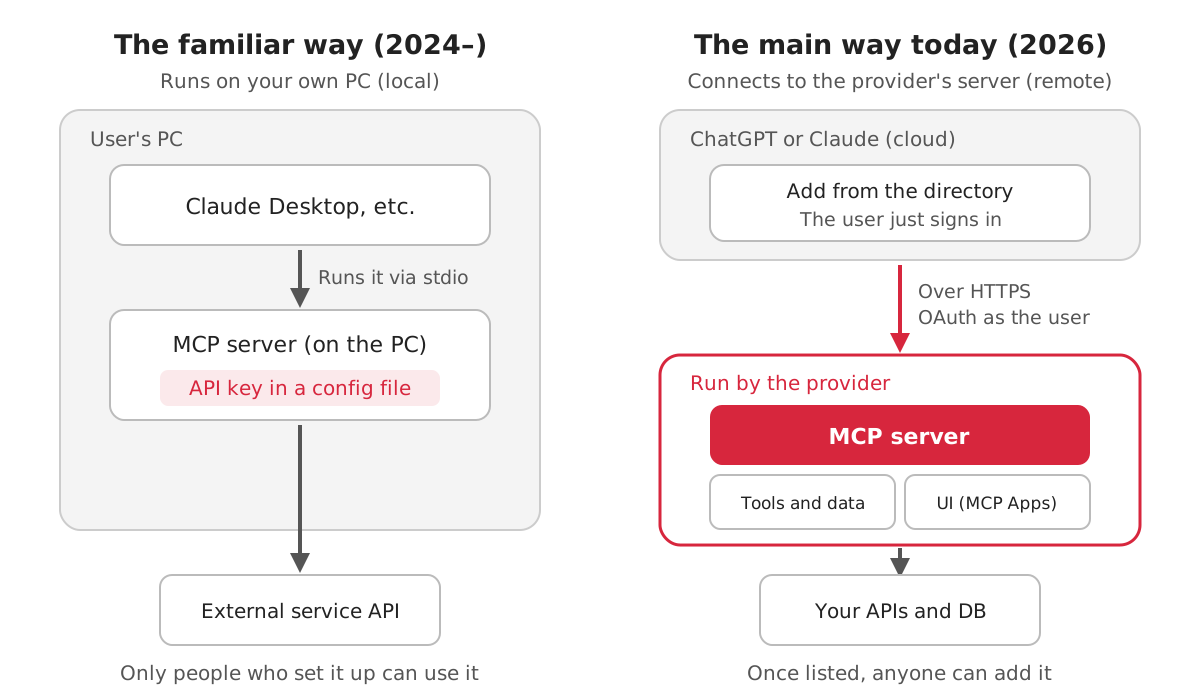
| The well-known way (2024 onward) | Today's main way (2026) | |
|---|---|---|
| Where the MCP server runs | The user's PC | The company's server |
| Authentication | API key in a config file | The user logs in with OAuth |
| What it can return | Text and data | Plus interactive screens (MCP Apps) |
| How it reaches users | Users write a config file | Added from the ChatGPT or Claude directory |
| Who uses it | Developers who can configure it | Everyday ChatGPT and Claude users |
For product planning, the right-hand column is what matters. You do not need to issue API keys for users to configure; they just log in with their account for your service.
Who pays for inference
There are two main ways to add AI features to your service. Build AI into your own product, or offer your service as an MCP server and let users use it from ChatGPT or Claude.
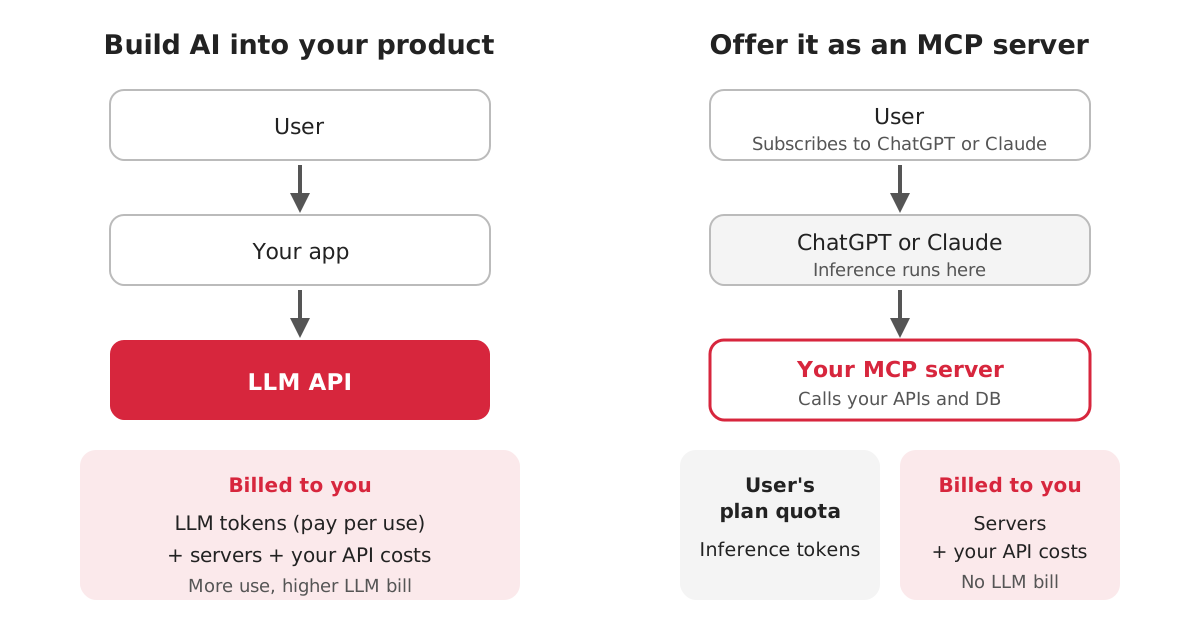
If you build AI into your product, you sign up for an LLM API and pay for the tokens used. If you let the AI use tools, the tool definitions and tool results are also counted as tokens.
Tool use requests are priced based on: 1. The total number of input tokens sent to the model (including in thetoolsparameter). 2. The number of output tokens generated.
(Claude API: Pricing)
The more users you have, the higher your bill. If you offer AI features for free, the more they are used, the closer you get to a loss.
If you offer your service as an MCP server, the conversation and inference run inside ChatGPT or Claude. That inference counts against the usage limits of the user's plan.
App use may count toward your ChatGPT plan limits, feature-specific allowances, and limits imposed by the app provider.
(OpenAI Help: Connected apps in ChatGPT)
Tools and connectors are token-intensive, so managing them helps both maximize your available context window and optimize your usage limits.
(Claude Help: How do usage and length limits work?)
Both show that tool use comes out of the user's allowance. Neither set of documentation describes any mechanism for billing LLM token fees to the business. What the business pays for is the server that runs the MCP server, and the cost of the APIs and databases that server calls.
| Build into your product | Offer as an MCP server | |
|---|---|---|
| LLM inference cost | Paid by you as pay-as-you-go API fees | Counted against the user's plan |
| What you pay | Inference, servers, your own APIs | Servers, your own APIs |
| Screens and experience | Fully your decision | Chat-centered. Screens within MCP Apps |
| Touchpoint with users | Your own app | Inside ChatGPT or Claude conversations |
| Publishing process | Your decision | Directory review (next section) |
That said, you cannot claim that running costs nearly disappear. These costs and constraints remain:
- You must host the MCP server yourself and keep it running. If you publish to ChatGPT, OpenAI scans the server every day after publication (Submit and maintain).
- If your tools use an LLM internally, for example for summarizing, you pay for it under your own API contract. A design where the host handles inference and tools focus on returning data fits this structure better.
- When a user reaches their plan limit, your tools stop working for them too. Tools that return large results use up the user's allowance faster, so Anthropic's directory policy asks you to save tokens (Anthropic Software Directory Policy).
- Inside a ChatGPT plugin, you can sell only physical goods, not subscriptions or digital goods. Logging in to an existing paid account is allowed (Plugin guidelines). Revenue basically comes from contracts for your service or from your core transactions, such as reservations and purchases.
Even so, removing LLM costs that grow with your user count from your bill is a big difference. As a way to let existing customers use your service from the ChatGPT or Claude they already use, it is an easy option to start with in terms of cost.
Getting listed for everyone
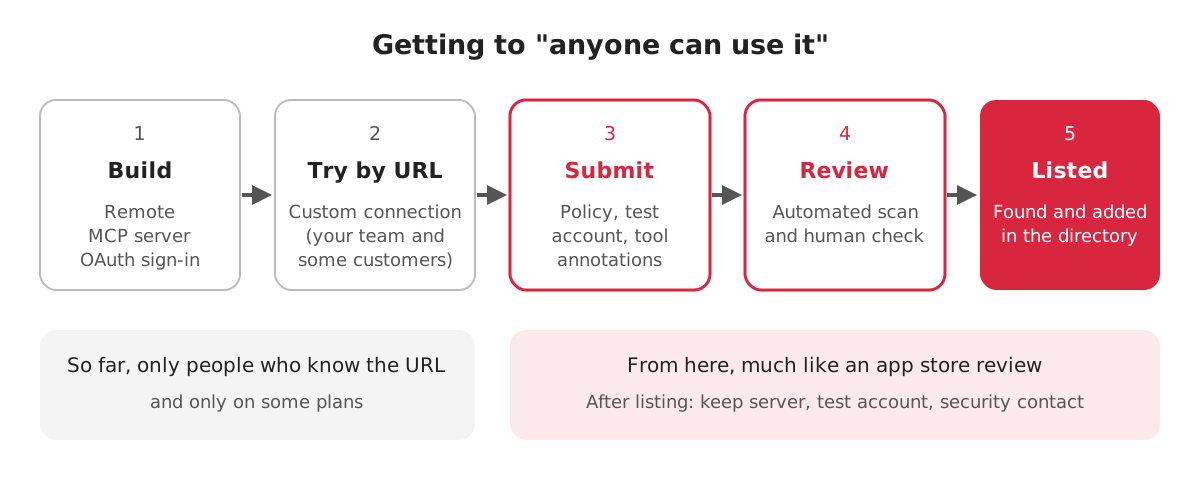
Building an MCP server alone does not let ChatGPT or Claude users find and use it. Before listing, a "custom" connection where users enter the URL by hand works, but only for people who know the URL, and only on some plans.
- ChatGPT: Custom MCP servers (including write actions) are available on Business and Enterprise/Edu. Pro is read-only (OpenAI Help: Connecting custom MCP servers).
- Claude: Custom connectors are available on all plans, including Free, but Free allows only one (Add an unlisted connector).
To let users search for and add your service inside ChatGPT or Claude, you need to submit to each directory and pass review. As with app store submissions, you are asked for a privacy policy, a test account for reviewers, and well-written tool descriptions.
OpenAI now calls the ChatGPT apps that began with the Apps SDK "plugins." ChatGPT and Codex share one plugin directory, so a published plugin appears in both (Plugins quickstart). On the Claude side, there is one Connectors Directory shared across all Claude apps (Connectors Directory).
| ChatGPT (plugin directory) | Claude (Connectors Directory) | |
|---|---|---|
| Who can submit | Organization owners who have completed individual or business identity verification | Users on paid plans (Pro and above). Owners on Team and Enterprise |
| Server requirements | HTTPS on a public domain, with domain ownership verification | Remote HTTPS |
| Authentication | Clearly state the permissions requested | OAuth 2.0 for services that require authentication |
| Tool annotations | Boolean flags on every tool for read-only, destructive, and external effects | A name for every tool, plus read-only or destructive annotations |
| What to submit | URLs for website, support, privacy policy, and terms of use. A test account. Five examples that should succeed and three that should fail | URLs for documentation and privacy policy, a support contact, and three or more example prompts. A test account |
| Review and publication | Automated scans and human review. You publish yourself after approval, choosing the countries | Listed as Community after an automated scan. Moves to Verified review at Anthropic's discretion |
| After publication | Scanned daily. New tools cannot be used until approved | Uptime and usage metrics available in the portal |
Sources: OpenAI's App review, Submit and maintain, and Plugin guidelines. Anthropic's Publish to the directory, Submit your connector, and Anthropic Software Directory Policy.
Common reasons for rejection are also published. Under Claude's review criteria, generic API tools that accept both safe reads and risky writes in one tool, and error messages without details, do not pass (Review criteria). Rather than listing your API as-is in MCP, you need to reshape it into tools that the AI will not get confused by.
Also, some Claude MCP Apps features, such as embedding websites, are available only for Verified listings (MCP Apps getting started). If you want to show screens, it is safer to first check what you can do with a Community listing.
We found no mention of listing fees on either company's submission pages or terms. Neither company states how long review takes.
Steps from planning to launch
Here is what we have covered, arranged as steps from planning to launch. We separate what the product planner decides from what development builds.
| Stage | What the planner decides | What development builds |
|---|---|---|
| 1. Choose features | Which features are valuable when used in a conversation. For a reservation service: "search," "check availability," "book" | Check whether existing APIs are enough |
| 2. Design tools | Whether to separate reads and writes, and whether to ask the user to confirm before writes | Tools in units the AI will not get confused by, with names and descriptions |
| 3. Decide on screens | Return text only, or show screens like restaurant cards (MCP Apps) | The UI, if showing screens |
| 4. Build and test | How far to test with internal staff or some customers | Remote MCP server, OAuth login, testing via a custom connection |
| 5. Submit | Which directory to submit to, and which countries to publish in | Privacy policy, test account for reviewers, test cases and examples |
| 6. Operate | Contact points for inquiries and bugs | Server monitoring, keeping up with spec revisions, accepting vulnerability reports |
Steps 1 and 2 shape the outcome the most. If you turn every API into a tool, the AI gets confused about which one to call, and review becomes harder to pass. The shortest path is to work backward from what users are likely to ask in a conversation and start with just a few tools.
Notes for developers
Why repositories have a Dockerfile
Some public MCP server repositories include a Dockerfile. This does not mean users need Docker to run the MCP server.
Chatwork's MCP server has no Dockerfile. By default, users put an API token in an environment variable and start it on their own PC with npx. The Dockerfile in freee's MCP server builds an image that starts the remote MCP server freee operates (https://mcp.freee.co.jp/mcp). The compose file in the same repository also describes the production setup, running alongside Redis and monitoring.
In other words, the Dockerfile is a piece for the business to run the MCP server on its own servers; the MCP specification does not require Docker. Once you move to the remote form, an MCP server becomes something you run like any web service: in containers, monitored, and scaled out. Separately, Docker offers MCP Catalog and MCP Gateway, which isolate and manage locally run MCP servers in containers (Docker Docs). That is about the user's own environment and is not required when a business offers its service.
Spec history and the 2026-07-28 version
The MCP specification has dated versions. The main changes are as follows (from each version's changelog).
| Version | Main changes |
|---|---|
| 2024-11-05 | First version. stdio and HTTP+SSE transports. Tools, resources, and prompts |
| 2025-03-26 | Authorization with OAuth 2.1. Streamable HTTP replaces the transport. Tool annotations (read-only or destructive) |
| 2025-06-18 | Structured tool output. Elicitation, where the server asks the user for more input. MCP servers defined as OAuth resource servers |
| 2025-11-25 | URL-mode Elicitation, asking the user to open a URL. New client registration method (Client ID Metadata Documents). Tasks for long-running work (experimental) |
| 2026-07-28 | Stateless. Sessions and the initialization handshake removed. Sampling, Roots, Logging, and others deprecated |
The latest version, 2026-07-28, was released as final on July 28, 2026, and is the current version (Versioning). The biggest change is that each exchange now completes in a single request.
Make MCP stateless: remove theinitialize/notifications/initializedhandshake. Every request now carries its protocol version and client capabilities in_meta
(2026-07-28 Changelog)
Until now, MCP first went through a connection handshake and kept that session for the rest of the exchange. So when you scaled out to multiple servers, you needed to route the same user's requests to the same server or share session state. In the 2026-07-28 version, any request can be handled on its own, which makes it easier to run behind an ordinary load balancer or in a serverless environment.
Any request can now land on any server instance behind a plain round-robin load balancer without needing shared storage.
(The 2026-07-28 MCP Specification)
Request headers now carry the method and tool name, so gateways and WAFs can route and meter traffic without reading the body. Sampling, where the server borrows the host's LLM, is deprecated, and Claude does not support it (Building connectors). Deprecated features have a grace period of at least 12 months, and Roots, Sampling, and Logging are scheduled for removal in a version on or after July 28, 2027 (Deprecated features). Going forward, the specification will be revised twice a year, in March and September, with the next one planned for March 30, 2027 (MCP release cycle). If you build something new, target the 2026-07-28 version and plan to keep up with the twice-yearly revisions after launch.
Summary
When considering whether to offer your service as an MCP server, check the following.
・[ ] You have narrowed down the features that are valuable inside ChatGPT or Claude conversations
・[ ] You have split tools into units the AI will not get confused by, with reads and writes separated
・[ ] It runs as a remote MCP server, with OAuth login if authentication is needed
・[ ] New builds target the 2026-07-28 version (stateless) and avoid deprecated features
・[ ] If tools use an LLM internally, you have estimated that cost assuming you pay for it
・[ ] Tool results are kept small so they do not waste the user's allowance
・[ ] Before listing, you tested with a custom connection internally and with some customers
・[ ] You have a privacy policy, a support contact, and a test account for reviewers
・[ ] After listing, you can keep the server running, the test account working, and the vulnerability reporting contact open
At Vitalify Asia, we work on development that connects generative AI with existing services and business systems. We have experience implementing MCP servers like those described in this article for internal systems, and researching and preparing estimates for MCP-related consultations. If you want your service to be usable from ChatGPT or Claude, or are unsure which features to offer through MCP, please feel free to contact us.
Since 2008, VFA has been involved in more than 1,000 development projects. Some of our work is not public, so please feel free to ask us for details.
Vitalify Asia's development portfolio
Specifications of each service are updated continuously. The content of this article is as of November 17, 2026.
Vitalify Asia Co., Ltd. https://vitalify.asia/
Struggling to turn ideas into reality? With a proven track record of over 1,000 clients, our agile and flexible team will accelerate your business growth.