
Why AI That Worked in a Chat Window Fails in Your Product
Generative AI may work well in a chat window yet behave differently after API integration. Using a PDF datasheet extraction example, this article explains three common challenges—output consistency, input scope, and production-scale latency—and practical ways to address them.

On this page
- The difference between a chat window and an API
- Case: turning PDF spec tables into data
- Wall 1: The names come out inconsistent
- Wall 2: Handing over a whole page makes it read too much
- Wall 3: Latency only shows up at production volume
- Applying this to other kinds of work
- What to check once it works in the chat window
You hand your business documents to ChatGPT, and it works better than you expected. So you ask for it to be built into your own system, and what comes back does not behave the way you wanted. In consultations about products that embed generative AI, this is a very common story.
When you investigate the cause, you need to compare more than the AI model. You also need to compare the processing around it. Even with the same model, a chat window and a product differ in how they handle input and which features they use. This article explains that difference and the three walls you are likely to hit when building AI into a product.
The difference between a chat window and an API
In this article, chat window means the screen where you use ChatGPT, Gemini, or Claude in a browser or an app. When you build AI into your own system, you use it through an API (a doorway that programs can call).
A chat window is a service that bundles file reading, search, conversation history, and result display around the model. When you build in through an API, you choose the features your work needs and connect them to your application's processing. APIs also offer features such as search and conversation-state management, but what to use and what to pass in is up to the development side (OpenAI API: using tools, conversation state).
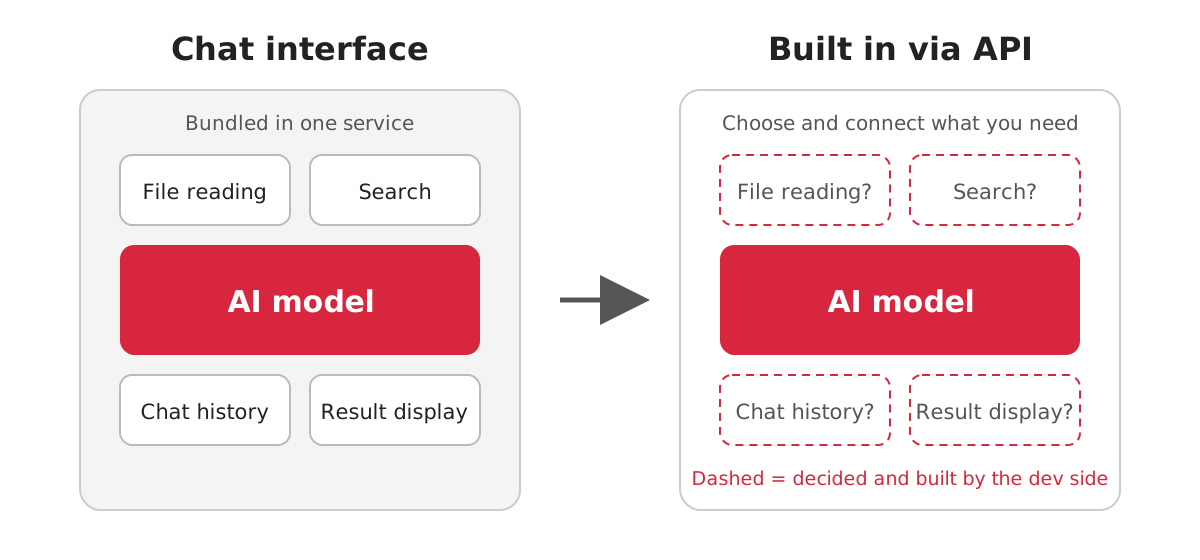
In other words, part of the reason things worked in the chat window may lie not in the AI but in the machinery behind it. Building in starts with listing the features you were using without noticing in the chat window.
Case: turning PDF spec tables into data
Take an electronic components trading company as an example. Component makers publish a PDF called a datasheet for each part. At the trading company, people copied the voltage and current tables in those PDFs into Excel one by one. The trial was to see whether AI could automate this.
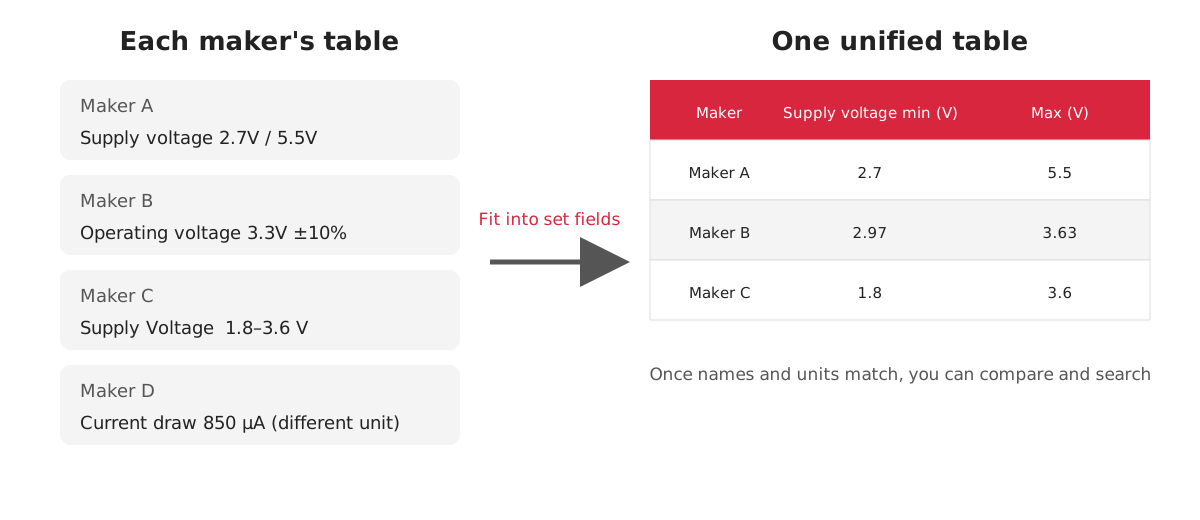
Each maker writes its tables differently. One maker writes "Supply Voltage" as "2.7V to 5.5V", while another writes "Operating Voltage" as "3.3V ±10%". Some tables use mA and others µA, and some lay items out vertically while others lay them out horizontally. The goal was a single table in which every maker's data shares the same items and units.
When we tried it in the chat window, the values in the tables were extracted correctly. But once we built it into the product, we hit three walls.
Wall 1: The names come out inconsistent
The same item appears under different names, such as "Supply Voltage", "Operating Voltage", and "VDD". If the AI returns the names exactly as written in the table, the system treats each one as a separate column. Values with the same meaning end up split across three columns, and you can neither compare nor search them.
The fix is to decide the items and units you want back in advance. Prepare slots such as "minimum supply voltage (V)", and have the AI fit the values from the table into them. Similar names can differ in conditions or meaning, so check the footnotes and tell them apart.
In a chat window, a slightly messy answer still gets through because a person reads it. In a product, the answer goes straight into the system, so it is unusable unless the format is consistent.
Wall 2: Handing over a whole page makes it read too much
One datasheet page holds graphs, notes, and other tables besides the table you want to read. In the chat window, we could hand over the whole page and it still read the right table. When we passed the page the same way through the API, it picked up values from a nearby table.
We do not know which process in the chat window made the difference. It could be the model, the way files are read, the instructions, or the settings. So rather than guess at the internals and try to reproduce them, we first tried narrowing the range to be read.
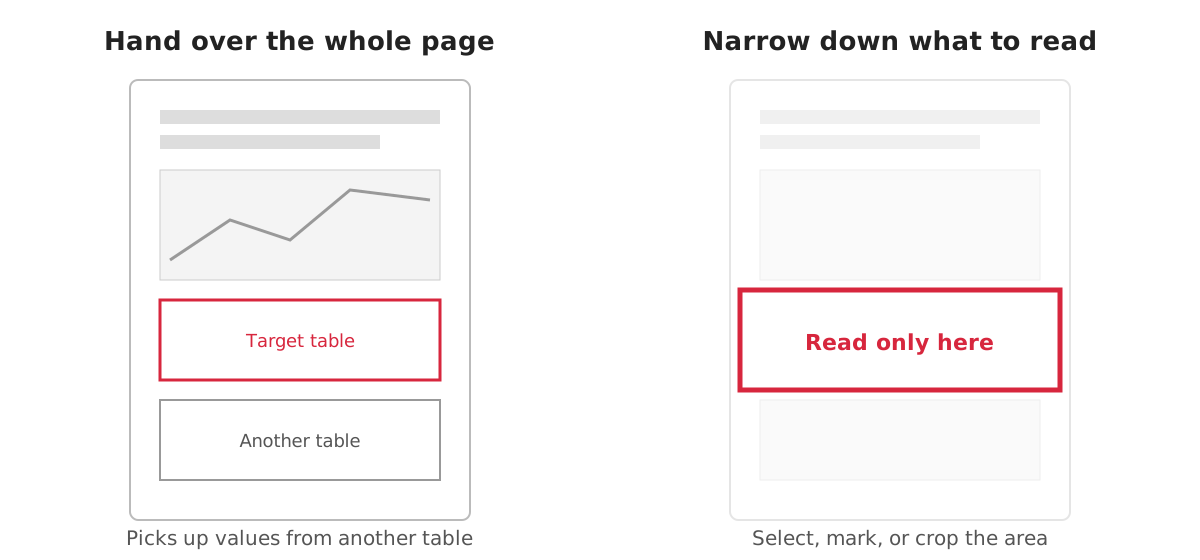
Ways to tell the AI the range include having a person select it, marking the table, and cutting out only the table to pass in. Which one fits depends on the documents and the work, so you decide by trying.
Wall 3: Latency only shows up at production volume
In the trial we tested one page at a time, so we never noticed the total processing time. In production there are thousands of items, and a single datasheet runs to dozens of pages. Processing that returns in a few seconds for one page takes minutes for hundreds of pages. If the screen just keeps saying "Processing" for all that time, users assume it is broken and want to reload.
We could not make the processing itself fast, so we changed how it is shown. Instead of making users wait until everything is done, we show each row on screen as soon as it is ready. Receiving and displaying results bit by bit is called streaming (OpenAI API streaming responses). When processing multiple pages, you can also have the application send results to the screen each time a page or row finishes. Even when the API offers streaming, how to show results and progress to users is something the application side designs.
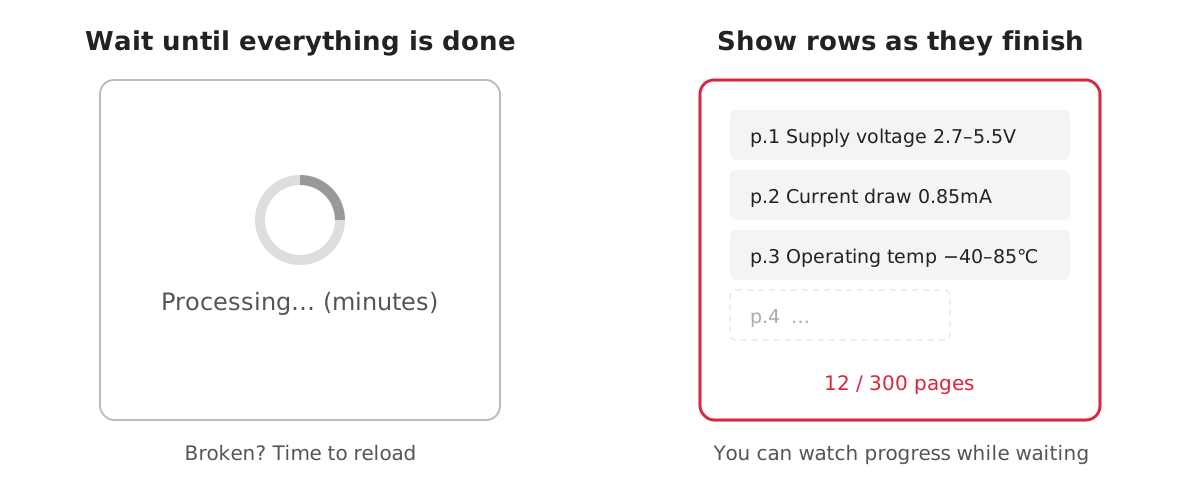
Even if the time taken is the same, users can wait while watching progress when results keep appearing.
Applying this to other kinds of work
The same thinking applies to work that has all three traits: large volume, inconsistent formats, and a need to feed the system.
| Industry | Example |
|---|---|
| Logistics | Enter freight rate tables, written differently by each carrier, into a quoting system |
| Finance and research | Pull each company's earnings figures into a comparison table |
| Transportation | Turn each station's timetable into data for a route-search service |
What to check once it works in the chat window
・Have you decided the format you want back (items and units)?
・Have you narrowed the range you pass to the AI?
・Have you decided the latency at production volume, and how to show it?
・Have you decided how to validate the values you receive, and what to do when something cannot be read?
Success in the chat window is only the starting point of validation. Testing early what happens when you run documents in the production format at production volume helps you reduce rework later.
If you are considering a product that embeds generative AI, please contact us. Bringing the documents you used in validation, along with the output you expected and the output you actually got, lets us sort out the points to check in concrete terms.
This article reorganizes the content of the webinar "Why AI That Worked in the Browser Fails in Your Product," held on October 28, 2026. The case is fictional, based on our development experience, while the walls and the ways around them come from real projects. Specifications of each service are updated continuously.
Struggling to turn ideas into reality? With a proven track record of over 1,000 clients, our agile and flexible team will accelerate your business growth.