Ship Production AI Features Faster with Firebase AI Logic
A practical guide to shipping Gemini-powered AI features with Firebase AI Logic. Learn how App Check, rate limits, Server Prompt Templates, and Template-only Mode can reduce backend complexity—and when RAG, private APIs, trusted operations, or complex workflows still require a backend.

On this page
- Flutter Code Demo: Calling Gemini in Just a Few Lines
- 1. RAG and Private Data
- 2. Complex AI Workflows
- 3. Trusted Business Operations
- 4. Private APIs and Server-side Tools
- 5. Compliance, Auditing, and Governance
- Traditional Architecture
- Firebase AI Logic
- Level 1 — Direct AI Feature
- Level 1.5 — Protected Prompt
- Level 2 — AI with Trusted Business Logic
- Level 3 — RAG
- Level 4 — AI Workflow / Agent
Generative AI is becoming an increasingly common part of mobile applications. When building an AI feature, developers often start with an architecture like this:
Mobile App
    ↓
Backend API
    ↓
LLM Provider
For complex AI systems, this architecture makes perfect sense.
The backend may need to handle:
- RAG (Retrieval-Augmented Generation)
- Vector databases
- LangChain / LangGraph workflows
- Tool calling
- Business rules
- Conversation memory
- Multi-agent orchestration
- Access control
- Prompt management
- Usage tracking
- Integration with internal systems
But what if the AI feature is actually very simple?
For example:
A mobile application only needs a chatbot where the user sends a message, the system combines it with a prompt, and Gemini generates a response.
In that case, adding a backend service may introduce more infrastructure and maintenance work than the value that backend actually provides.
Firebase AI Logic offers another approach.
Instead of:
Mobile App
    ↓
Backend API
    ↓
LangChain / LangGraph
    ↓
Gemini API
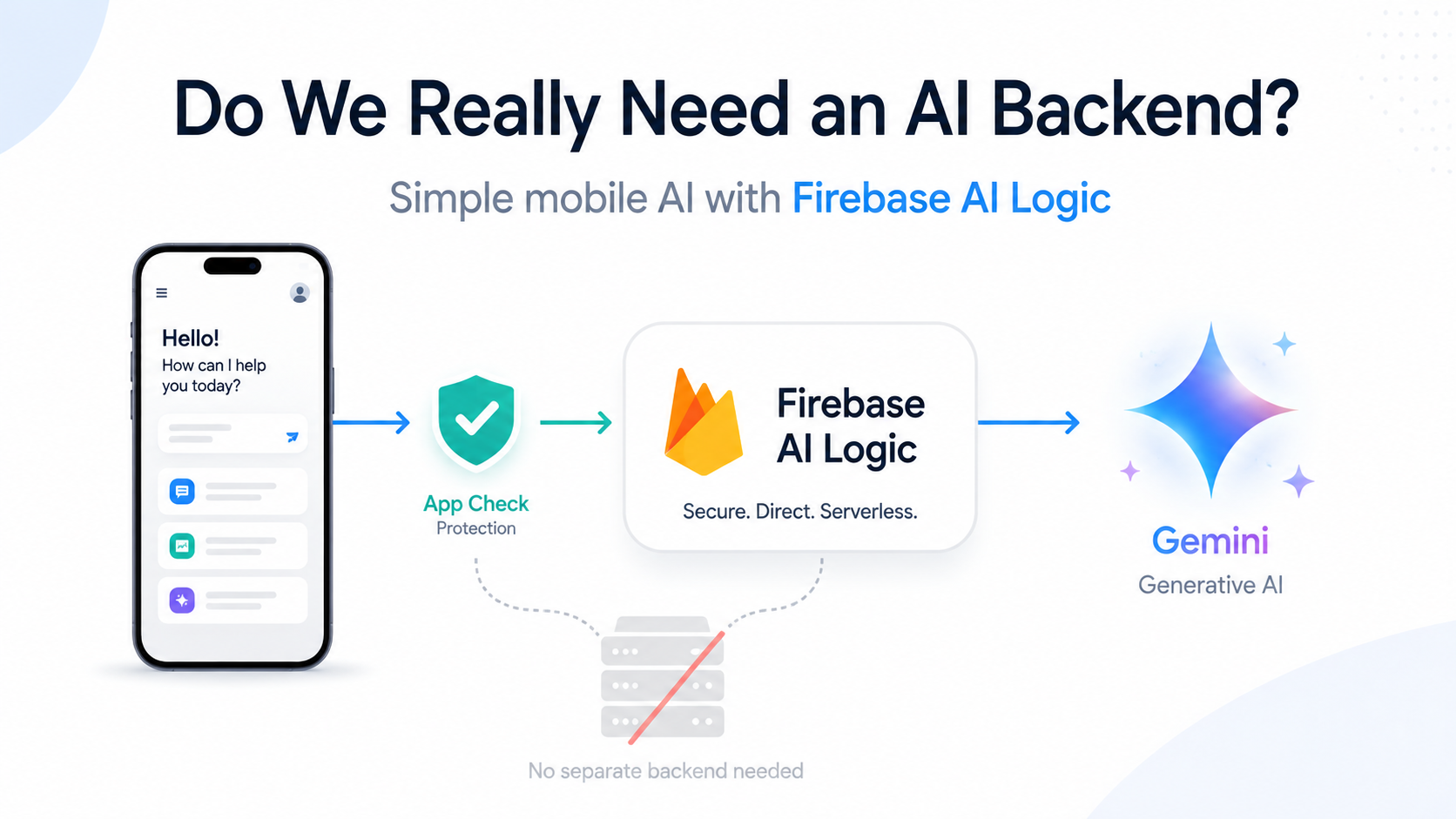
we can simplify the architecture to:
Mobile App
    ↓
Firebase AI Logic
    ↓
Gemini
Firebase AI Logic provides client SDKs that allow mobile and web applications to call Gemini APIs directly from application code. The SDKs currently support Swift for Apple platforms, Kotlin/Java for Android, JavaScript for Web, Dart for Flutter, and Unity.
Firebase AI Logic supports Gemini through two provider options:
This leads to a practical architecture question:
How can we ship an AI feature to production faster without over-engineering the system?
The Traditional Architecture
Suppose we are building a simple chatbot inside a mobile application.
The backend architecture might look like this:
┌─────────────────────┐
│     Mobile App      │
└─────────┬───────────┘
          │ HTTPS
          ▼
┌─────────────────────┐
│     Backend API     │
│                     │
│ - Authentication    │
│ - Prompt creation   │
│ - API proxy         │
└─────────┬───────────┘
          │
          ▼
┌─────────────────────┐
│    Gemini API       │
└─────────────────────┘
This design is completely valid.
However, if the backend effectively does little more than:
const response = await model.generateContent([
  SYSTEM_PROMPT,
  userMessage,
]);

return response.text;
then it is worth asking:
Does this backend actually provide enough value to justify building and operating it?
In production, a backend service typically brings additional responsibilities:
- Deployment pipelines
- Container or serverless runtime
- Logging
- Monitoring
- Scaling
- Authentication middleware
- Secret management
- API rate limiting
- Error handling
- Infrastructure configuration
- Security patching
For complex AI workflows, this overhead is justified.
For a simple AI feature, it may not be.
How Does Firebase AI Logic Work?
Firebase AI Logic is designed to allow mobile and web applications to call Gemini through Firebase client SDKs.
A simple architecture can look like this:
┌─────────────────────┐
│     Mobile App      │
│                     │
│ Firebase AI Logic   │
│ SDK                 │
└─────────┬───────────┘
          │
          ▼
┌─────────────────────┐
│ Firebase AI Logic   │
│ Proxy / Gateway     │
└─────────┬───────────┘
          │
          ▼
┌─────────────────────┐
│      Gemini         │
└─────────────────────┘
One important point is:
Firebase AI Logic is not simply about embedding a Gemini API key inside an APK or IPA and calling the Gemini REST API directly.
Firebase AI Logic includes a proxy service between the client SDK and the Gemini API provider. This is an important part of the Firebase AI Logic security model.
Flutter Code Demo: Calling Gemini in Just a Few Lines
After configuring Firebase for the Flutter project, the basic integration is quite small:
import 'package:firebase_ai/firebase_ai.dart';
import 'package:firebase_core/firebase_core.dart';
import 'firebase_options.dart';

// Initialize FirebaseApp
await Firebase.initializeApp(
  options: DefaultFirebaseOptions.currentPlatform,
);

// Initialize the Gemini Developer API backend service
// Create a `GenerativeModel` instance with a model that supports your use case
final model =
      FirebaseAI.googleAI().generativeModel(model: 'gemini-3.7-flash');

// Provide a prompt that contains text
final prompt = [Content.text('Write a story about a magic backpack.')];

// To generate text output, call generateContent with the text input
final response = await model.generateContent(prompt);
print(response.text);
Can Client-Side AI Calls Be Abused?
This is usually the biggest concern when calling AI directly from a client.
If requests originate from the mobile application, an attacker could try to:
- Decompile the APK
- Inspect network requests
- Reverse-engineer the application flow
- Write scripts that send automated requests
- Consume Gemini quota
- Generate unexpected costs
Firebase addresses part of this problem with Firebase App Check.
Starting November 2, 2026, Firebase App Check enforcement will be required to use Firebase AI Logic. This means requests to Firebase AI Logic must pass App Check verification, helping reject traffic that does not originate from legitimate application instances.
Conceptually:
Mobile App
    │
    │ App attestation
    ▼
App Check
    │
    │ Valid token
    ▼
Firebase AI Logic
    │
    ▼
Gemini
App Check does not turn a mobile client into a trusted server.
It solves a different problem:
Did this request actually come from a legitimate instance of the application that we accept?
This is an important protection layer when moving Generative AI closer to the client.
Rate Limiting Is Still Necessary
App Check should not be the only protection layer.
Even legitimate users can send too many requests.
Firebase AI Logic supports configurable per-user rate limits, in addition to the rate limits and quotas of the selected Gemini provider.
For example:
Expected usage:
5–10 requests / minute / user

Configured limit:
20 requests / minute / user
Production protection can therefore be layered:
Request
   │
   ▼
App Check
   │
   ▼
Per-user Rate Limit
   │
   ▼
Gemini API Quota
   │
   ▼
Gemini
This is a much more reasonable architecture than:
Mobile App
    ↓
Gemini REST API
    ↓
API key embedded inside app
Server Prompt Templates: No Need to Embed Prompts in the Mobile App
A common reason developers build an AI backend is:
"The system prompt contains business instructions, so it cannot live inside the mobile application."
That concern is valid.
A mobile application can always be reverse-engineered to some degree.
However, Firebase AI Logic now supports Server Prompt Templates.
With server prompt templates, prompts, schemas, and model configurations are stored server-side. The client application only sends a template ID together with the required input variables.
For example, instead of hard-coding:
SYSTEM PROMPT:

You are a sales training evaluator.

Evaluate the conversation using:
- Questioning
- Listening
- Proposal
- Logic
- Closing

Return JSON using this schema...
inside the mobile application, the client can call:
// Initialize the Gemini Developer API backend service.
// Create a `TemplateGenerativeModel` instance.
var _model = FirebaseAI.googleAI().templateGenerativeModel()

var customerName = 'Jane';

var response = await _model.generateContent(
        // Specify your template ID
        'my-first-template-v1-0-0',
        // Provide the values for any input variables required by your template.
        inputs: {
           'customerName': customerName,
        },
      );

var text = response?.text;
print(text);
while the actual system instruction is managed on the server.
Server prompt templates provide several clear benefits:
- Prompts are not directly exposed in client code
- Prompts can be updated without releasing a new app version
- Schemas and model configurations can be managed server-side
- Prompt versions can evolve independently from application releases
Template-only Mode
Firebase AI Logic also provides template-only mode.
When this feature is enforced, Firebase AI Logic blocks requests that do not use server prompt templates. This is a project-wide setting for requests going through Firebase AI Logic.
The flow becomes:
Mobile App
    ↓
Template ID + Input
    ↓
Firebase AI Logic
    ↓
Server Prompt Template
    ↓
Gemini
instead of:
Mobile App
    ↓
Arbitrary System Prompt
    ↓
Gemini
This significantly changes the architecture decision.
Previously, we might have assumed:
Sensitive System Prompt
        ↓
Must use Backend
With Firebase AI Logic:
Sensitive System Prompt
        ↓
Server Prompt Template
        ↓
Template-only Mode
        ↓
May not need a dedicated Backend
Firebase also recommends combining template-only mode with input validation to reduce abuse and prompt-injection risk.
Server Prompt Templates Do Not Replace the Backend Entirely
The important distinction is:
Protecting a prompt is different from protecting a business operation.
Server prompt templates are suitable for managing:
- System prompts
- Evaluation criteria
- Output schemas
- Model configuration
- Prompt structure
- Input validation
- Prompt versioning
But they do not turn the mobile application into a trusted execution environment.
Therefore:
Sensitive Prompt
      ↓
Server Prompt Template
      ↓
May not need Backend
while:
Sensitive Business Operation
      ↓
Trusted Backend
is still the correct architecture in many cases.
When Would I Still Use a Backend?
Firebase AI Logic can eliminate a dedicated AI backend for many simple AI use cases.
However, there are still cases where a backend is the better choice.
1. RAG and Private Data
If the AI needs access to:
Internal Documents
Private Database
Vector Search
Enterprise Search
Customer Data
Company Knowledge Base
the backend is usually the right place for the retrieval pipeline.
For example:
Mobile
   ↓
Backend
   ↓
Retriever
   ↓
Vector DB / Search
   ↓
Gemini
A server prompt template is not a RAG engine.
2. Complex AI Workflows
If the AI workflow looks like this:
User Request
     ↓
Classifier
     ↓
Planner
     ↓
Retriever
     ↓
Tool A
     ↓
Tool B
     ↓
Validator
     ↓
Gemini
then orchestration frameworks such as LangGraph still provide real value.
These workflows often require:
- State management
- Retry
- Branching
- Tool execution
- Multi-step processing
- Human approval
- Long-running jobs
This is no longer a simple model invocation.
3. Trusted Business Operations
If the AI can trigger operations such as:
Create order
Cancel order
Refund payment
Modify permissions
Approve transaction
Update private records
those operations require trusted server-side authorization.
For example:
User:
"Refund order #123"
       ↓
AI
       ↓
Check refund eligibility
       ↓
Check payment status
       ↓
Execute refund
The backend should still be responsible for:
Authentication
Authorization
Business validation
Transaction integrity
Audit logging
An AI response should not become an authorization decision by itself.
4. Private APIs and Server-side Tools
If the model needs to call:
CRM
ERP
Payment Gateway
Internal API
Database
Email Service
Admin API
a backend or trusted server-side tool layer is still required.
API credentials and privileged operations should not live inside a mobile application.
5. Compliance, Auditing, and Governance
Some systems require centralized:
- AI request logging
- Prompt history
- Output auditing
- Moderation
- Cost allocation
- User-level usage control
- Compliance policy
- Data retention policy
In these cases, a dedicated backend or AI gateway may still be a better architecture.
Server Prompt Templates Still Have Limitations
Server Prompt Templates are currently a Preview capability, which means the feature can continue to evolve and may not be covered by normal SLA or deprecation policies.
Firebase also documents capabilities that are not fully supported by server prompt templates. For example, Gemini Live models are not currently supported by server prompt templates.
Therefore, if an application depends on capabilities that are not supported by templates, enabling template-only mode can block those requests.
This should be checked before enforcing template-only mode in production.
Benefits of Removing a Dedicated AI Backend
For simple AI use cases, the biggest benefit is not necessarily infrastructure cost.
The larger benefit is reducing architectural complexity.
Traditional Architecture
Mobile
  ↓
API Gateway
  ↓
Backend
  ↓
AI SDK / Framework
  ↓
Gemini
The team has to maintain:
Mobile Application
+
Backend Repository
+
CI/CD
+
Runtime
+
Infrastructure
+
Secrets
+
Monitoring
+
Scaling
+
AI Integration
Firebase AI Logic
Mobile
  ↓
Firebase AI Logic
  ↓
Gemini
Or, when prompts need protection:
Mobile
  ↓
Firebase AI Logic
  ↓
Server Prompt Template
  ↓
Gemini
The team can focus more on:
Mobile Application
+
Firebase Configuration
+
Prompt Templates
+
AI Feature
If the backend previously existed only to:
Receive Request
       ↓
Attach System Prompt
       ↓
Call Gemini
       ↓
Return Response
then Server Prompt Templates significantly reduce the reason to keep that backend.
Fewer Network Hops and Less to Operate
Traditional architecture:
Mobile
 → Our API Gateway
 → Our Backend
 → Gemini
 → Our Backend
 → Mobile
Firebase AI Logic:
Mobile
 → Firebase AI Logic
 → Gemini
 → Mobile
Firebase still has infrastructure between the client and Gemini.
The difference is not:
"There is no server anymore."
The difference is:
The team no longer needs to build and operate a dedicated AI proxy server.
This reduces:
- Infrastructure setup
- Deployment
- Monitoring
- Scaling responsibility
- Backend maintenance
What About Pricing?
Firebase AI Logic supports the Gemini Developer API with both free and paid tiers.
Paid tiers require the Firebase project to be linked to Cloud Billing, which means using the Blaze pay-as-you-go plan.
The important point is:
Not needing a backend does not mean cost governance is unnecessary.
Firebase provides tools to monitor cost, usage, and metrics related to Firebase AI Logic.
A production setup should still combine:
App Check
+
Per-user Rate Limits
+
Gemini API Quotas
+
Budget Alerts
+
Token / Usage Monitoring
When Is Firebase AI Logic a Good Fit?
An AI feature with a flow like this is a good candidate:
User Input
    ↓
Prompt
    ↓
Gemini
    ↓
Response
For example:
- Simple chatbot
- Rewrite
- Translation
- Summarization
- Classification
- Grammar correction
- Content suggestion
- Image understanding
- Basic multimodal interaction
If the prompt needs to be protected:
User Input
    ↓
Server Prompt Template
    ↓
Gemini
    ↓
Response
Firebase AI Logic can still handle this without a dedicated backend.
A More Practical Way to Classify AI Architecture
Instead of starting every AI feature with:
LangChain
+
LangGraph
+
Vector Database
+
Redis
+
Backend API
+
Worker
we can choose the architecture based on actual complexity.
Level 1 — Direct AI Feature
Mobile
   ↓
Firebase AI Logic
   ↓
Gemini
Suitable for:
- Rewrite
- Summary
- Simple Chat
- Classification
Level 1.5 — Protected Prompt
Mobile
   ↓
Firebase AI Logic
   ↓
Server Prompt Template
   ↓
Gemini
Can be combined with:
App Check
+
Template-only Mode
+
Rate Limiting
Suitable for:
- Server-managed system prompts
- Evaluation instructions
- Standardized AI behavior
- Prompt configuration managed independently from app releases
Level 2 — AI with Trusted Business Logic
Mobile
   ↓
Backend
   ↓
Gemini
Suitable for:
- Private APIs
- Business authorization
- Sensitive operations
- Centralized auditing
Level 3 — RAG
Mobile
   ↓
Backend
   ↓
Retriever
   ↓
Vector DB / Search
   ↓
Gemini
Suitable for:
- Internal knowledge assistants
- Enterprise document Q&A
- Private knowledge retrieval
Level 4 — AI Workflow / Agent
Mobile
   ↓
Backend
   ↓
LangGraph / Agent Workflow
   ├── Planner
   ├── Retriever
   ├── Tools
   ├── APIs
   └── Validator
          ↓
        Gemini
Suitable for:
- AI Agents
- Complex workflows
- Multi-step automation
- Tool-heavy AI systems
Do Not Use Level 4 Architecture for a Level 1 Problem
Generative AI has introduced many technologies:
- LangChain
- LangGraph
- Vector Databases
- Embeddings
- Rerankers
- Agent Frameworks
- MCP
- AI Gateways
They all solve real problems.
But their existence does not mean every AI feature needs them.
If the real requirement is only:
Input
  ↓
Prompt
  ↓
Model
  ↓
Output
then the architecture can be equally simple.
Conclusion
Firebase AI Logic makes it easier to bring Generative AI features into mobile and web applications by providing a set of capabilities that can be used directly from the client:
Firebase AI Logic SDK
+
App Check
+
Per-user Rate Limiting
+
Server Prompt Templates
+
Template-only Mode
Server prompt templates allow prompts, schemas, and configuration to remain server-side instead of being hard-coded into the mobile application. Template-only mode can further enforce that Firebase AI Logic requests use those templates.
This does not mean Firebase AI Logic replaces every backend.
A backend remains important when AI needs:
- Private data
- RAG
- Trusted business operations
- Private APIs
- Complex orchestration
- Compliance or centralized auditing
The main message is:
Use the simplest architecture that still satisfies your security, business, and operational requirements.
Before adding an API Gateway, Backend Service, LangChain, LangGraph, Redis, Vector Database, or Agent Framework to a simple AI feature, perhaps we only need to ask:
“Does this AI feature actually need a backend?”
References
- Firebase AI Logic Documentation
- Get started with Firebase AI Logic
- Gemini Developer API
- Gemini Enterprise Agent Platform
- Firebase AI Logic — App Check
- Firebase AI Logic — Server Prompt Templates
- Firebase AI Logic — Template-only Mode
- Firebase AI Logic — Server Prompt Template Best Practices
- Firebase AI Logic — Rate Limits and Quotas
- Firebase AI Logic — Pricing
- Firebase AI Logic — Monitoring
Struggling to turn ideas into reality? With a proven track record of over 1,000 clients, our agile and flexible team will accelerate your business growth.