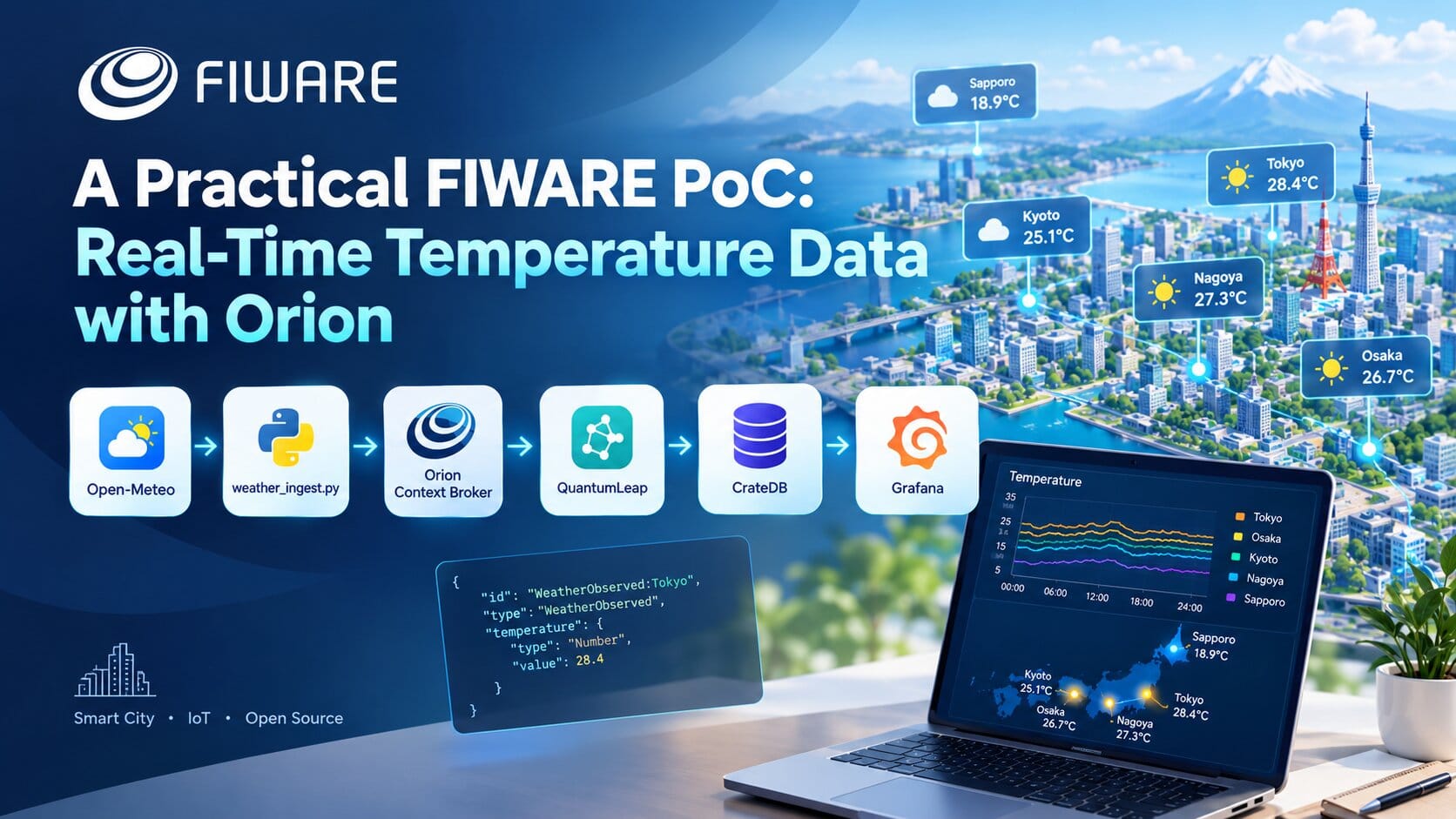
A Practical FIWARE PoC: Real-Time Temperature Data with Orion
A hands-on FIWARE Orion PoC using real temperature data from Open-Meteo. The article covers NGSI-v2 entities, Smart Data Models, Orion subscriptions, QuantumLeap, CrateDB, Grafana, Docker health checks and practical issues encountered while building an end-to-end IoT pipeline.
On this page
Hello, I'm Thinh, an engineer specializing in 3D development.
I usually work mainly with 3D and BIM, but last week, my boss suddenly told me:
“Try looking into FIWARE (Future Internet WARE).”
…What exactly is FIWARE?
And that was how this whole journey started.
After doing some research, I learned that FIWARE is an open-source platform ecosystem used in areas such as Smart City and IoT. One of its central components is the Orion Context Broker.
However, simply reading the documentation still made it difficult to visualize how FIWARE actually works.
So this time, I decided to use real temperature data to build a data pipeline like this:
Open-Meteo
    ↓
weather_ingest.py
    ↓
Orion Context Broker
    ↓
QuantumLeap
    ↓
CrateDB
    ↓
Grafana
Through this experiment, I wanted to see how FIWARE works in practice.
In this article, I will share what I learned—from initially wondering “What is FIWARE?” to building a working PoC, including some of the practical problems I encountered along the way.
1. What is FIWARE?
Before writing any code, the first thing I needed to understand was:
What exactly is FIWARE?
At first glance, it is easy to think of FIWARE as a single piece of software or a single server.
But that is not really the case.
FIWARE is an open-source platform ecosystem, consisting of multiple components that can be combined to build Smart City, IoT, and context-aware applications.
Among these components, the one I was most interested in was:
Orion Context Broker.
That led me to the next question:
What exactly does a Context Broker do?
2. What does Orion Context Broker do?
Simply put, a Context Broker manages the current state of objects and entities in a system.
For this PoC, I used five cities:
Tokyo
Osaka
Kyoto
Nagoya
Sapporo
Each city has a corresponding entity:
WeatherObserved:Tokyo
WeatherObserved:Osaka
WeatherObserved:Kyoto
WeatherObserved:Nagoya
WeatherObserved:Sapporo
Each entity stores the current temperature.
For example:
{
  "id": "WeatherObserved:Tokyo",
  "type": "WeatherObserved",
  "temperature": {
    "type": "Number",
    "value": 28.4
  }
}
Here:
WeatherObserved:Tokyois the Entitytemperatureis the Attribute28.4is the current value of that attribute
The important point is that Orion is not simply a database.
It manages context information and allows other systems to subscribe to changes in that information.
3. What is NGSI-v2?
During my research, I kept coming across another term:
NGSI-v2.
If FIWARE is the ecosystem and Orion is the Context Broker, NGSI-v2 can be understood simply as the API/protocol used to communicate with the Context Broker.
For example, to retrieve entities:
GET /v2/entities
To update an attribute:
PATCH /v2/entities/WeatherObserved:Tokyo/attrs
So the relationship can be visualized like this:
FIWARE
  │
  └── Orion Context Broker
          │
          └── NGSI-v2 API
This helped me understand one important point:
FIWARE is not Orion.
FIWARE is the ecosystem, while Orion is an implementation of a Context Broker.
4. Entity and Attribute
One of the most important concepts in FIWARE is the Entity.
When building a typical IoT system, we might think in terms of database tables or JSON objects.
FIWARE uses a slightly different way of thinking.
An Entity represents an object or an entity in the real world.
For example:
WeatherObserved:Tokyo
This entity can have attributes such as:
temperature
relativeHumidity
windSpeed
location
dateObserved
For this PoC, I mainly focused on temperature to keep the pipeline simple and easy to observe.
An attribute is not just a raw value.
For example:
"temperature": {
  "type": "Number",
  "value": 28.4
}
It contains:
typevalue- and potentially additional metadata
This structure was one of the things that made FIWARE feel quite different from a typical REST API.
5. Smart Data Models
Another concept I encountered during my research was Smart Data Models.
If every project defines its own Entity structure, sharing and integrating data becomes difficult.
For example, Project A might use:
temperature
while Project B might use:
temp
or:
currentTemperature
Smart Data Models provide standardized schemas for different domains.
For this PoC, I used:
WeatherObserved
This means the weather data is not just an arbitrary JSON object. It follows a predefined structure.
6. Building the PoC
Once I understood the basic concepts, I started building a simple pipeline.
The goal of the PoC was straightforward:
Get real temperature data → send it to Orion → store the history → display it on a dashboard.
I chose Open-Meteo as the data source.
Open-Meteo provides a weather API that does not require an API key for this use case.
I collected data for five cities in Japan:
Tokyo
Osaka
Kyoto
Nagoya
Sapporo
The data is updated approximately every five minutes.
7. Open-Meteo → weather_ingest.py
First, a Python script called:
weather_ingest.py
calls the Open-Meteo API.
Instead of sending five separate requests, the script sends a single request containing the coordinates of all five cities.
After receiving the response, the data is converted into a format that Orion can understand.
Conceptually:
Open-Meteo
    ↓
weather_ingest.py
    ↓
WeatherObserved entities
For example, Tokyo's temperature data:
{
  "id": "WeatherObserved:Tokyo",
  "type": "WeatherObserved",
  "temperature": {
    "type": "Number",
    "value": 28.4
  }
}
The entity is then sent to Orion.
8. Sending Data to Orion
To update the data, the script uses the Orion NGSI-v2 API.
For example:
PATCH /v2/entities/WeatherObserved:Tokyo/attrs
If the entity does not exist yet, the script creates it.
The actual flow is:
Entity exists?
     │
 ┌───┴───┐
Yes      No
 │        │
PATCH    POST
 │        │
 └───┬────┘
     ↓
   Orion
On the first run, Orion creates five entities.
On subsequent runs, the temperature values of those entities are updated.
9. One Important Point: Orion Only Keeps the Current State
At this point, I realized something important.
If Tokyo has:
10:00 → 28.0°C
10:05 → 28.3°C
10:10 → 28.7°C
10:15 → 29.1°C
Orion is mainly concerned with:
29.1°C
In other words, the current state.
It is not the component I would use to store the entire history:
28.0
28.3
28.7
29.1
...
So the next question was:
If Orion is not the historical database, where does the old data go?
That is where QuantumLeap comes in.
10. Orion → QuantumLeap
QuantumLeap is a component used to persist historical context data from the Context Broker into a time-series database.
I created a subscription in Orion.
Conceptually:
Orion
  │
  │ data changed
  ↓
QuantumLeap
When the temperature changes, Orion sends a notification to QuantumLeap.
This means:
weather_ingest.py does not need to call QuantumLeap directly.
The script only needs to do:
Open-Meteo
    ↓
Orion
Orion then takes care of notifying QuantumLeap.
I liked this approach because the responsibilities of each component are clearly separated.
11. QuantumLeap → CrateDB
QuantumLeap then writes the historical data into CrateDB.
At this point, the pipeline starts to become complete:
Open-Meteo
    ↓
weather_ingest.py
    ↓
Orion
    ↓
QuantumLeap
    ↓
CrateDB
After some time, CrateDB might contain something like:
Tokyo
10:00   28.0°C
10:05   28.3°C
10:10   28.7°C
10:15   29.1°C
This is exactly the part that Orion is not primarily designed to handle:
historical data.
12. CrateDB → Grafana
Finally, I needed a way to actually see the data.
I used Grafana to query data from CrateDB and display it as a dashboard.
The complete pipeline now looks like this:
┌─────────────┐
│ Open-Meteo  │
└──────┬──────┘
       ↓
┌──────────────────┐
│ weather_ingest.py│
└────────┬─────────┘
         ↓
┌──────────────────┐
│ Orion Context    │
│ Broker           │
└────────┬─────────┘
         ↓
┌──────────────────┐
│ QuantumLeap      │
└────────┬─────────┘
         ↓
┌──────────────────┐
│ CrateDB          │
└────────┬─────────┘
         ↓
┌──────────────────┐
│ Grafana          │
└──────────────────┘
Grafana can now display the temperature history of the five cities.
Starting from a simple weather API, I ended up with a fairly complete pipeline:
Real-time data → Context Broker → Historical storage → Visualization.
13. Looking Back at the Whole Pipeline
After running the system, I could summarize the role of each component like this:
| Component | Role |
|---|---|
| Open-Meteo | Provides temperature data |
| weather_ingest.py | Fetches and transforms the data |
| Orion | Manages the current context |
| QuantumLeap | Converts context changes into historical data |
| CrateDB | Stores historical/time-series data |
| Grafana | Queries and visualizes the data |
And the complete flow is:
Open-Meteo
    ↓
weather_ingest.py
    ↓
Orion Context Broker
    ↓
QuantumLeap
    ↓
CrateDB
    ↓
Grafana
This was probably the most important thing I learned from this PoC.
Instead of thinking of FIWARE as a database, I started to see it more as a data/context platform, where each component has a different responsibility.
14. Some Practical Problems I Encountered
When looking at an architecture diagram, everything looks fairly simple.
But once I actually ran the system, I encountered a few interesting problems.
14.1. Starting a container does not mean the service is ready
With Docker Compose, a container being started does not necessarily mean that the application inside it is ready to accept requests.
For example:
MongoDB starts
      ↓
Orion container starts
      ↓
Orion is not ready yet
If another service calls Orion at this point, the request may fail.
So I needed to use health checks and depends_on with service_healthy to make sure the dependency was actually ready.
14.2. Grafana Login Session
Another issue was related to Grafana.
After using the default account and changing the password, the session could be invalidated.
As a result, some subsequent requests were redirected to:
/login
If I only looked at the frontend, it was easy to mistake this for an API or datasource problem.
14.3. A Subscription Can Exist While Notifications Still Fail
This was one of the more interesting problems.
A subscription in Orion can appear to be working normally, while QuantumLeap still returns:
HTTP 400
In my case, the issue was related to the notification format.
If attrsFormat uses the legacy NGSI-v1 format while QuantumLeap expects a format compatible with NGSI-v2, the subscription can exist successfully while the actual data delivery still fails.
This taught me an important lesson:
“Subscription exists” does not necessarily mean “the data pipeline is working.”
The actual notification flow also needs to be checked.
15. What Does This PoC Prove?
This PoC is relatively small:
- 5 cities
- updates approximately every 5 minutes
- one main data type: temperature
- running locally with Docker Compose
But it was enough for me to understand how the different FIWARE components work together.
More importantly, I now have a clearer picture of Orion's role:
Orion
  ↓
Manage current context
  ↓
Notify other systems
rather than:
Orion
  ↓
Store everything forever
That is an important distinction when designing the architecture.
16. What This PoC Does Not Cover
This PoC is only a starting point.
I have not yet tested things such as:
- Thousands or millions of entities
- Very high update frequencies
- MQTT / LoRaWAN
- IoT Agents
- Message queues
- High availability
- Orion clustering
- MongoDB scaling and sharding
For example, with five cities updating every five minutes, the system is relatively lightweight.
But what happens if we move to:
100,000 sensors
      ↓
updates every few seconds
The architecture would need to be evaluated again.
And that is probably the more interesting question to explore next.
17. Conclusion
At the beginning, when I heard:
“Try looking into FIWARE.”
I honestly had no idea what FIWARE was.
After researching it and building a PoC myself, I now have a much clearer picture.
I would summarize what I learned like this:
FIWARE
  │
  ├── Orion
  │     └── Current Context
  │
  ├── QuantumLeap
  │     └── Historical Persistence
  │
  ├── CrateDB
  │     └── Historical Data
  │
  └── Grafana
        └── Visualization
For a small use case such as five cities with data updated every five minutes, FIWARE Orion appears to be a reasonable choice as a central context broker.
What I found most interesting was not simply getting temperature data from an API.
It was that, after building the pipeline myself, I started to understand why FIWARE is designed this way, and what problem each component is trying to solve.
And perhaps this is only the beginning.
The next question I want to explore is:
What happens to FIWARE Orion when we scale from five cities to thousands or even hundreds of thousands of entities?
Struggling to turn ideas into reality? With a proven track record of over 1,000 clients, our agile and flexible team will accelerate your business growth.