
CLAUDE.md vs Skills: Where Should Claude Code Instructions Go?
CLAUDE.md should not store every project instruction. This guide explains when to use CLAUDE.md, Skills, .claude/rules/, and Hooks in Claude Code, with examples and a decision tree for organizing project context, task workflows, scoped rules, and deterministic automation.
On this page
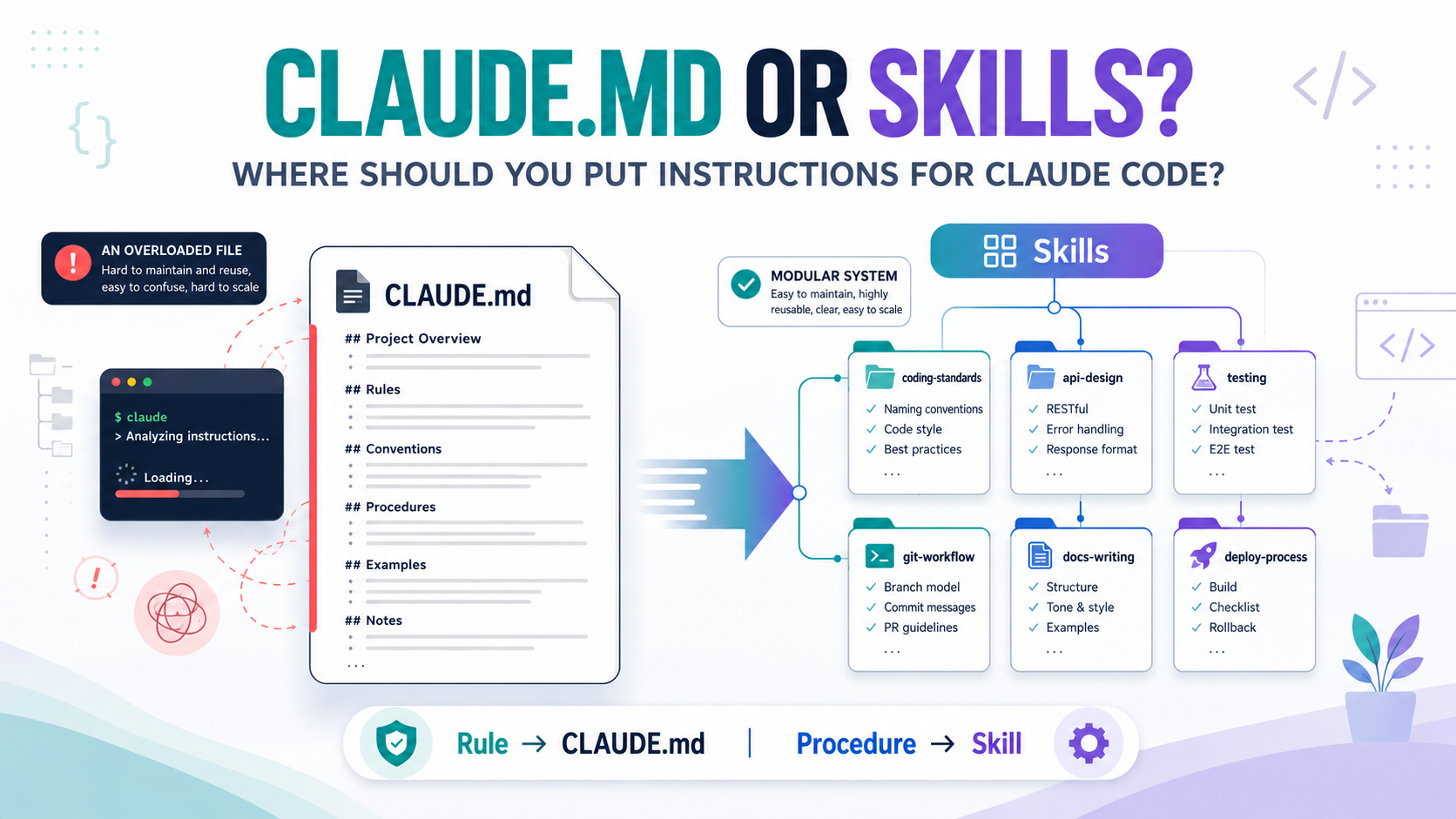
For: Software Engineers, Developers, and anyone interested in using Claude Code in projects.
Quick summary: Don't turn CLAUDE.md into a place to store every project instruction. CLAUDE.md is suitable for context and rules Claude needs to know throughout the project, while Skills are suitable for checklists or procedures that are only needed when performing a specific task. After reading this article, you will know how to distinguish between and choose CLAUDE.md and Skills for the right purpose, so you can organize instructions clearly, make them easy to maintain, avoid bloated context, reduce unnecessary tokens, and help Claude focus on instructions relevant to the task.
You can start with this principle:
Project-wide rule → CLAUDE.md
Procedure → Skill
When you first start using Claude Code, the simplest way to help Claude understand the project is usually to create a file.
CLAUDE.md
Example:
# Project Rules
Use TypeScript
Use pnpm instead of npm
Follow existing naming conventions
Database access must go through the repository layer
Run tests after changing business logic
This works well.
Problems arise as the team keeps adding:
- Coding convention
- PR Review Process
- API checklist
- Bug Analysis Process
- Security Review
- Unit Test Procedure
- Release Note Process
- Migration checklist
From a few dozen lines, CLAUDE.md can quickly become a file hundreds of lines long.
At this point, the question is no longer:
“Does Claude have enough instructions?”
Instead, it should be:
“Does Claude really need this instruction in every task?”
This is exactly where CLAUDE.md and Skills need to be distinguished.
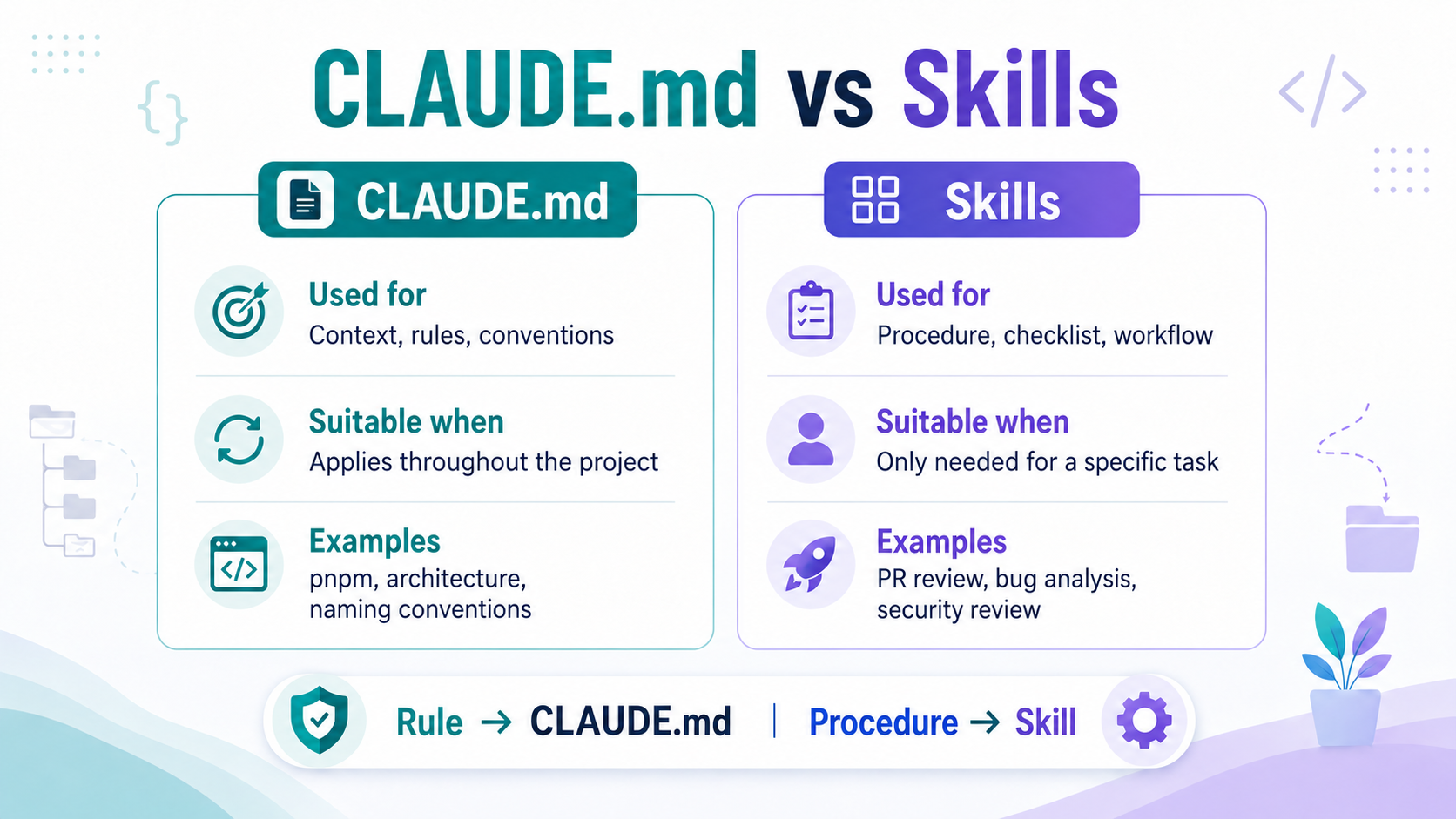
1. CLAUDE.MD IS FOR CONTEXT AND RULES USED THROUGHOUT THE PROJECT
CLAUDE.md is where you store project instructions that Claude needs to use while working. A project-level CLAUDE.md is read by Claude at the start of a session and is suitable for information Claude needs to retain while working.
Example:
# Project

Backend service for Order Management System

## Stack

Node.js
TypeScript
PostgreSQL
pnpm

## Architecture

Controller
→ Service
→ Repository
→ Database
Controllers must not access repositories directly

## Development Rules

Use pnpm
Follow existing naming conventions
Do not change public API contracts without confirmation
Update tests when changing business logic
Even when Claude is:
- Fix bug
- Refactor
- Writing an API
- Writing tests
the information above may still be relevant.
That is the kind of instruction that belongs in CLAUDE.md.
2. SKILLS ARE FOR THE PROCEDURE OF A TASK
Suppose the team has a Pull Request review process:
1 Read the requirement
2 Check changed files
3 Check business logic
4 Check error handling
5 Check security
6 Check test coverage
7 Compare with acceptance criteria
8 Classify findings by severity
9 Generate the review report
This process is necessary when:
Review Pull RequestBut it is not needed when:
Fix typo in READMEor:
Instead of putting the entire procedure in CLAUDE.md, you can create:
.claude/
 └── skills/
      └── review-pr/
           └── SKILL.md
Example:
---
name: review-pr
description: Review a Pull Request for correctness, risks and test coverage
---

When reviewing a Pull Request:

1 Read the requirement
2 Inspect changed files
3 Check business logic
4 Check error handling
5 Check security risks
6 Evaluate test coverage
7 Compare with acceptance criteria

Output:

## Critical
## Major
## Minor
## Suggestions
## Final Recommendation
Claude Code can use a Skill when it is relevant to the task, or the user can invoke it directly with /skill-name. More importantly, the Skill body is loaded only when the Skill is used, instead of always occupying context like background instructions.
This is the core difference:
CLAUDE.md
↓
Claude needs to know this throughout the project
Skill
↓
Claude needs to know how to do this when the task appears3. WHY SHOULDN'T EVERYTHING GO IN CLAUDE.MD?
A common mistake is:
Claude gets it wrong
↓
Add an instruction
↓
Claude gets it wrong again
↓
Add an instruction
↓
CLAUDE.md keeps getting longer
A large CLAUDE.md does not mean Claude understands the project better.
There are three main problems.
3.1. UNNECESSARY CONTEXT CONSUMPTION
CLAUDE.md is part of the context loaded at the start of a session. Skill descriptions also appear in the startup context, but the full Skill content is only brought in when the Skill is used.
If CLAUDE.md contains:
PR Review Process
Security Checklist
Release Note Process
Migration Process
Bug Analysis Process
then these instructions still occupy context even when the current task is only:
Fix typo in READMEA larger context window does not mean we should use it for irrelevant information.
3.2. TOO MANY INSTRUCTIONS CAN REDUCE COMPLIANCE
Anthropic recommends keeping each CLAUDE.md under 200 lines: long files consume context and can reduce compliance. This is a recommendation, not a hard limit. See Write effective instructions.
For example, suppose the Submit button remains disabled even after a user has filled in all required information. The task is to fix this bug without changing the API or database.
The instructions relevant to this task might be:
Follow existing component conventions and state-management patterns.
Change only the logic that determines whether the Submit button is enabled or disabled.
Add a test for the bug scenario and run the relevant tests.
Yet the context may simultaneously contain these other instructions:
Release procedure
PR Review procedure
Security checklist
Migration rules
API checklist
Testing workflow
In this example, the Testing workflow is directly relevant. Migration rules and the API checklist are not needed yet, since the task does not change the database or API. The release and PR review procedures become relevant at their respective stages. General security rules still apply, but specialized authentication or authorization checklists are not directly related to this button-state bug.
Claude must distinguish instructions to follow now, instructions needed at later stages, and instructions outside the scope of the change. The issue is not just token usage: important directions for the current task are mixed with guidance that is not yet needed.
3.3. LOSING THE BENEFITS OF PROGRESSIVE LOADING
Skills are designed so Claude can know that a Skill exists and load its full content only when needed.
If every procedure is put directly into CLAUDE.md, we lose this benefit.
Instead of:
Load everything
↓
Claude finds the relevant part itself
it can become:
Load project rules
↓
Identify the task
↓
Load the relevant Skill
4. CHECKLIST: WHERE SHOULD AN INSTRUCTION GO?
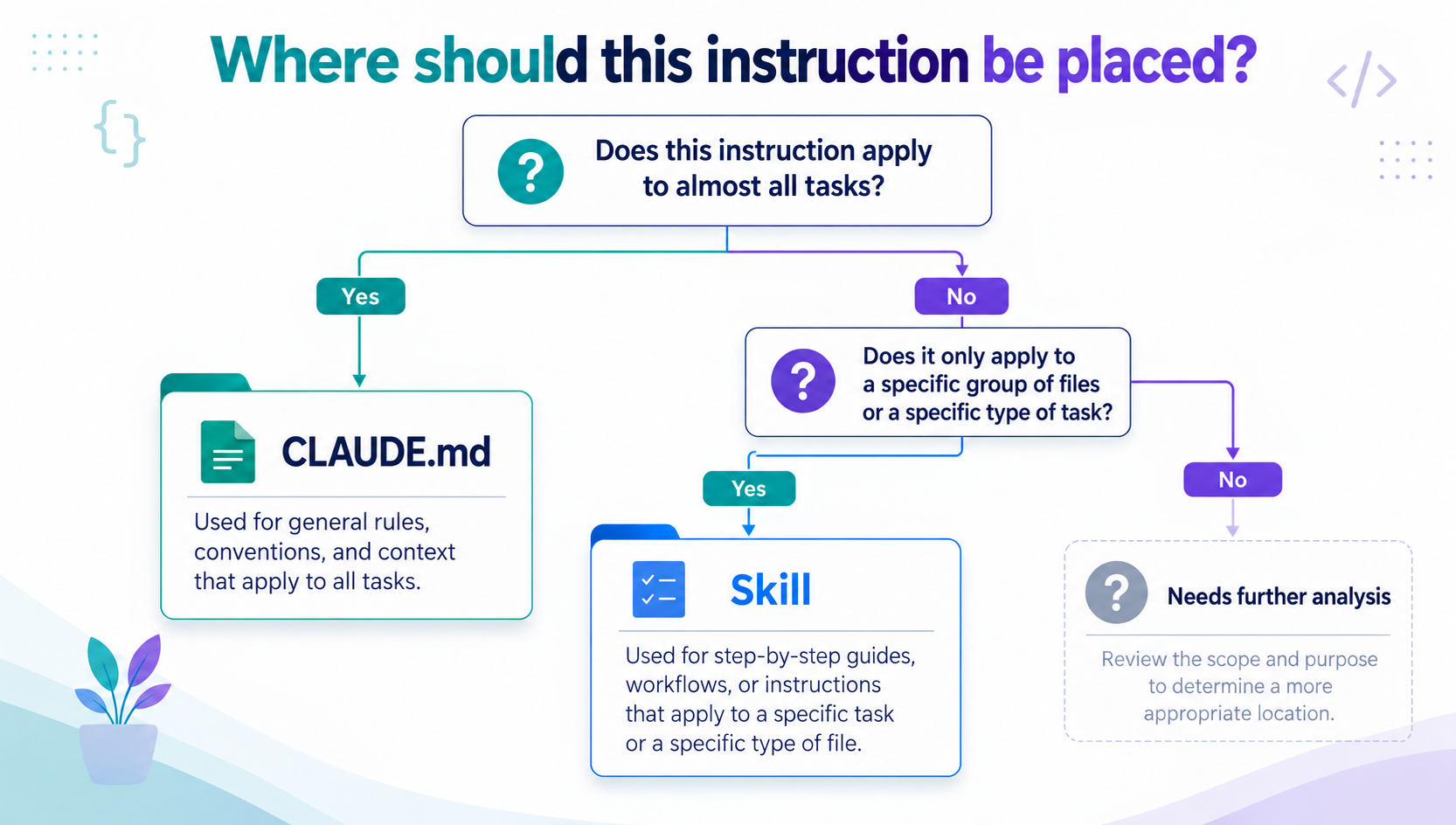
Not every instruction needs to be available to Claude in every task. Choose between CLAUDE.md and Skill based on the instruction's purpose and scope.
| Instruction / Task Type | Suitable Location | Reason |
|---|---|---|
Package Manager (pnpm/npm) |
CLAUDE.md |
Background information needed when working on the project. |
| Architecture Constraint | CLAUDE.md |
Architectural constraints that must be followed during development. |
| Naming Convention & Code Style | CLAUDE.md |
Shared conventions used frequently throughout the project. |
| PR / Code Review Process | Skill | A specialized workflow for code review. |
| Root Cause Analysis | Skill | A multi-step workflow for analyzing the root cause of a bug. |
| Security Review Checklist | Skill | A checklist specifically for security review tasks. |
| Release Note Process | Skill | A step-by-step process for creating release notes. |
| API Review Checklist | Skill | A checklist used when reviewing an API. |
A simple way to tell them apart:
Ask yourself: “Does Claude need to know this instruction for most tasks in the project?”
- Yes → CLAUDE.md: General background information, conventions, and constraints that Claude needs to keep in mind while working on the project.
- No → Consider a Skill: If this is a workflow, procedure, or checklist for a specialized task, a Skill is usually appropriate.
Remember:
CLAUDE.md helps Claude understand how to work within the project.A Skill guides Claude through a specific task.
Note: This is a basic distinction. Section 6 explains instructions that apply only to selected parts of the project.
5. REFACTOR CLAUDE.MD INTO A MORE MAINTAINABLE STRUCTURE
Suppose it initially looks like this:
CLAUDE.md
├── Project architecture
├── Coding convention
├── API checklist
├── Testing procedure
├── Bug analysis procedure
├── PR review procedure
├── Security checklist
└── Release note procedure
It can be refactored into:
project/
│
├── CLAUDE.md
│
└── .claude/
    └── skills/
        ├── analyze-bug/
        │   └── SKILL.md
        │
        ├── review-pr/
        │   └── SKILL.md
        │
        ├── security-review/
        │   └── SKILL.md
        │
        └── release-note/
            └── SKILL.md
CLAUDE.md acts as the Hub containing global context and project rules.
Skills become Spokes containing workflows for each type of task.
                 review-pr
                    │
                    │
analyze-bug ─── CLAUDE.md ─── security-review
                    │
                    │
               release-note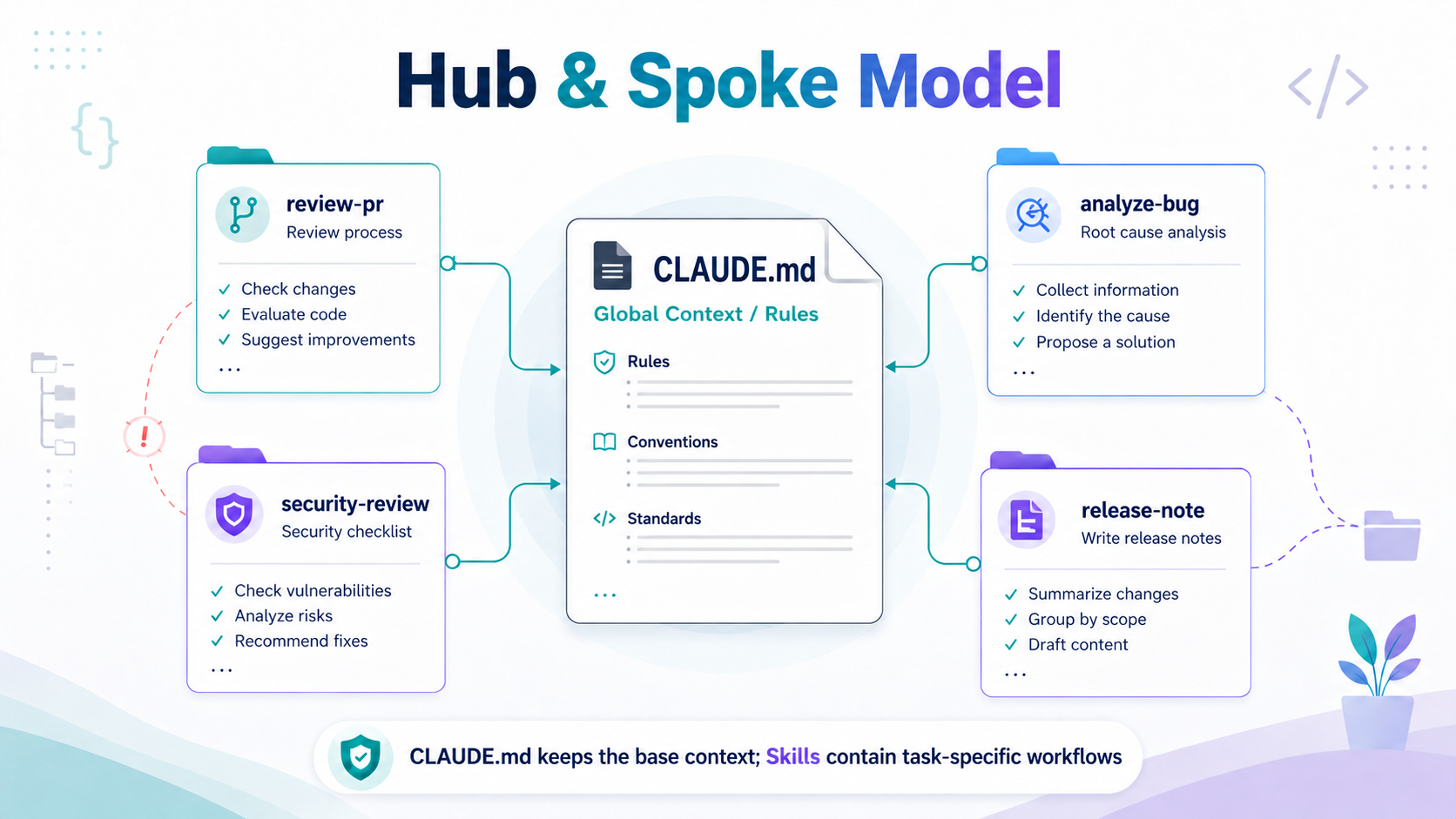
Hub & Spoke model infographic:
- Center: CLAUDE.md – Global Context / Rules
- Surrounding: .claude/skills/ – Task-specific Workflows
The result is a shift from: One file trying to teach Claude everything
To: A base context layer + workflows loaded when needed.
6. NOT EVERYTHING IS CLAUDE.MD OR A SKILL
In practice, Claude Code also has two other notable mechanisms.
Rule
If an instruction is a Rule but applies only to a specific group of files, put it in .claude/rules/ and use paths to limit its scope.
This ensures Claude applies the rule only when working with the relevant files, rather than across the entire project.
.claude/
└── rules/
    ├── frontend.md
    ├── backend.md
    └── testing.md
Claude Code supports path-scoped rules and loads a rule when working with matching files.
Example content for .claude/rules/frontend.md (Markdown with YAML frontmatter):
---
paths:
  - "frontend/**/*.tsx"
---

# React conventions

- Use function components and TypeScript.
- Follow the existing component naming conventions.
Hooks are an automation mechanism in Claude Code that triggers preconfigured actions when specific events occur, instead of relying on Claude to decide whether to execute them.
If the requirement is “After editing source code, the formatter must always run,” simply writing:
Always run formatter after editing filesin CLAUDE.md is not the most reliable form of enforcement.
Hooks run at specific lifecycle events and are suitable for actions that need to happen deterministically.
JSON example in .claude/settings.json:
{
  "hooks": {
    "PostToolUse": [
      {
        "matcher": "Edit|Write",
        "hooks": [
          {
            "type": "command",
            "command": "file=$(jq -r '.tool_input.file_path // empty'); if [ -n \"$file\" ]; then pnpm exec prettier --write --ignore-unknown \"$file\"; fi"
          }
        ]
      }
    ]
  }
}
It can be classified as follows:
Claude needs to KNOW
-> CLAUDE.md

Claude needs to KNOW when working with a group of FILES
-> .claude/rules/

Claude needs to KNOW HOW TO DO a TASK
-> Skills

An ACTION needs to be executed at a lifecycle event
-> Hooks
Each mechanism in Claude Code has its own role and scope. CLAUDE.md provides the project's foundational context, Rules apply instructions to selected files, Skills guide specialized tasks, and Hooks run actions when the corresponding events occur.
In practice, however, deciding where a new instruction belongs is not always straightforward.
So how can you choose the right mechanism without overloading CLAUDE.md?
The next section summarizes these concepts in a decision tree to help you quickly identify the most appropriate place for each instruction or action.
7. SIMPLE DECISION TREE
Before adding a new instruction, ask:
Does this instruction apply to almost every task?
│
├─ Yes -> CLAUDE.md
│
└─ No
    │
    ├─ Only applies to a group of files?
    │      └─ Yes -> .claude/rules/
    │
    ├─ Is it a procedure/checklist for a task?
    │      └─ Yes -> Skill
    │
    └─ Is it an action that must run automatically?
           └─ Yes -> Hook
This decision tree alone helps avoid turning CLAUDE.md into a Prompt Storage that contains everything in the project.
8. CONCLUSION
When Claude gets something wrong, a common reaction is: Add an instruction.
But optimizing Claude Code is not only about writing better instructions.
An equally important question is: Where should that instruction appear, and when?
An easy-to-maintain structure can be:
Minimal CLAUDE.md
        +
Scoped Rules
        +
Task-specific Skills
        +
Deterministic Hooks
Where:
- CLAUDE.md holds project context and global rules.
- .claude/rules/ holds rules; add paths to limit them to groups of files.
- Skills hold procedures and knowledge for each type of task.
- Hooks handle actions that need to run at specific lifecycle events.
If you only remember one principle:
CLAUDE.md describes how Claude should work in the project.A Skill describes how Claude performs a specific type of work.
The ultimate goal is not to make Claude know as much as possible.
It is: Give Claude the right context, the right instruction, at the right time.
How many lines long is your project's CLAUDE.md now? Are you keeping the entire workflow in one file, or have you started splitting it into Skills?
REFERENCES
Struggling to turn ideas into reality? With a proven track record of over 1,000 clients, our agile and flexible team will accelerate your business growth.