
3D Avatar from One Photo with FLAME, DECA and DiffLocks

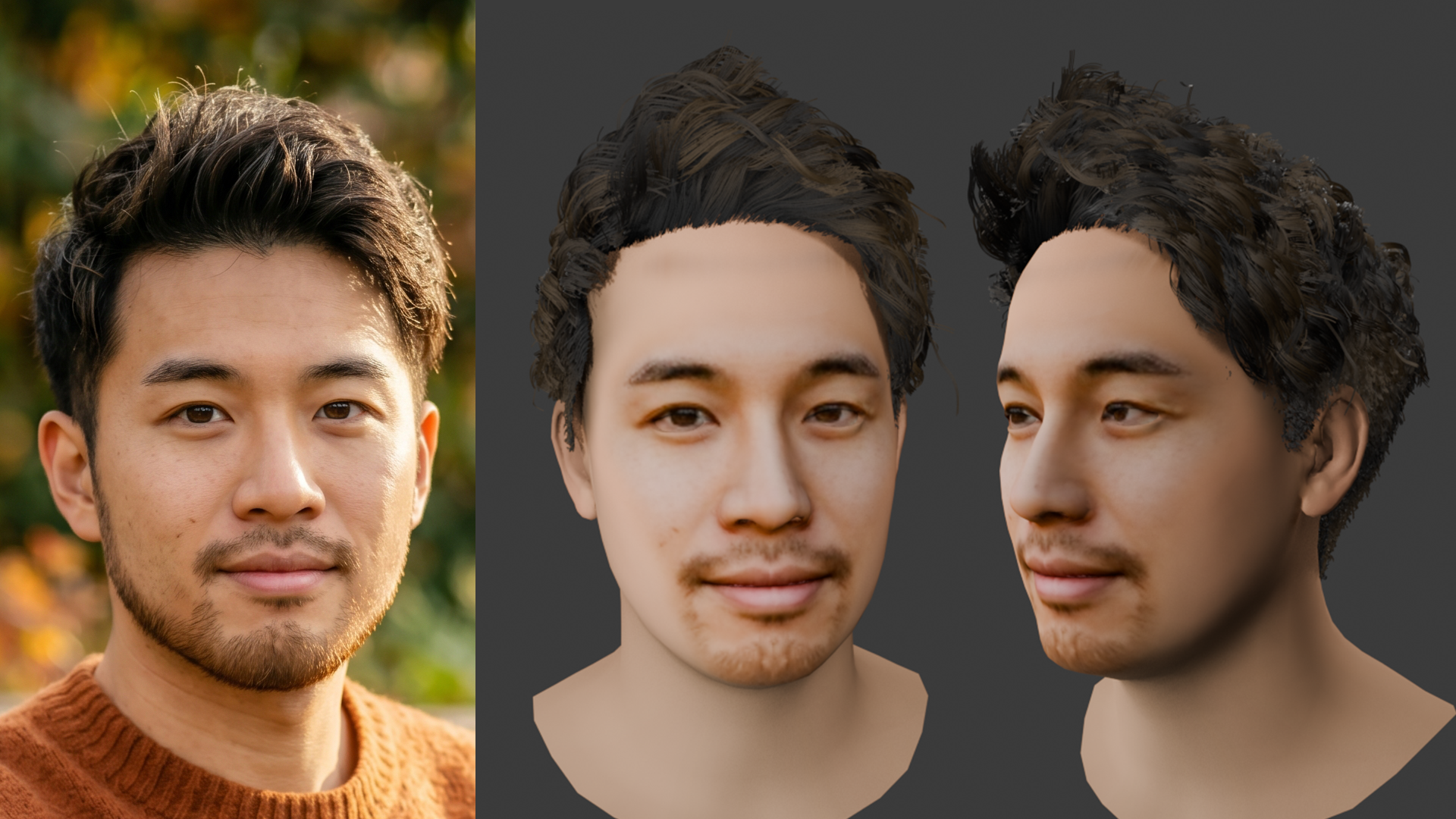
“What if I could create a realistic 3D character, like the ones in movies or games, from just one photo of myself?”
Have you ever thought about that? As demand for 3D avatars grows with the spread of the metaverse, VRChat, and similar platforms, manually creating a 3D model still has a very high barrier to entry.
This time, we tried an advanced workflow that combines FLAME, the inference model DECA, and DiffLocks to create a realistic 3D head model from a single face photo, and then grow natural-looking hair on it.
In this article, we explain the workflow, the results, and the basic knowledge behind each technology.
First, the basics: The AI technologies used this time
Before going into the actual workflow, let’s look at the main technologies used in this project. In particular, DECA, which became a breakthrough in 3D face reconstruction, is very interesting, so we will go into a little more detail.
FLAME: A standard for 3D face models
FLAME, short for Faces Learned with an Articulated Model and Expressions, is a “statistical 3D head model” created by learning from face data of thousands of people. It is a system that can represent the “shape,” “expression,” and “pose” of a face using numerical parameters.
However, FLAME itself is only a model “standard.” To predict parameters from a photo, another AI model is needed.
To accurately estimate FLAME parameters from a single photo and also reconstruct realistic texture, we used the following two advanced models this time.
DECA: Generating the head shape and texture
The most technically exciting part of this workflow is DECA, short for Detailed Expression Capture and Animation.
Conventional 3D face reconstruction technologies could capture rough outlines and the placement of facial parts, but the results often looked flat, like a mannequin. What makes DECA impressive is that it separates facial geometry into “coarse shape” and “detail,” and also separates “color” from “lighting.”
Generating displacement, or fine surface details: DECA generates data called a displacement map for details such as “nasolabial folds” and “forehead wrinkles” that appear when making facial expressions. By applying this data to the base mesh, it can reconstruct surprisingly lifelike texture.
Separating albedo, the original skin color, from lighting: Here, let’s briefly explain “albedo.” In 3DCG, albedo means “the base color of the object itself, without any influence from light or shadows.”
A photo always includes the light and shadows from the moment it was taken. However, DECA uses AI inference to separate the “pure base color of the skin,” or albedo, from the “lighting environment.” This prevents shadows in the original photo from being baked into the texture, and makes it possible to freely recreate lighting later in 3D software.
That said, the albedo generated by DECA has one major characteristic. It refers to the overall color tone of the original photo, such as skin brightness, but it does not refer to specific facial details such as beards, moles, blemishes, or makeup. These details are completely ignored.
As a result, although it produces clean albedo, the skin looks smooth and like “a mannequin that does not belong to any specific person.”
DiffLocks: Generating 3D hair
Once the face is ready, the next step is hair. This is where DiffLocks comes in.
DiffLocks is a technology that applies diffusion models, which became well known through image generation AI, to the generation of 3D hair, specifically hair strands. Instead of the “clay-like polygon hair” often seen in traditional games, it can generate very rich and realistic 3D hairstyles with individual hair flow and locks.
It is possible to specify styles such as “curly hair” or “short bob,” and generate hair that fits the shape of the head.
Practical workflow: From one photo to a completed avatar
Now, let’s look at the actual workflow we tested.
Preparing the base photo
First, we prepared one photo as the input. To help the AI accurately recognize the shape of the face, we selected a photo that met the following conditions.
Facing forward
No strong shadows on the face
Forehead and facial outline not hidden by hair
This time, we used a selfie-style image with the bangs lifted so the facial outline could be clearly seen. However, it was actually an AI-generated image made to look like a selfie.

Generating a 3D head mesh with DECA
Using the prepared photo, we then generated the 3D head model.
Extracting the base shape
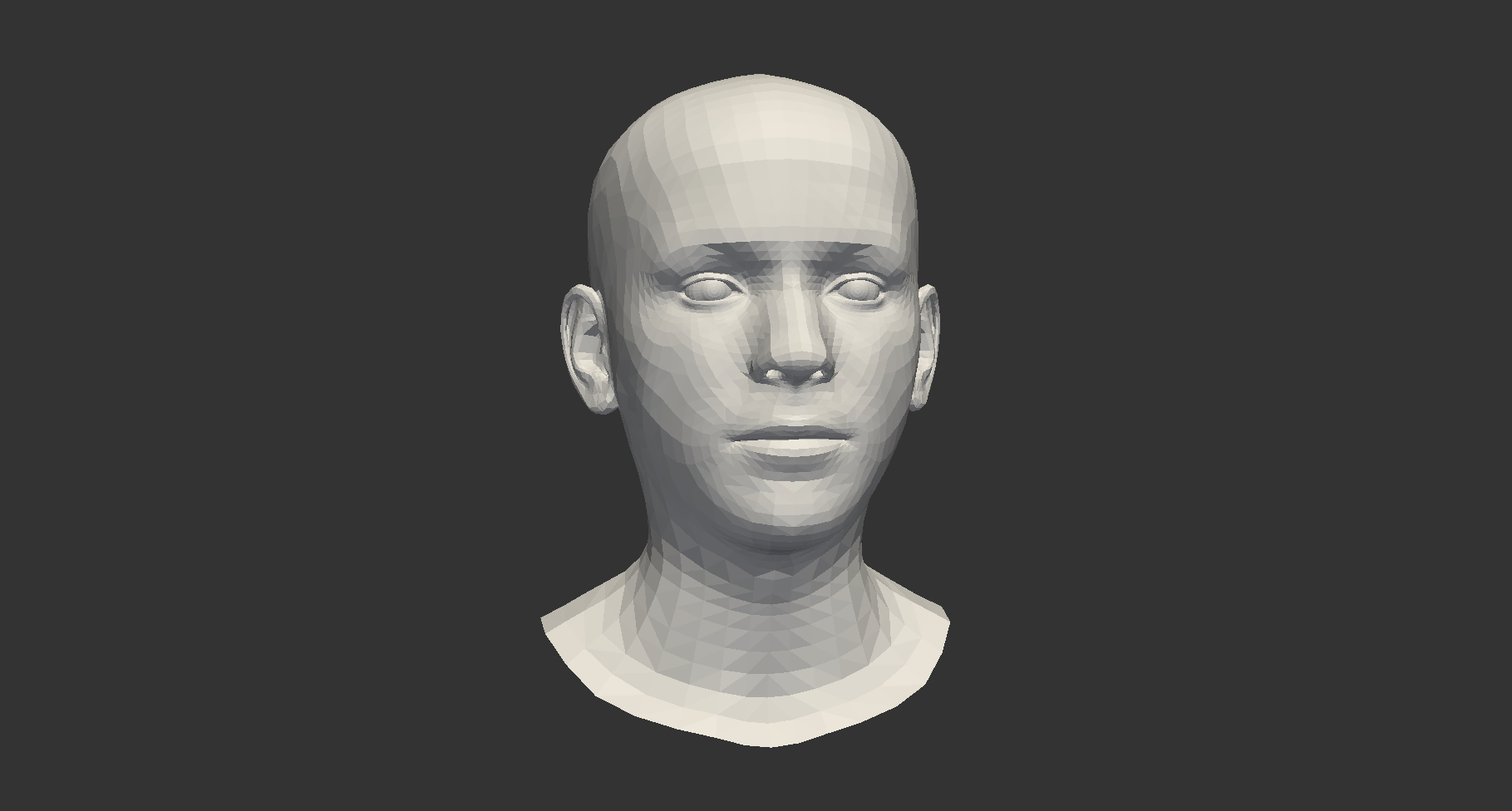
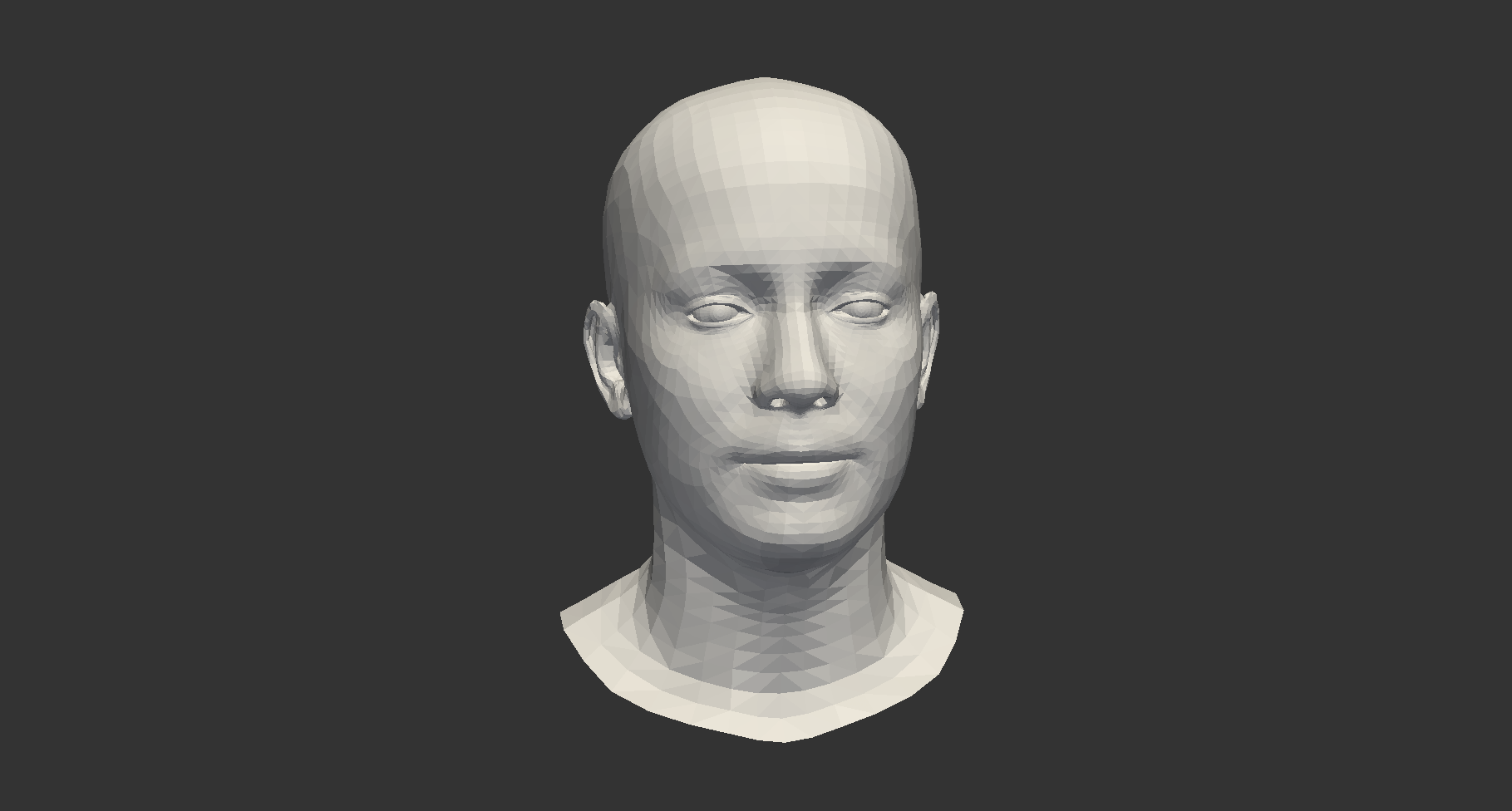
First, we loaded the photo into DECA. As described above, the “coarse shape” is applied to the basic FLAME model.
From the input photo, DECA detects the face region and passes it through a deep learning model, an encoder for image recognition, to extract and encode the visual features of the face.
From the extracted features, DECA infers, or regresses, the numerical values of the parameters needed to drive FLAME. These include shape, expression, jaw pose, camera position, lighting environment, albedo, and more. By feeding these parameters into the FLAME standard, a “basic head mesh” with relatively few surface details is first constructed.
Because DECA does not modify the mesh structure at all, the expression parameters that FLAME has are preserved as they are.
Extracting the texture
As explained earlier, DECA removes the lighting environment from the photo at this stage and generates a “pure albedo texture.” At the same time, it builds a realistic base head with fine surface details using a displacement map.
After a few seconds to a few tens of seconds of processing, 3D mesh data closely resembling the photo, as an .obj file, and the texture were output.
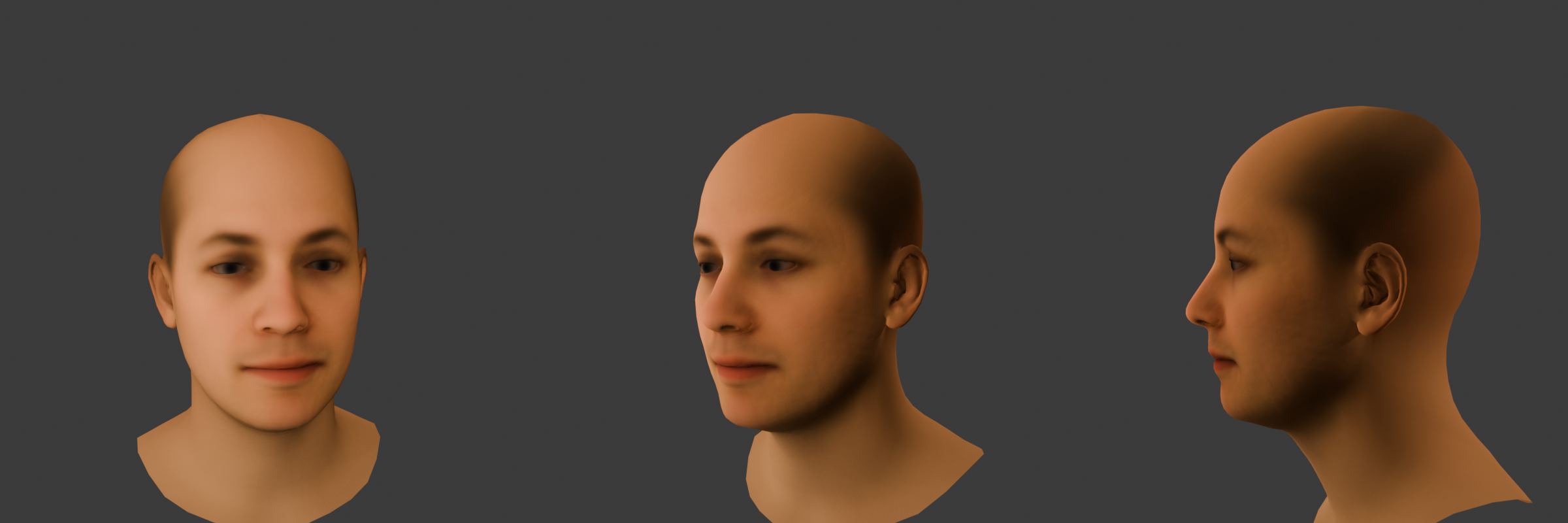
It is a slightly strange feeling: the face that was just a flat image can now be rotated in 3D space. However, at this stage it is still a smooth bald head, so it is not yet complete.
Growing hair with DiffLocks
Based on the head model we created, we then generated hair using DiffLocks.
In DiffLocks, the shape data of the head created earlier is loaded in a way similar to collision data, so that the hair grows naturally along the scalp.
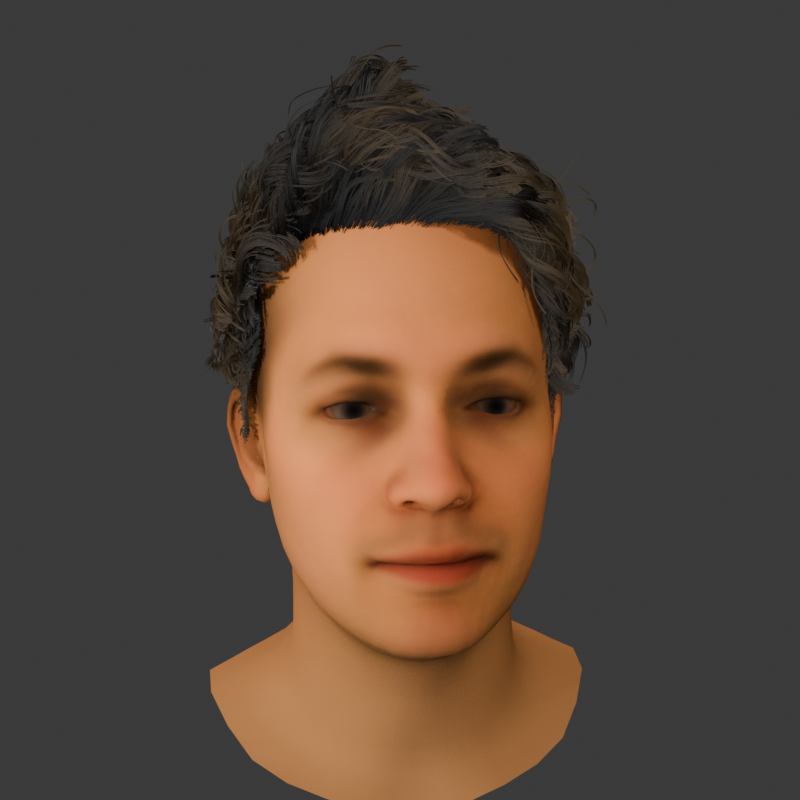
This time, we adjusted the parameters and text prompt with the goal of creating “medium-length hair with a slight wave.” After running the GPU at full capacity and waiting for a few minutes, the result was generated.
Our custom approach: Hybrid texture compositing
The result was 3D hair data, or strands, with a fine and complex flow that fit the head shape very well.
However, we ran into one major issue. As mentioned earlier, the “albedo texture” extracted by DECA separates light and shadows, but it completely ignores personal features such as beards and moles. Because of this, when we applied it to the 3D model, the face became flat and looked like a different person, with little resemblance to the person in the original photo.
So this time, we automated and incorporated a process that “cuts out the face area from the original photo and directly uses it as a texture” in order to make the model look closer to the original face.
However, with a simple frontal projection, the textures on the side areas of the face, such as the ears and cheeks that are not visible from the camera, become stretched and break down.
To solve this, we used the following hybrid process.
Front of the face, around the eyes, nose, and mouth: The original photo is used directly as texture, fully preserving the “person’s likeness,” including the beard, moles, and other details.
Whole head, ears, and side areas such as the cheeks: The albedo texture generated by DECA is used as the base.
Boundary processing: A mask is applied to the boundary between the two textures, and the textures are smoothly blended so they do not look unnatural.
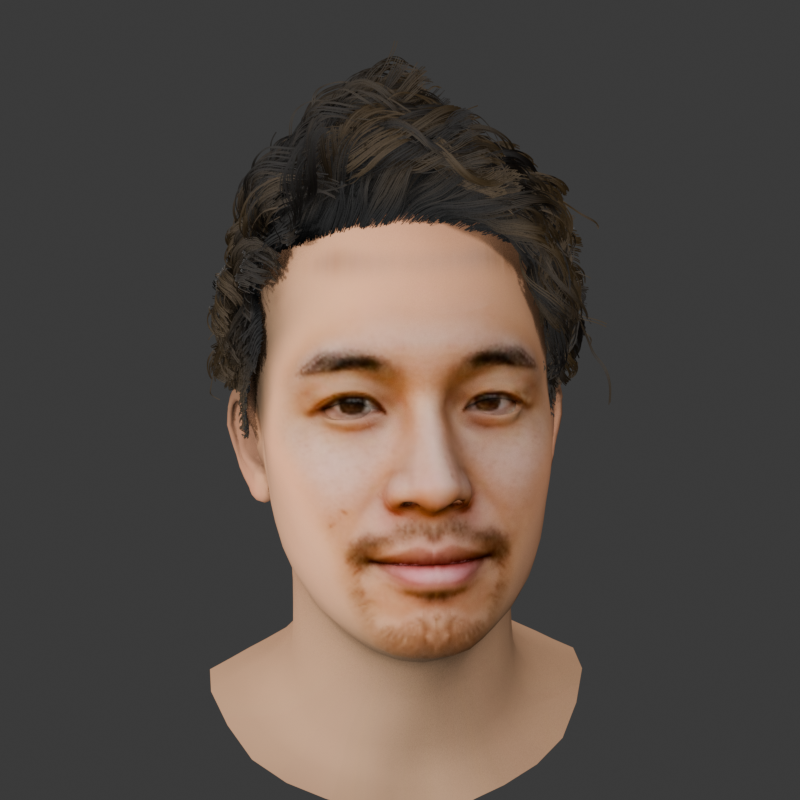
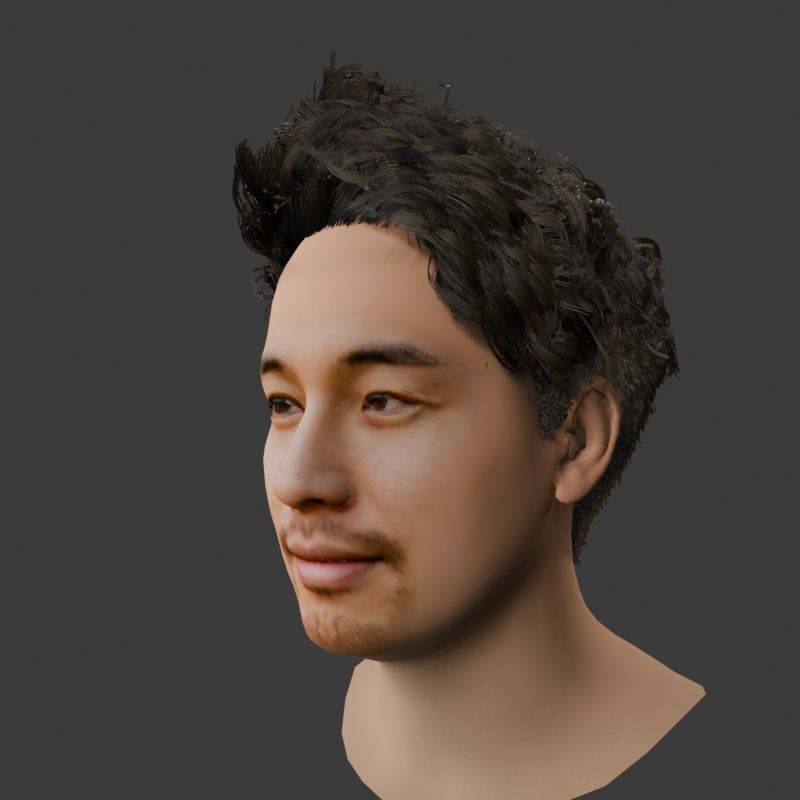
With this automatic compositing process, we were able to prevent texture problems in the side view while fully preserving the “person’s likeness” when viewed from the front.
Future challenges
Did you notice it? Compared with the original photo, the distinctive cheek beard has disappeared. This is a weakness of the method explained earlier, where the frontal image is blended with the albedo texture.
Because the front of the face, such as the area around the mouth and the tip of the chin, is projected from the original photo, the beard remains there. However, the “cheeks,” which are side areas of the face, use DECA’s albedo to prevent the texture from stretching.
As explained in the basics section, DECA’s albedo is designed, in principle, to completely remove “personal details” such as beards and moles during inference, and generate smooth skin.
As a result, when this hybrid texture is applied, the following phenomenon occurs: “There is a beard around the mouth, but as soon as it reaches the cheeks, the beard unnaturally disappears and turns into smooth skin.”
If the final finishing work is assumed to be done manually, this issue can be considered not a problem at all. For the texture, there is still plenty of room to improve quality by polishing it manually in Photoshop at the final stage. As part of that process, the cheek beard can simply be drawn in.
On the other hand, if the goal is to turn these steps into a pipeline and make the process fully automatic, further improvements will be needed when handling photos of people with rich cheek beards.
Testing with a female model and the issues we found
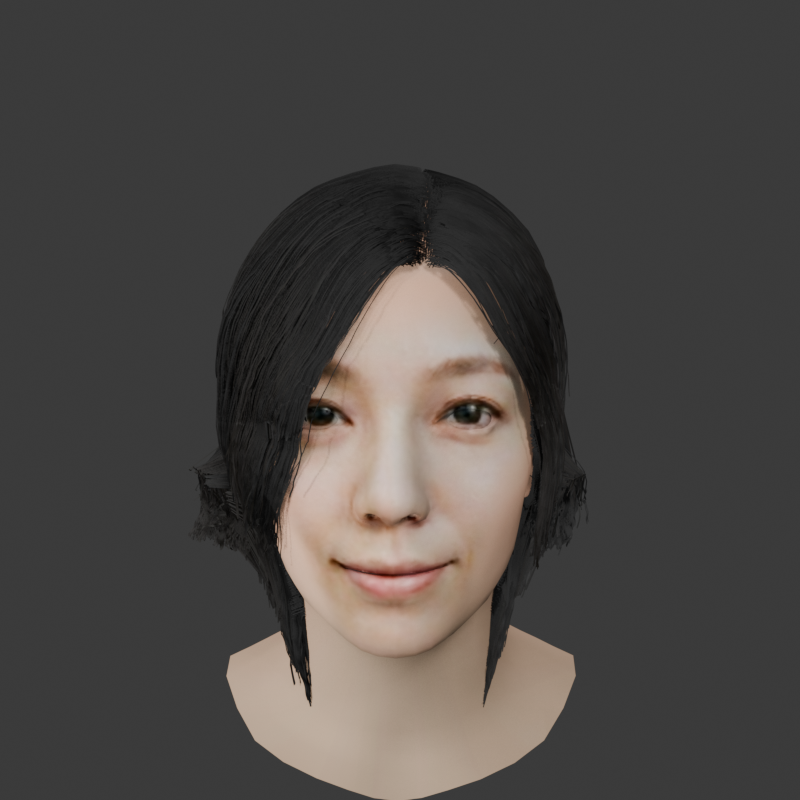
In addition to a male selfie-style image, we also tried the same workflow using a female image.
As a result, the quality of the “head model” created by DECA and our custom hybrid texture compositing was excellent. It was able to reproduce a very realistic and beautiful face.
However, the “hairstyle” generated by DiffLocks showed some breakdowns. It seems that naturally simulating and generating long, complex hairstyles often seen in female models, or hair with a lot of volume, is still a difficult task even for DiffLocks. We would like to continue exploring this issue in the future through further parameter tuning and improvements to the generation method.

⚠️ Note: About licenses, commercial use is not allowed
There is one important point to keep in mind when trying the technologies introduced here.
The model data and code for advanced AI and 3D technologies such as FLAME, DECA, EMOCA, and DiffLocks are mainly released for academic research purposes. Therefore, they are generally restricted to non-commercial use.
Using 3D models created with these technologies in a commercial game, or using them as Vtuber avatars on a monetized YouTube channel, is highly likely to violate the license.
Please enjoy them only within the scope of personal experiments, technical learning, or research. When actually trying them, be sure to check the license terms in each official repository yourself.
Summary and thoughts
Seeing a realistic 3D model and hair generated to this level from a single 2D photo made us feel just how astonishingly fast technology is evolving.
Next, we would like to try adding bones, or a rig, to the generated 3D model and making it move, or using facial tracking to sync it with our own facial expressions.
We are now in an era where even people without 3D modeling experience can create avatars of this quality with the help of AI. If you are interested, please check out the official repositories.
Struggling to turn ideas into reality? With a proven track record of over 1,000 clients, our agile and flexible team will accelerate your business growth.
Book a Free ConsultationRelated articles

Claude SEO for Digital Marketing: 5 Touchpoints That Optimize Your Entire Content Workflow
Claude SEO is a third-party, open-source SEO toolkit for Claude Code. Explore five practical integration points—content planning, brief creation, pre-publish QA, AI search readiness, and post-publish monitoring—and learn where human marketing judgment remains essential.

AI API Token Optimization: Cut Costs
A practical guide to AI API token optimization. See how conversation history, RAG documents, tool outputs and response length were reviewed to reduce input tokens from about 8,000 to 1,600 while preserving the information needed to answer users.

What Is a Digital Twin? A Complete 2026 Guide to How It Works, Its History, Use Cases, and Differences from the Metaverse and Simulation
A practical guide to digital twins covering their history, architecture and use cases in manufacturing, cities, construction, healthcare and aviation. It also explains how they differ from simulations, the metaverse and CPS, and why effective twins do not always require 3D graphics.
