How Far Can Crafting Apps Replace Adobe?
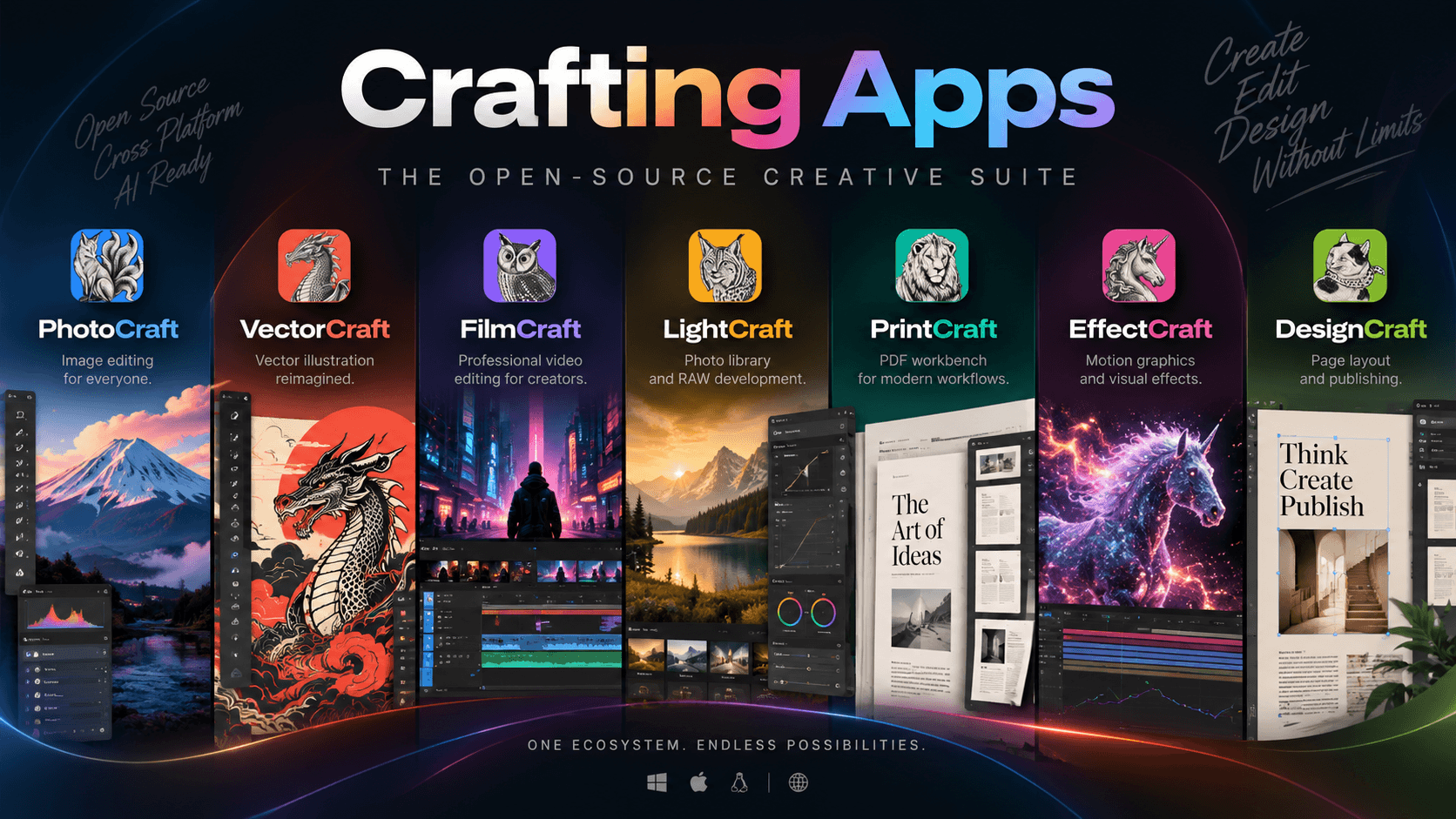
Crafting Apps is a suite of seven open-source creative applications aiming to cover key Adobe Creative Cloud workflows. This article compares their current maturity, Rust and local-first architecture, AI agent/MCP support, and potential as an agent-native creative suite.

On this page
- An Analysis of 7 Open-Source Tools Building a New Creative Suite
- What Is Crafting Apps Doing Differently from Adobe?
- Mapping Crafting Apps to Adobe
- Overall Assessment
- My Real-World Experience with Crafting Apps
- The Most Threatening Thing About Crafting Apps Is Not That It Is Free
- Rust + AI Architecture
- But Adobe Still Has Major Advantages
- Can Crafting Apps Replace Adobe Right Now?
- Development Direction
- Conclusion
An Analysis of 7 Open-Source Tools Building a New Creative Suite
If you look at the Crafting Apps lineup, the first impression is very clear: this is not a single piece of software trying to compete with Photoshop. Instead, it is an ecosystem of seven applications, each targeting a specific category of work that Adobe currently divides among Photoshop, Illustrator, Premiere Pro, Lightroom, Acrobat, After Effects, and InDesign.
What is even more interesting is that the entire system is being built with Rust, following an open-source, local-first approach, with the ability to be controlled by AI agents/MCP. The project's official website currently lists all seven applications: PhotoCraft, VectorCraft, FilmCraft, LightCraft, PrintCraft, EffectCraft, and DesignCraft.
However, an important distinction needs to be made:
Crafting Apps is currently a very interesting competitor in terms of direction and architecture, but it is not yet a complete replacement for Adobe Creative Cloud in professional production.
And it is precisely the gap between “being capable of doing something” and “being mature enough to replace a professional workflow” that makes this project worth analyzing.
What Is Crafting Apps Doing Differently from Adobe?
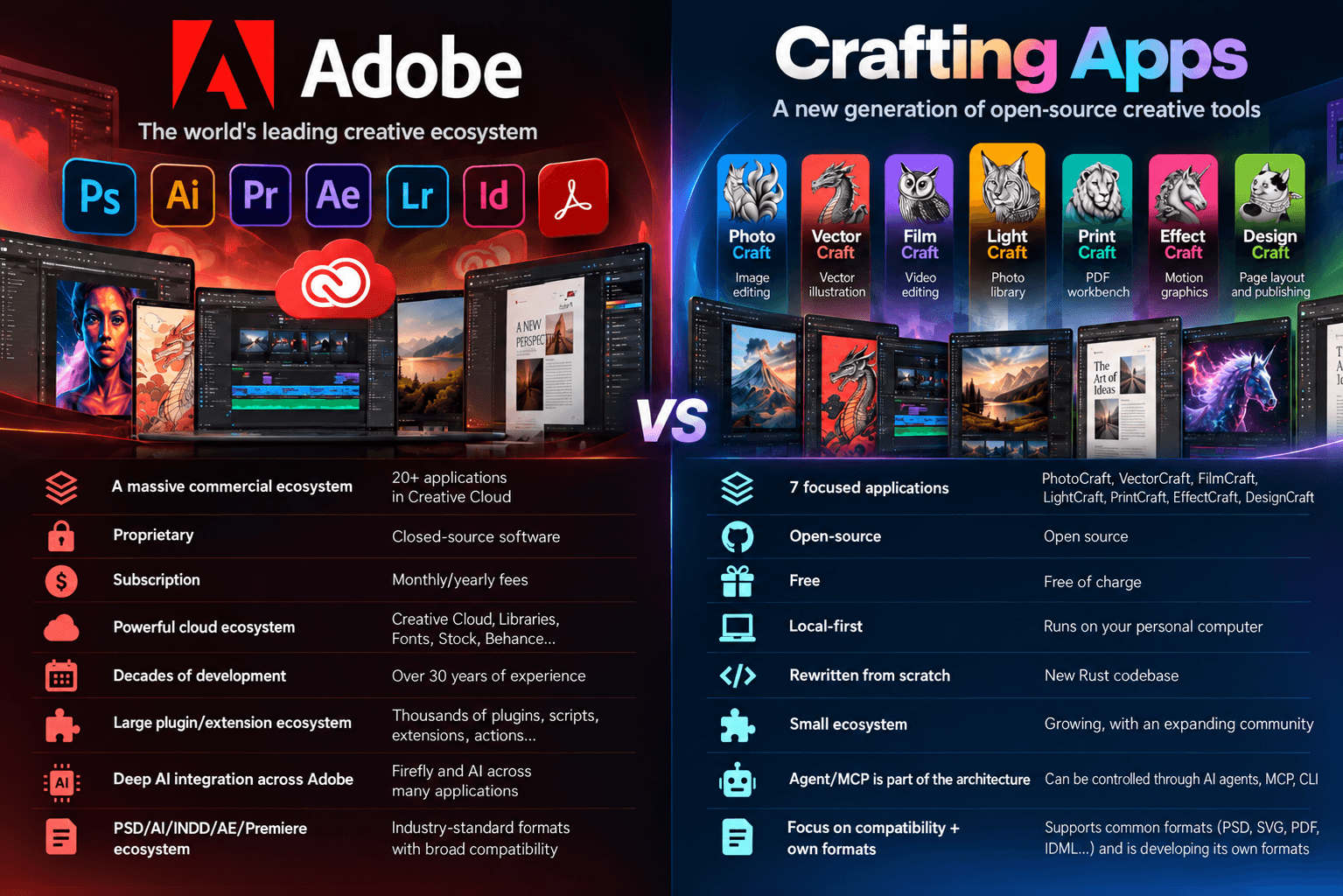
Adobe currently provides a very large ecosystem. Creative Cloud Pro includes more than 20 applications, with core applications such as Photoshop, Illustrator, Premiere, After Effects, InDesign, Lightroom, and Acrobat.
Crafting Apps is taking a different approach.
What makes the project particularly interesting is its architecture.
Crafting Apps is not simply trying to recreate the interface of Photoshop or Premiere.
Instead, it is building its engine around a structure like:
UI → Command → Engine → CLI / JSON / MCP → AI Agent
For example, PhotoCraft states that more than 500 commands can be accessed through the UI, CLI, JSON control channel, or MCP.
This means that an AI agent can actually perform operations inside the application rather than simply telling the user which buttons to click.
This could ultimately be the most important aspect of the project.
Mapping Crafting Apps to Adobe
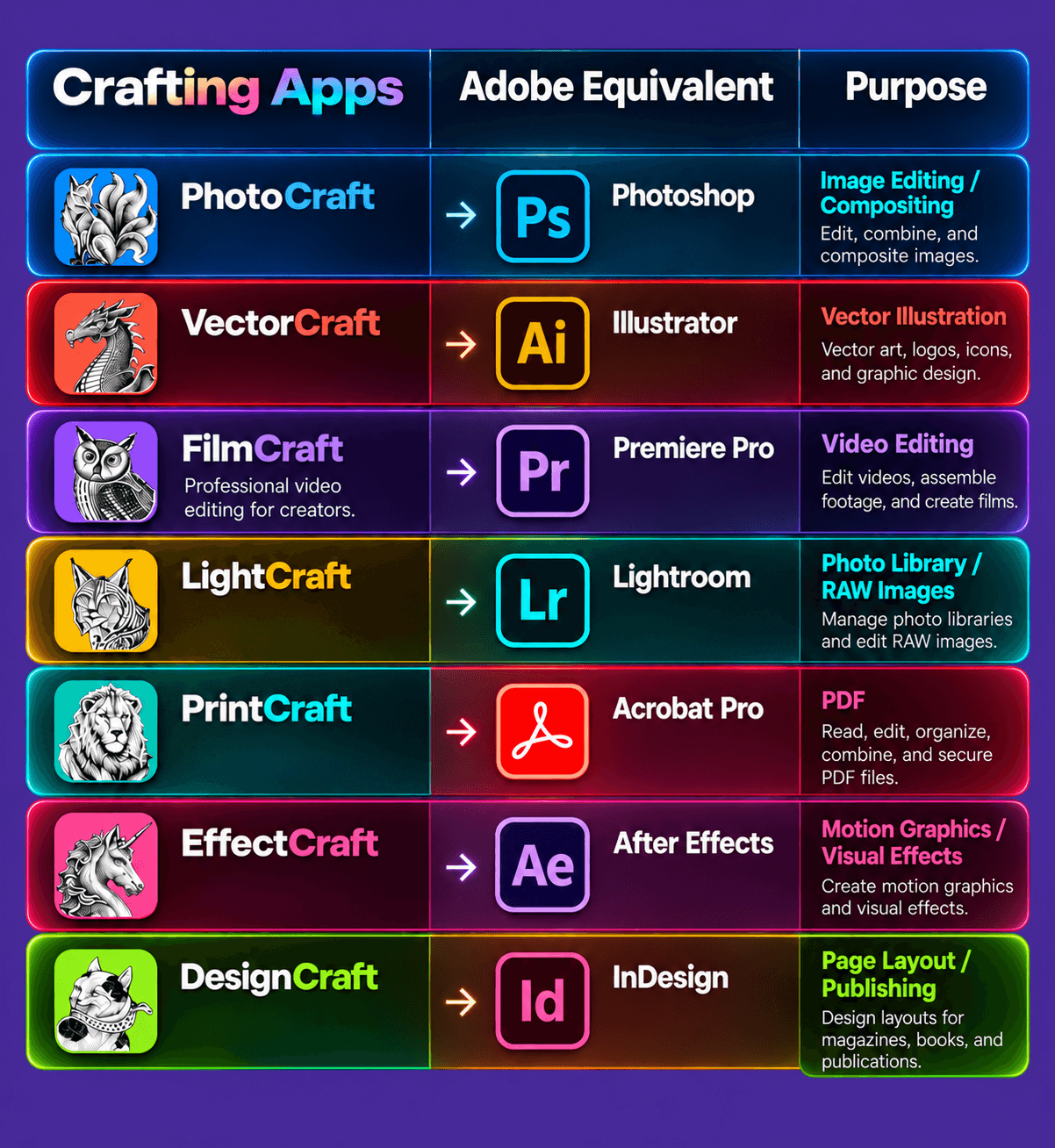
Conceptually, this is almost an “open-source Creative Cloud.”
However, the maturity level of each application is currently very different.
1. PhotoCraft vs Photoshop
PhotoCraft is currently one of the most attention-grabbing applications.
It is being developed as a clean-room implementation of Photoshop using Rust.
It already includes:
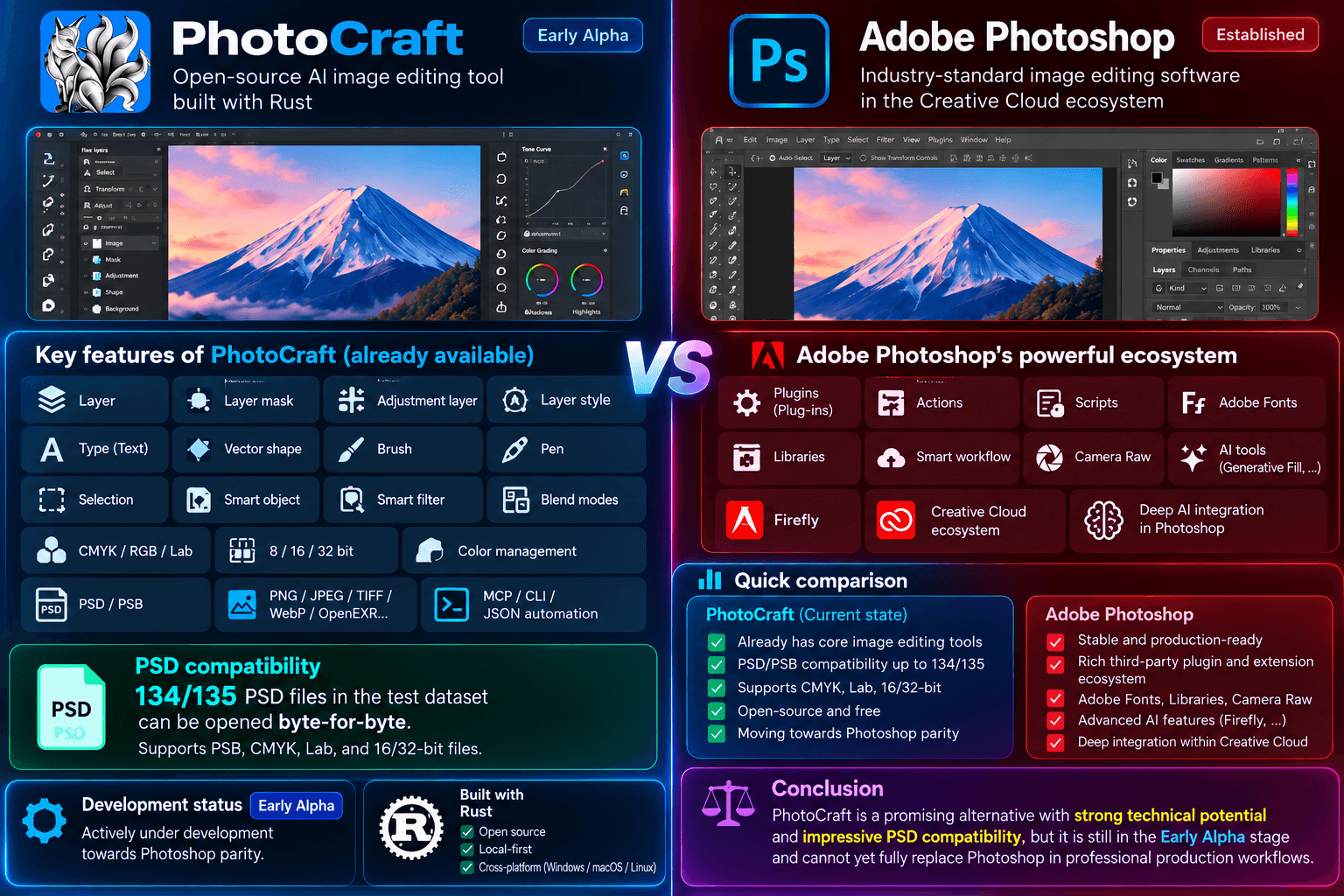
Assessment
Current ability to replace Photoshop: approximately 40–60% for basic to intermediate 2D work.
However, for professional production workflows that depend heavily on plugins, AI, advanced features, or complex ecosystem integrations, the replacement capability is significantly lower.
2. VectorCraft vs Illustrator
VectorCraft is probably one of the most interesting projects from a technical perspective.
It directly targets Illustrator and already includes:
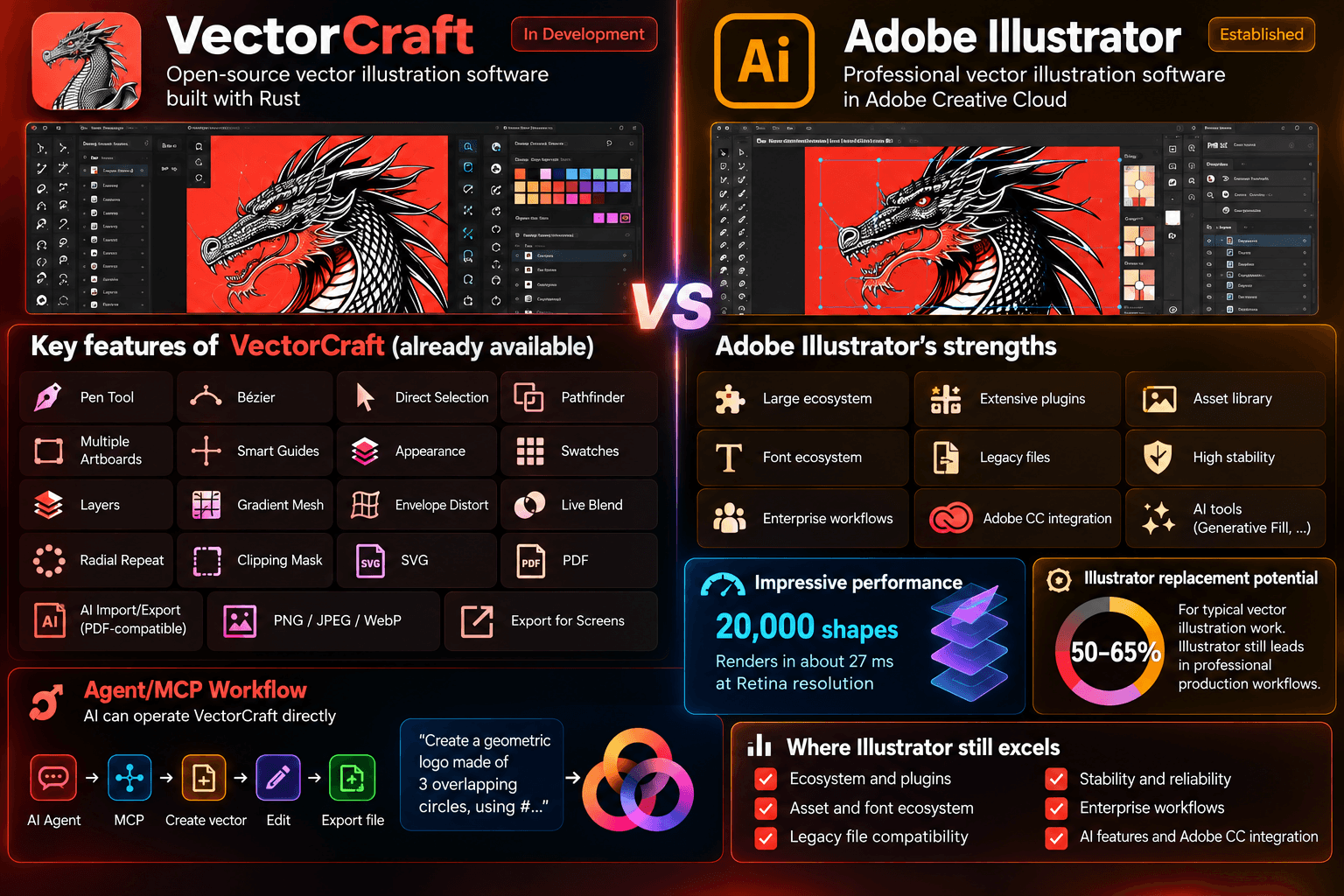
Assessment
Current ability to replace Illustrator: approximately 50–65% for typical vector illustration work.
For standard vector drawing, illustration, and design tasks, it already shows considerable potential.
3. FilmCraft vs Premiere Pro
FilmCraft is a particularly interesting case.
This is not simply a basic video editor.
The project claims to be building a clean-room implementation of Premiere Pro, with:
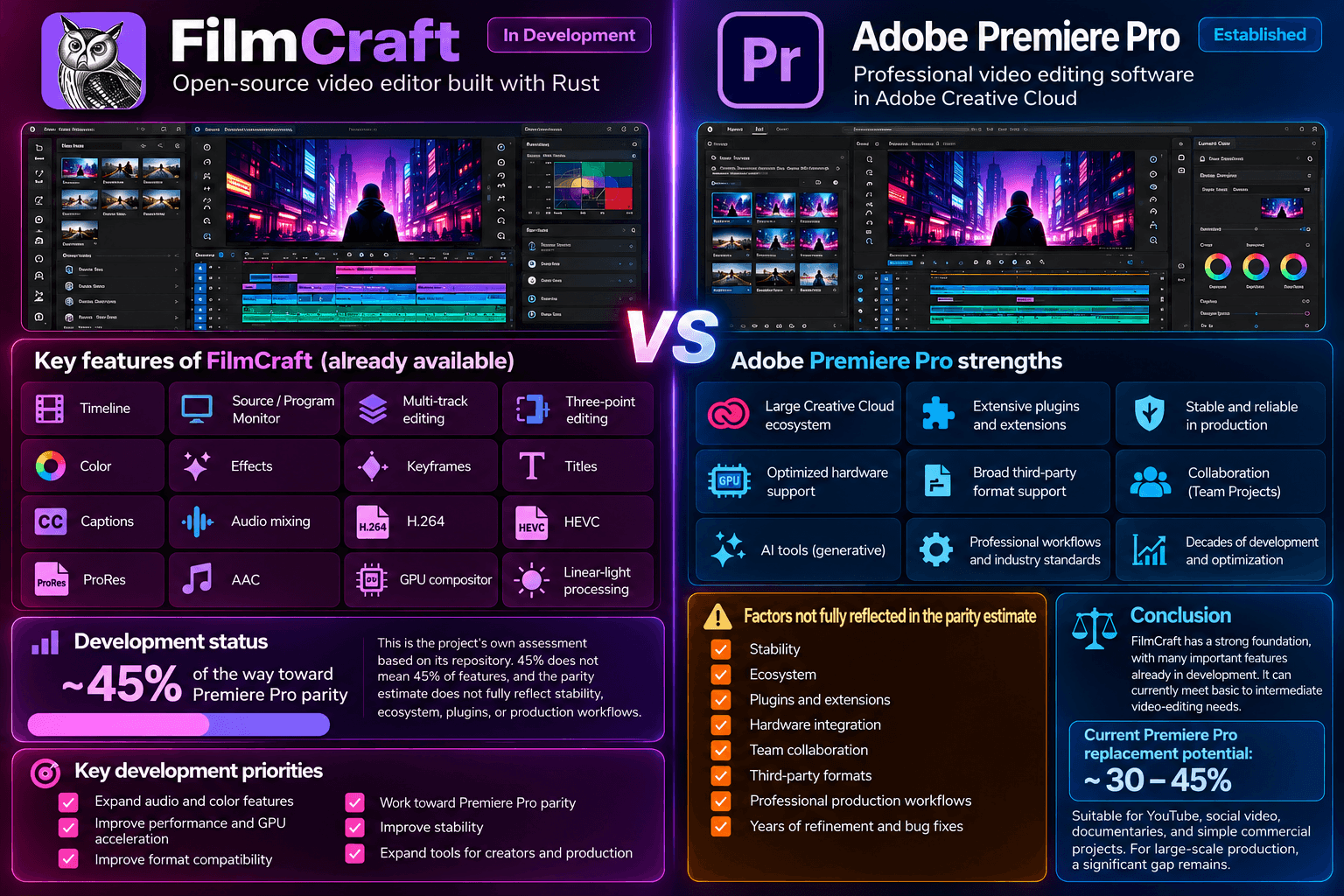
Assessment
Current ability to replace Premiere Pro: approximately 30–45%.
For:
- YouTube
- Social video
- Basic editing
- Documentary
- Simple commercial content
→ it has significant potential.
For:
- Broadcast
- Film
- Complex commercial production
→ it is not yet ready to replace Premiere Pro.
4. LightCraft vs Lightroom
LightCraft takes a particularly interesting approach.
It is not simply a RAW converter. It aims to become:
Photo library + RAW development + non-destructive workflow
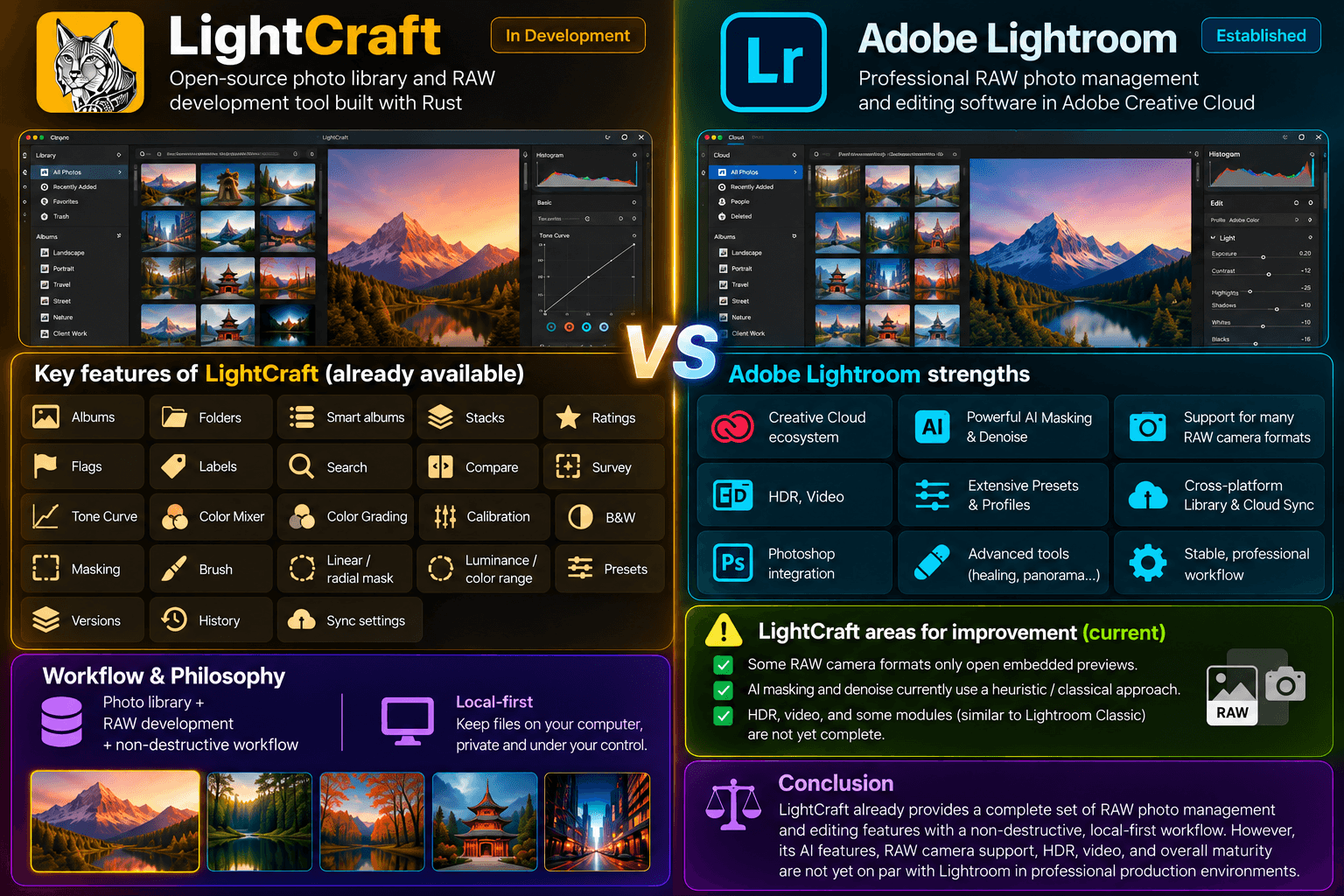
Assessment
Current ability to replace Lightroom: approximately 50–70% for typical photographers.
For professional photographers managing extremely large catalogs and relying heavily on Camera Raw or advanced AI masking:
→ there is still a significant gap.
5. PrintCraft vs Acrobat
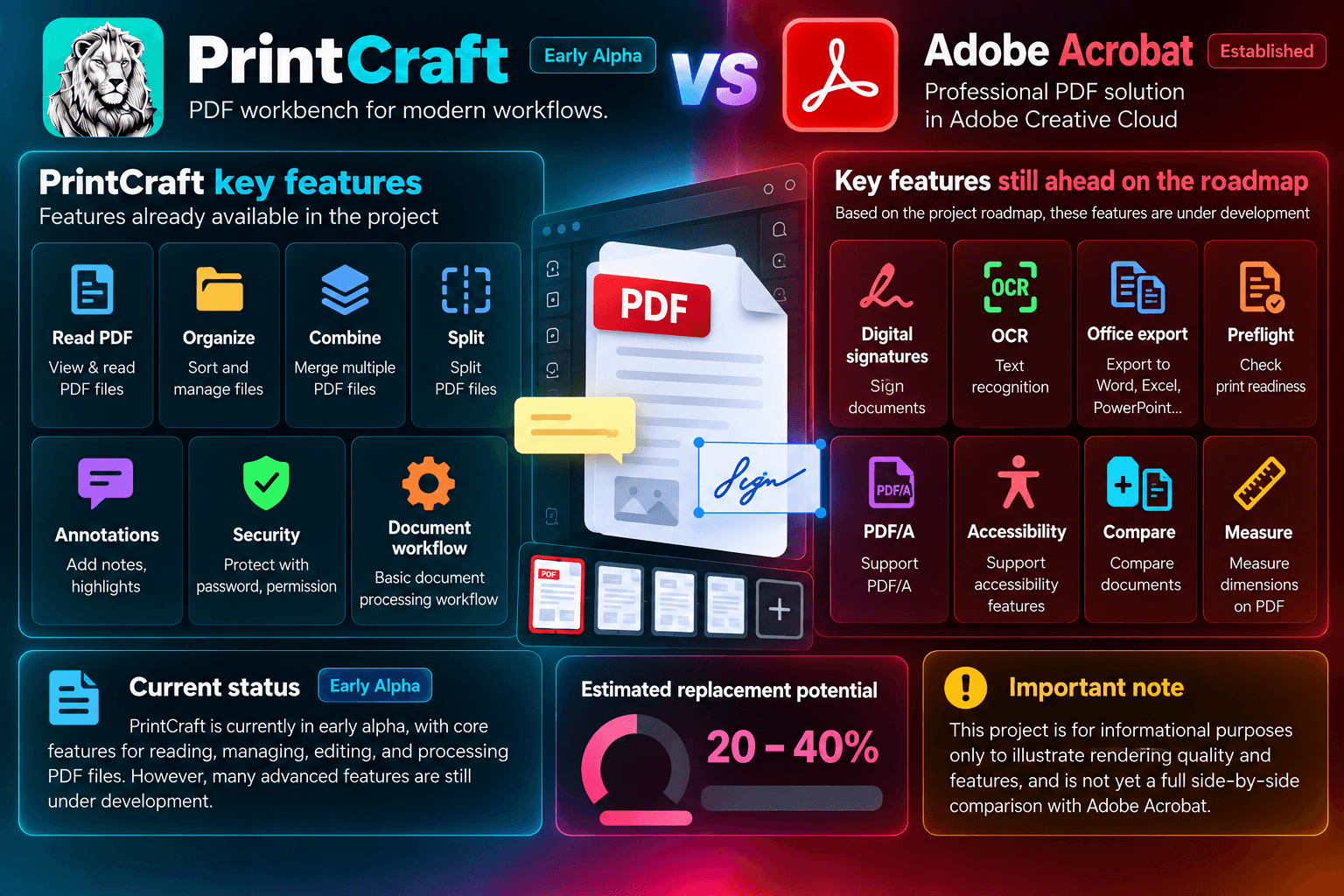
This is one of the areas where the gap with Adobe is quite large.
Assessment
Current ability to replace Acrobat: approximately 20–40%.
If your requirements are mainly:
- Read PDFs
- Merge PDFs
- Split PDFs
- Organize PDFs
then replacement is quite realistic.
However, if you rely on Acrobat for:
- OCR
- Digital signatures
- Preflight
- Accessibility
- Enterprise PDF workflows
then Crafting Apps is not there yet.
6. EffectCraft vs After Effects
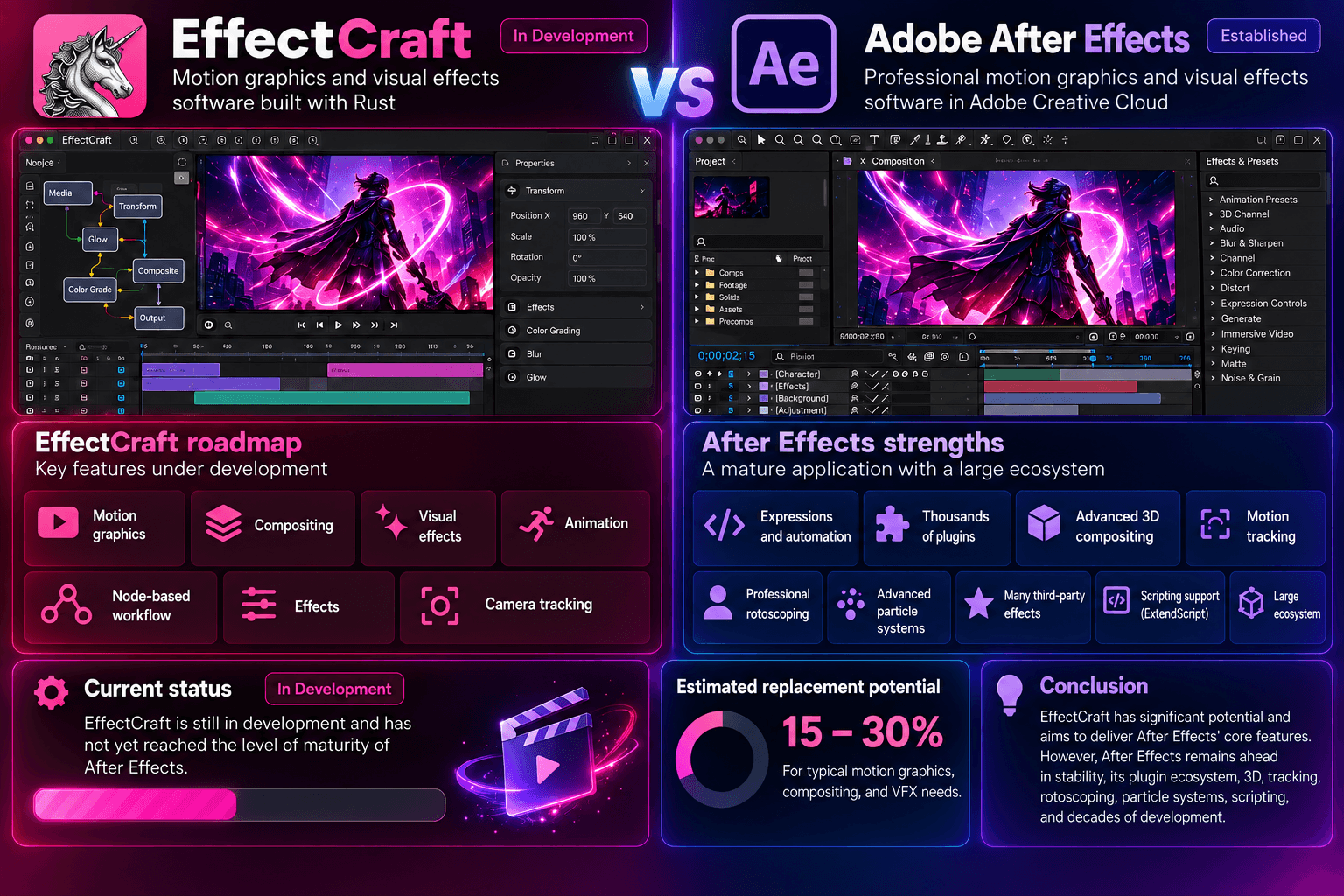
This is probably the area with the largest gap.
Assessment
Current ability to replace After Effects: approximately 15–30%.
This is the application I would not recommend using as a replacement for After Effects in professional production today.
However, it could become one of the most interesting projects in the suite if its node-based architecture and AI-agent capabilities continue to develop.
7. DesignCraft vs InDesign
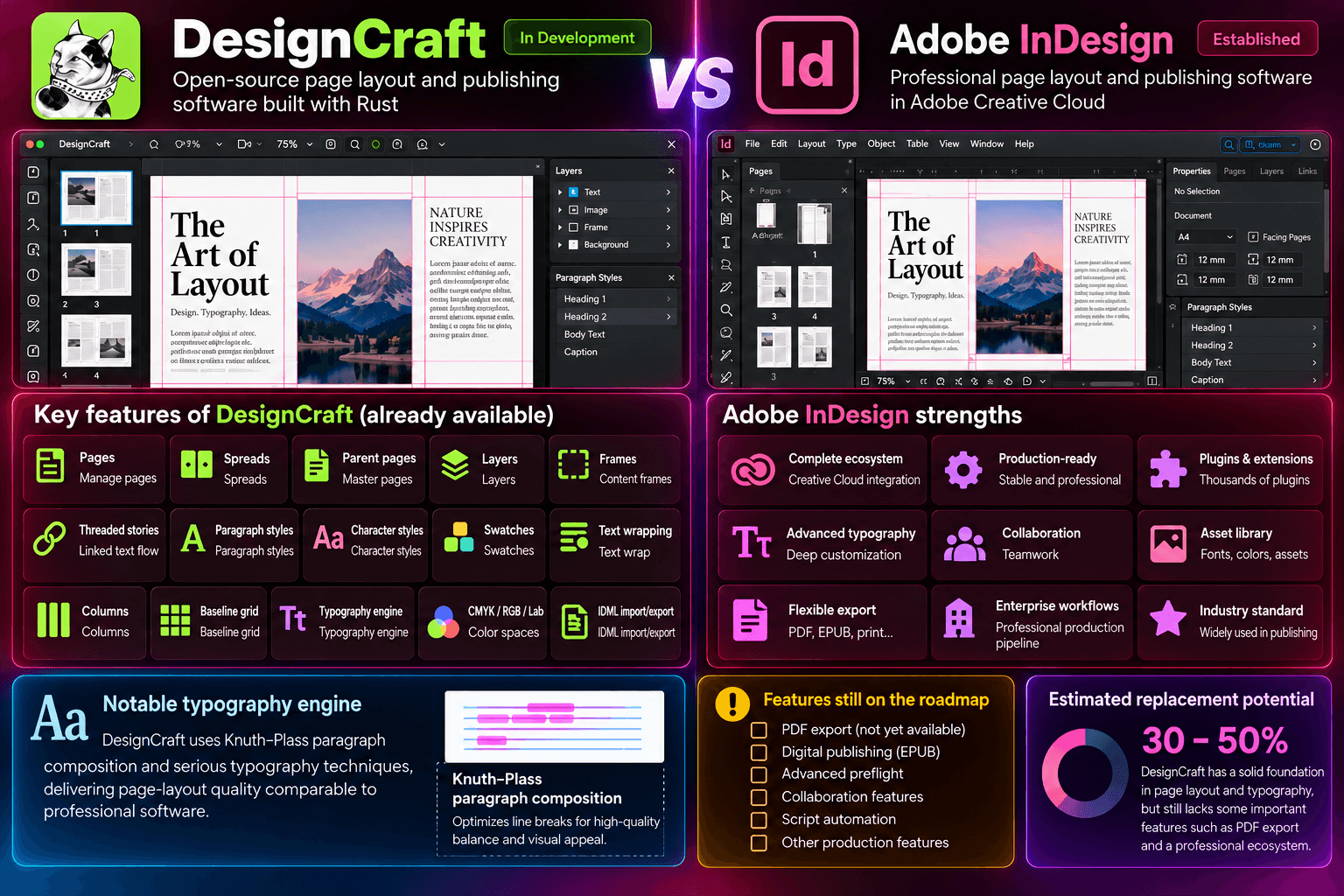
DesignCraft is another interesting case.
Assessment
Current ability to replace InDesign: approximately 30–50%.
For:
- Magazines
- Brochures
- Editorial design
- Basic publishing
→ it is worth watching closely.
For large-scale professional publishing production:
→ it is not there yet.
Overall Assessment
If we evaluate the ability to replace Adobe today, rather than simply looking at marketing claims or screenshots, the picture becomes much clearer.
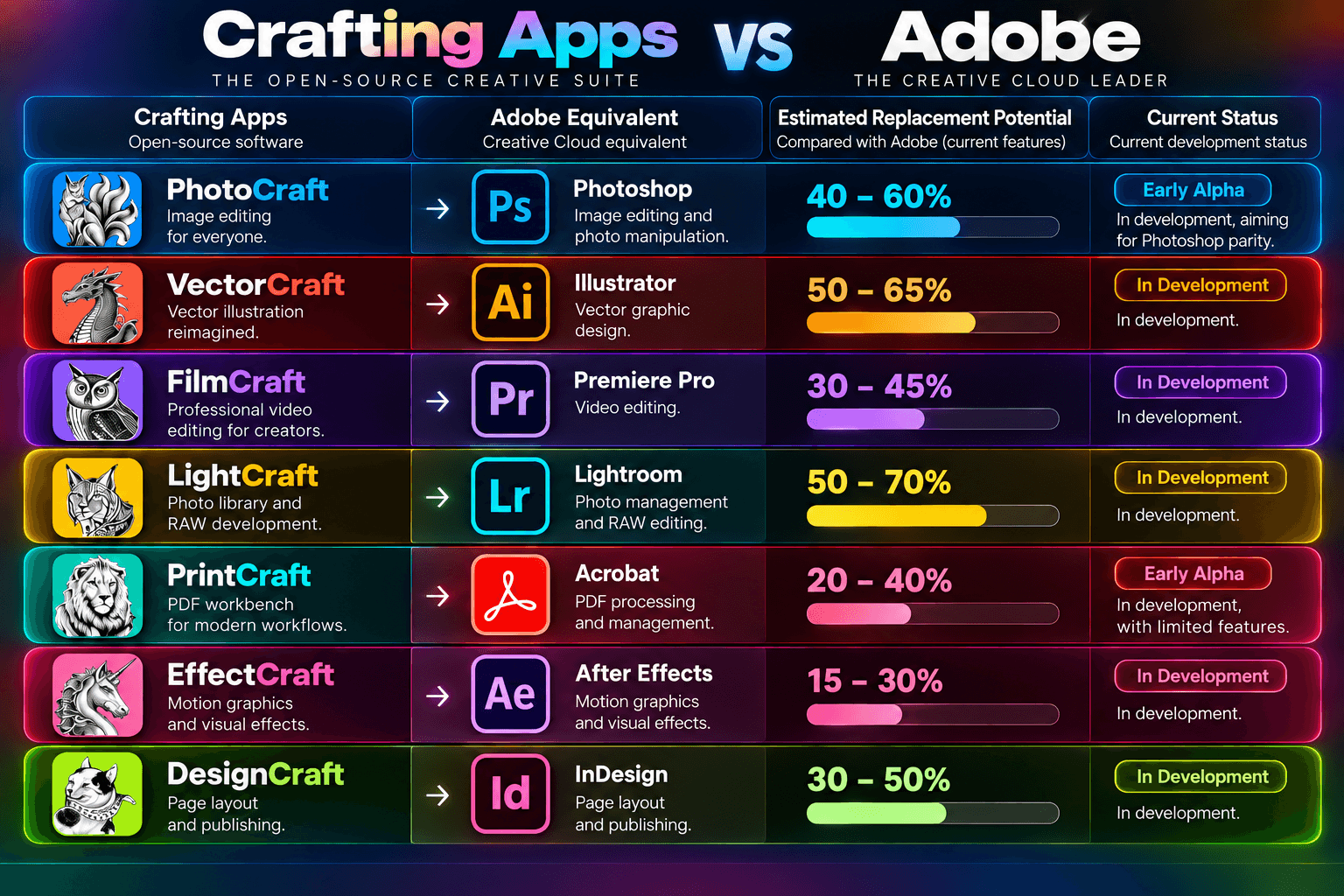
It is important to note that these percentages represent functional and workflow coverage, not software quality or the percentage of Adobe features that have been replicated.
An application with 50% feature coverage can still satisfy 80–90% of the needs of a particular user group.
My Real-World Experience with Crafting Apps
In my current work, I am a 3D Designer, but much of my day-to-day work does not revolve exclusively around 3D.
I frequently work with textures, draw and edit 2D graphics, occasionally process Illustrator files provided by clients, create 2D and 3D animations, and produce short videos for games.
The nature of my work does not heavily depend on highly specialized features or extremely large 2D projects.
Because of that, after spending some time testing Crafting Apps, my overall experience has been quite positive.
Fast and simple installation
The installation process is straightforward and lightweight, allowing me to start using the applications quickly.
Easy to get familiar with
The interface and keyboard shortcuts have many similarities to Adobe applications, so I barely had to relearn the basics when moving to a new tool.
Good coverage of my actual needs
For the tasks I commonly perform—such as texture processing, image editing, vector work, Illustrator data, and various 2D graphics tasks—Crafting Apps currently covers around 80% of my needs.
Of course, Crafting Apps is still under active development, so I cannot completely replace Adobe across every workflow.
In particular, for work involving motion graphics, compositing, and complex VFX, I would still continue using After Effects.
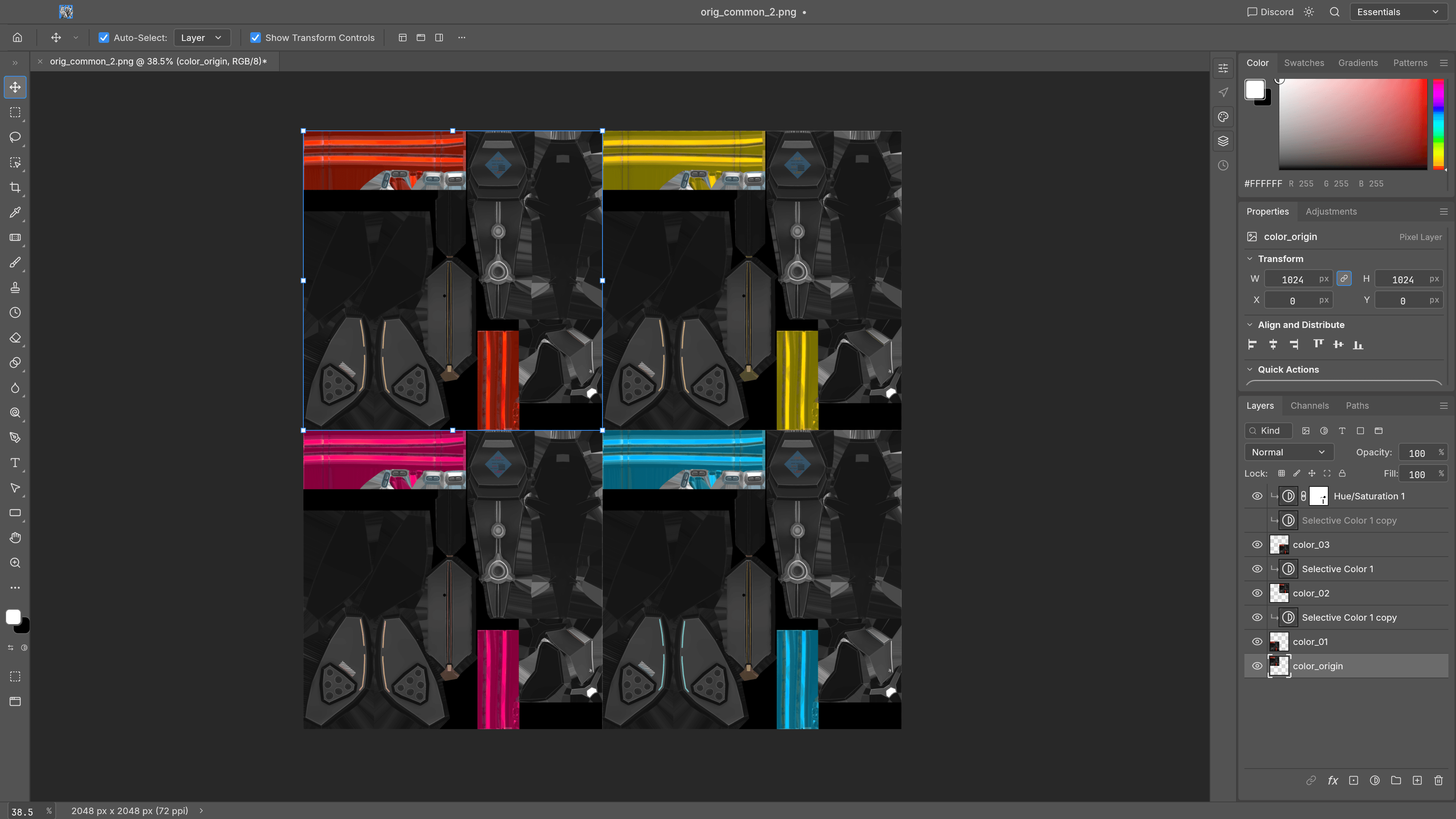
Try out PhotoCraft to create color options for the model's texture.
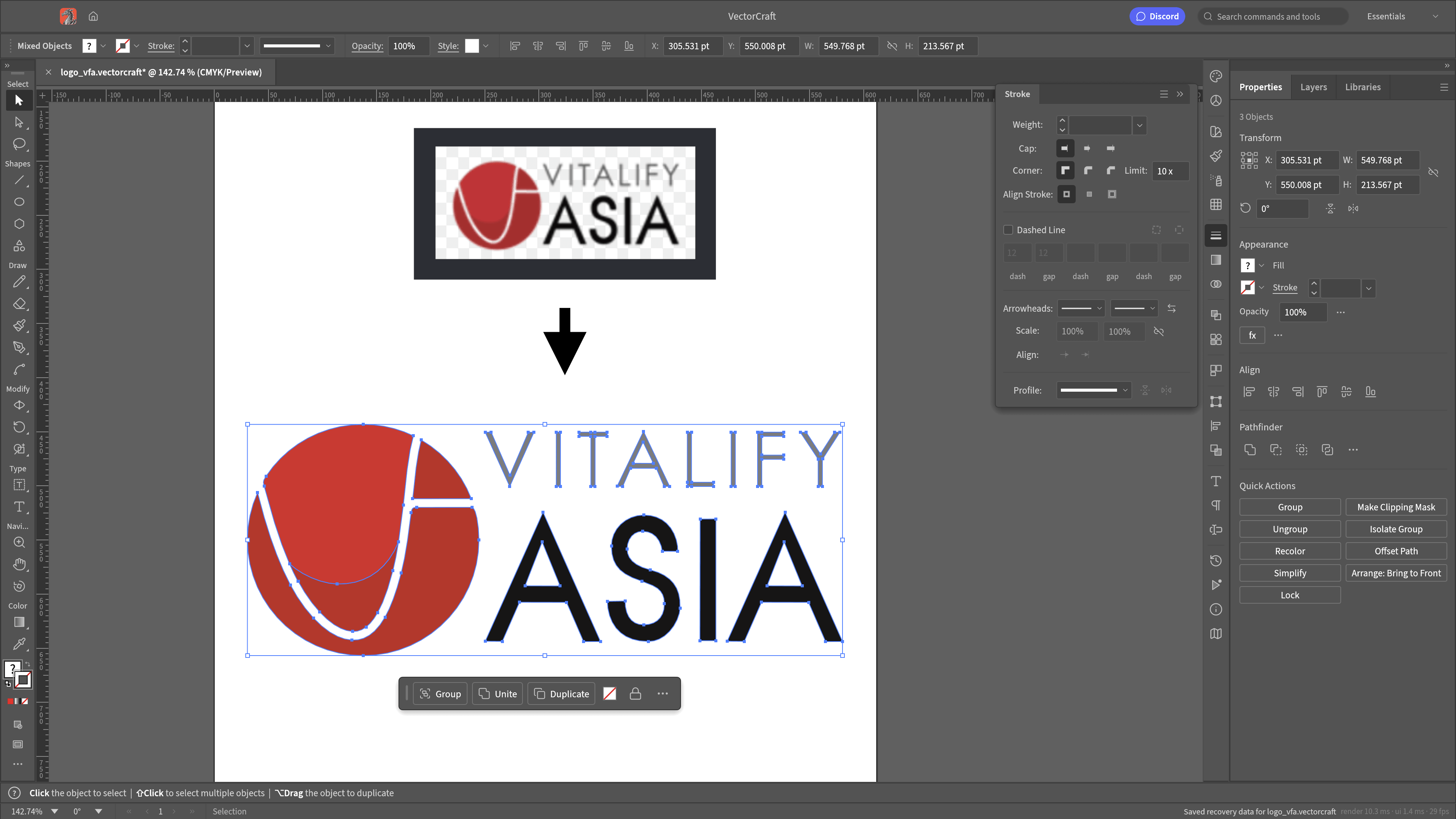
Try out VectorCraft to create a vector logo file from a low-quality image.
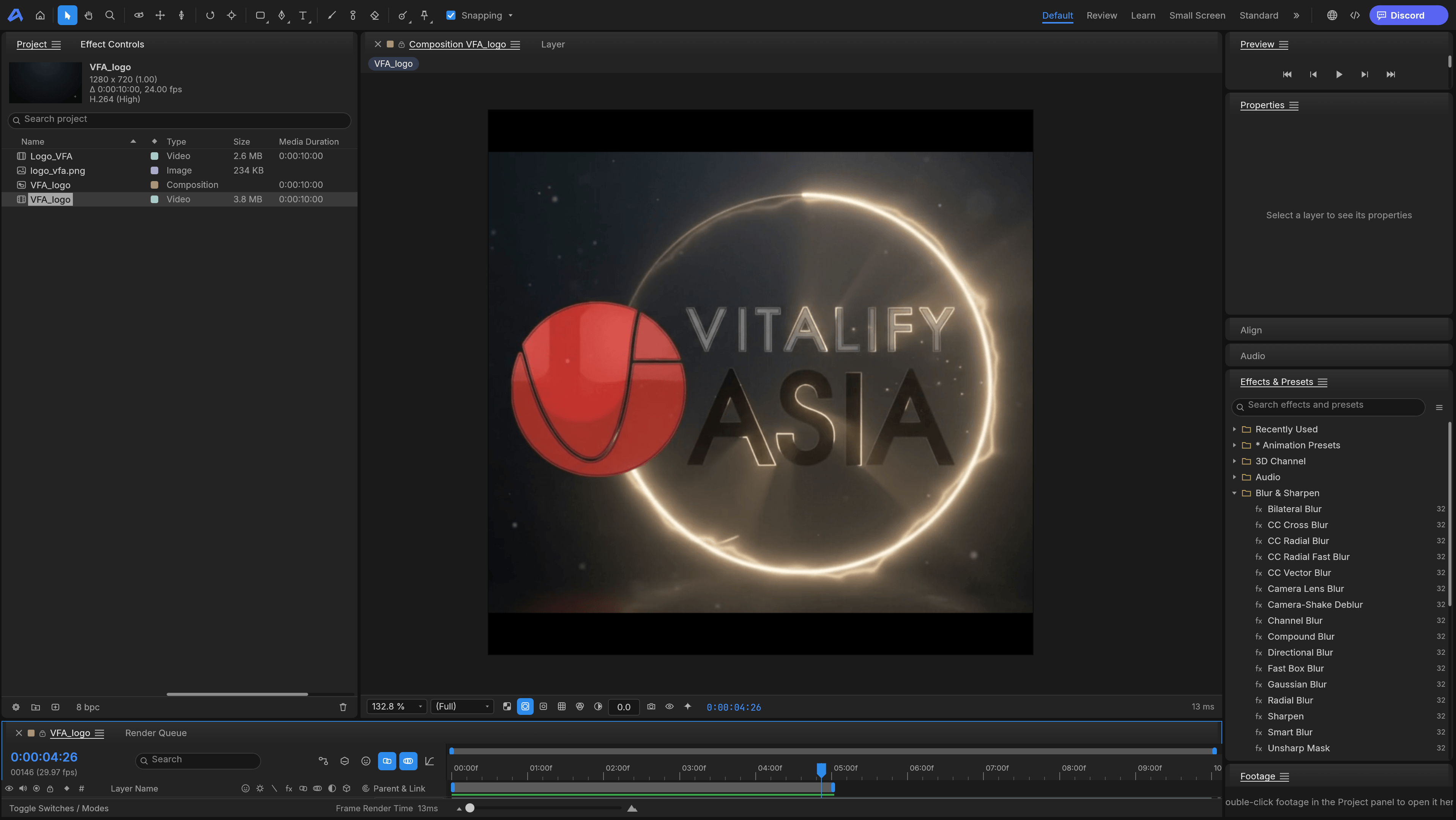
Try out creating video effects in EffectCraft.
However, this is also exactly what makes me optimistic about Crafting Apps.
If the project continues to develop steadily and more advanced tools are completed—especially in motion graphics and VFX—I believe Crafting Apps has the potential to become a practical option for designers who want to reduce their dependence on the Adobe ecosystem.
The Most Threatening Thing About Crafting Apps Is Not That It Is Free
If we simply look at it as:
“Crafting Apps is free → Adobe will lose users.”
that does not tell the whole story.
The more important point is that:
Crafting Apps is being designed so that AI can directly control the applications.
Adobe is also investing heavily in AI and Firefly. Creative Cloud now integrates generative AI into many applications and services.
But Crafting Apps is taking a different approach.
AI is not only used to generate assets.
An AI agent could potentially:
- Open a file
- Read its structure
- Modify layers
- Change colors
- Create vectors
- Edit a timeline
- Export the result
- Check the output
For example, with PhotoCraft and VectorCraft, this could eventually allow an AI agent to perform a complete creative workflow rather than simply assist the user with individual tasks.
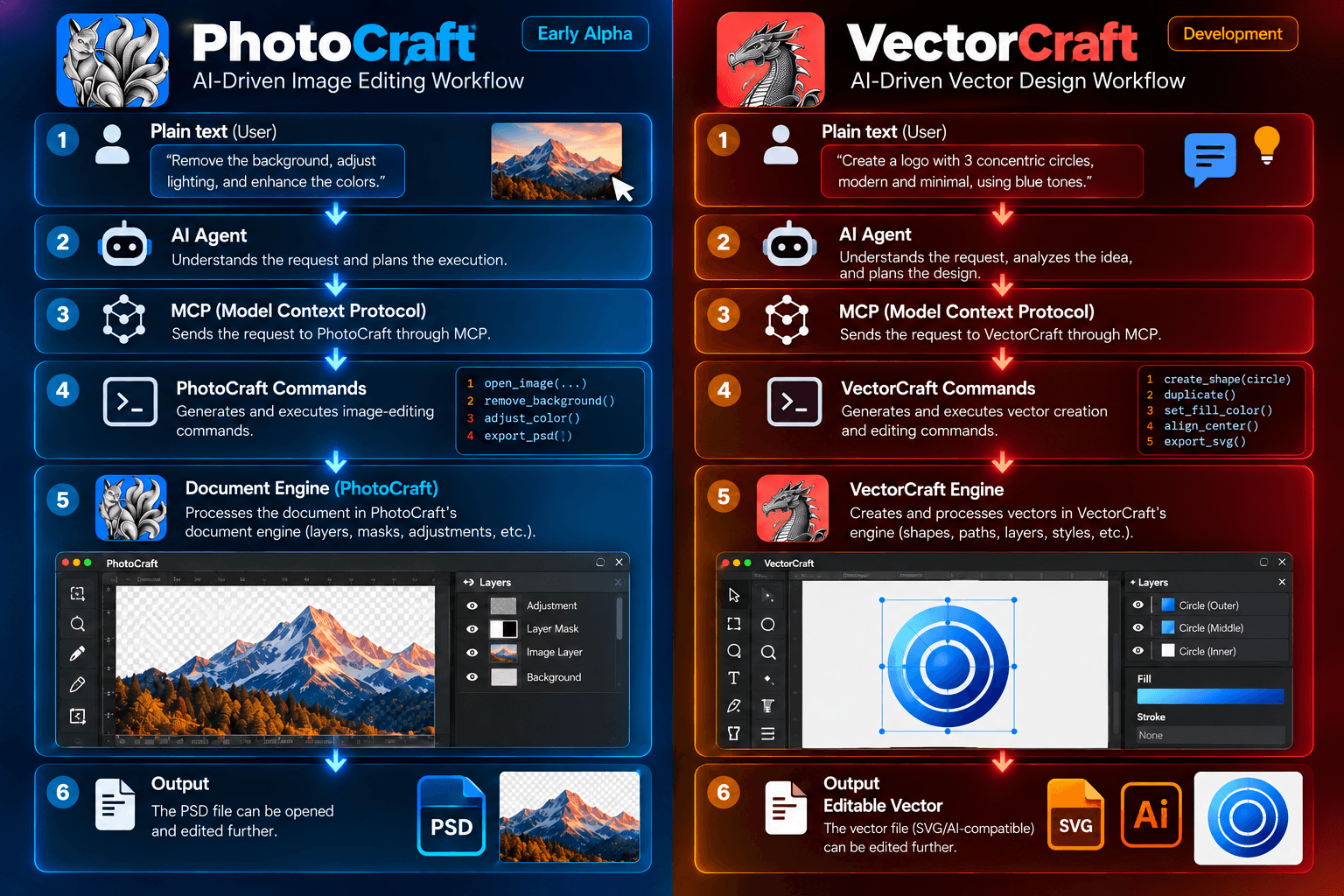
This is an architectural difference, not simply another AI button added to existing software.
Rust + AI Architecture
The applications are written in Rust and are designed with support for:
- macOS
- Windows
- Linux
- Web
The goal is to have a shared engine supporting:
Desktop + Web + CLI + AI Agent
MCP allows AI systems to directly control the applications.
But Adobe Still Has Major Advantages
If I had to identify the areas where Crafting Apps cannot yet replace Adobe, I would divide them into five major categories.
1. Ecosystem
Adobe has more than 20 applications and services working together.
2. Production maturity
Adobe products are mature, stable, and proven in large-scale professional production.
3. Compatibility
Adobe has decades of experience supporting its own file formats and a massive ecosystem built around them.
4. Plugins
Thousands of plugins, scripts, and extensions are available for Adobe applications.
5. AI
Adobe has Firefly and deeply integrated AI capabilities across its ecosystem.
Can Crafting Apps Replace Adobe Right Now?
In the short term: No.
If a professional studio asked me today:
“Can we completely abandon Adobe and switch to Crafting Apps?”
My answer would be:
Not yet.
But if the question were:
“Is Crafting Apps one of the most interesting open-source projects to watch if we want to move away from Adobe?”
My answer would be:
Absolutely.
In fact, I believe the most important thing to watch is not how many tools PhotoCraft has compared with Photoshop.
It is: Agent-Native Creative Software
Development Direction
Stage 1 — Adobe Alternative
Replace basic creative workflows.
Stage 2 — Adobe Compatible
Provide stable workflows around:
PSD / SVG / PDF / IDML...
and other established creative formats.
Stage 3 — Agent-Native Creative Suite
AI does not simply assist the user. It directly controls the applications.
User → AI Agent → MCP → Crafting Apps → Automated Workflow
This is where the project could potentially become much more significant than simply being another collection of free alternatives.
Conclusion
If we only look at the feature list, Crafting Apps is still a long way behind Adobe.
If we look at production maturity, the gap is even larger.
But if we look at the architecture and direction of the future, the story becomes very different.
Crafting Apps is attempting to build:
Photoshop + Illustrator + Premiere + Lightroom + Acrobat + After Effects + InDesign
but based on a different philosophy:
Open Source + Rust + Local-first + Cross-platform + AI Agent + MCP
That is why I do not see Crafting Apps simply as a group of “free Adobe alternatives.”
It is more interesting than that.
It is experimenting with a new model:
“A Creative Suite that AI can directly control.”
And as of October 2026, I would evaluate the project as follows:
Ability to replace Adobe features: ★★★☆☆Ready for professional production: ★★☆☆☆PSD/SVG/format compatibility: ★★★★☆ in some applicationsOpen-source: ★★★★★Cross-platform: ★★★★★AI/MCP potential: ★★★★★Tiềm năng dài hạn: ★★★★★
In short:
Adobe currently wins in ecosystem and maturity.
Crafting Apps has a very interesting advantage in software architecture designed for the AI era.
Struggling to turn ideas into reality? With a proven track record of over 1,000 clients, our agile and flexible team will accelerate your business growth.