Minimizing Release Downtime with Blue-Green Deployment
Blue-Green Deployment runs two environments in parallel so you can deploy and test a new version before switching traffic. This guide covers Nginx, Compute Engine, Cloud Build, instant rollback, database migrations, sessions, background workers, costs, and comparisons with Rolling and Canary.

On this page
- 1.The maintenance screen
- 2.Problems with the old release method
- 2.1 Weaknesses
- 2.2 What we need
- 3.Introducing Blue-Green Deployment
- 4.How to implement Blue-Green Deployment
- Step 1: Create two upstreams and a switch
- Step 2: Turn the switch into a script
- Step 3: Deploy to the idle VM
- Step 4: Test Green
- Step 5: Switch traffic
- Step 6: Roll back if needed
- What blue-green deployment solves
- 5.Things to watch out for when implementing
- 5.1 Database migrations
- 5.2 Background consumers
- 5.3 Sessions and state
- 5.4 Persistent connections
- 5.5 Cost
- 5.6 When is blue-green not the right choice?
- Similar approaches: Rolling and Canary deployment
- 6.1 Rolling deployment
- 6.2 Canary deployment
- 6.3 Choosing the right approach for your project
- 7.Conclusion
- References
The traditional release method with a maintenance mode (a maintenance screen) causes downtime on every release, pushes releases outside working hours, and when something breaks, rolling back means running the whole process again.
This article introduces blue-green deployment: run two environments side by side, deploy and test the new version on the idle one, then switch traffic with a single command. You will see:
- Why the maintenance-screen approach no longer fits
- How blue-green solves each of those problems
- How to implement it with an Nginx reverse proxy on Compute Engine and Cloud Build
- Things to watch out for: database migrations, background consumers, sessions, cost
1.The maintenance screen
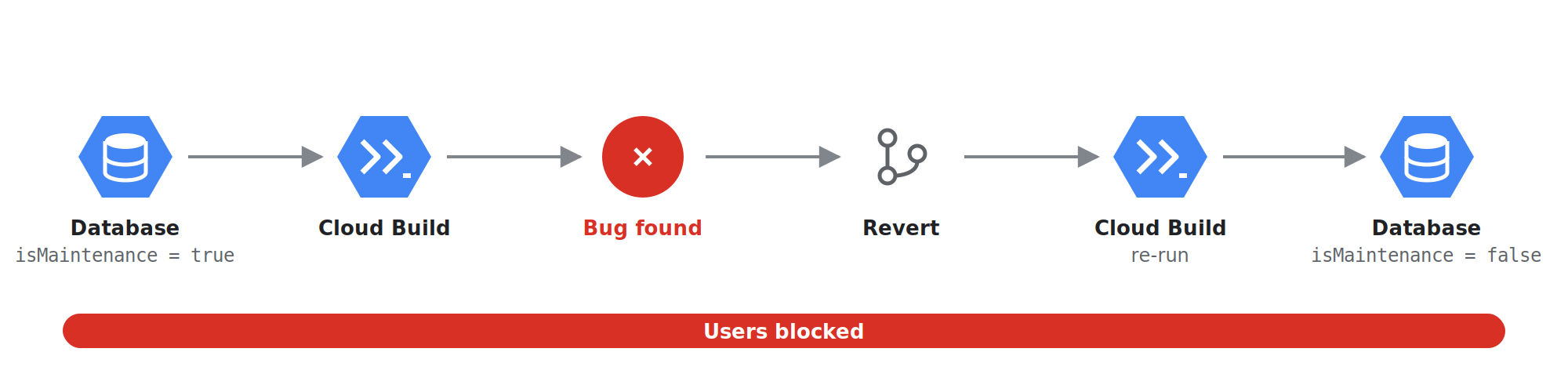
When I first started working as a software engineer, I joined a project building a novel web tool for real estate brokers, with a feature that used a machine learning model to predict which properties would be in high demand. Back then, every time we released a new version, our team followed an old process with plenty of shortcomings:
- Notify partners and users of the release schedule.
- The engineer in charge of the release sets the
isMaintenance = trueflag in the database, and the app shows the maintenance screen. - The engineer pushes to the release branch, Cloud Build runs the deploy pipeline, and the engineer keeps watching the deployment.
- Once the pipeline succeeds, the team uses an account that has access during maintenance to check the features.
- When the whole test checklist is done, the engineer sets the flag back to
isMaintenance = falseso users can use the app again.
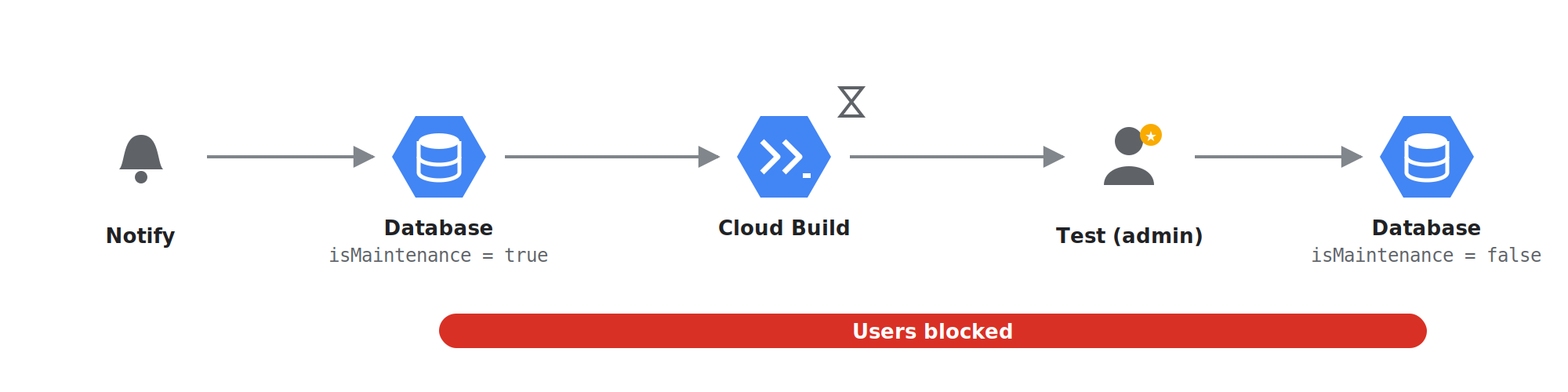
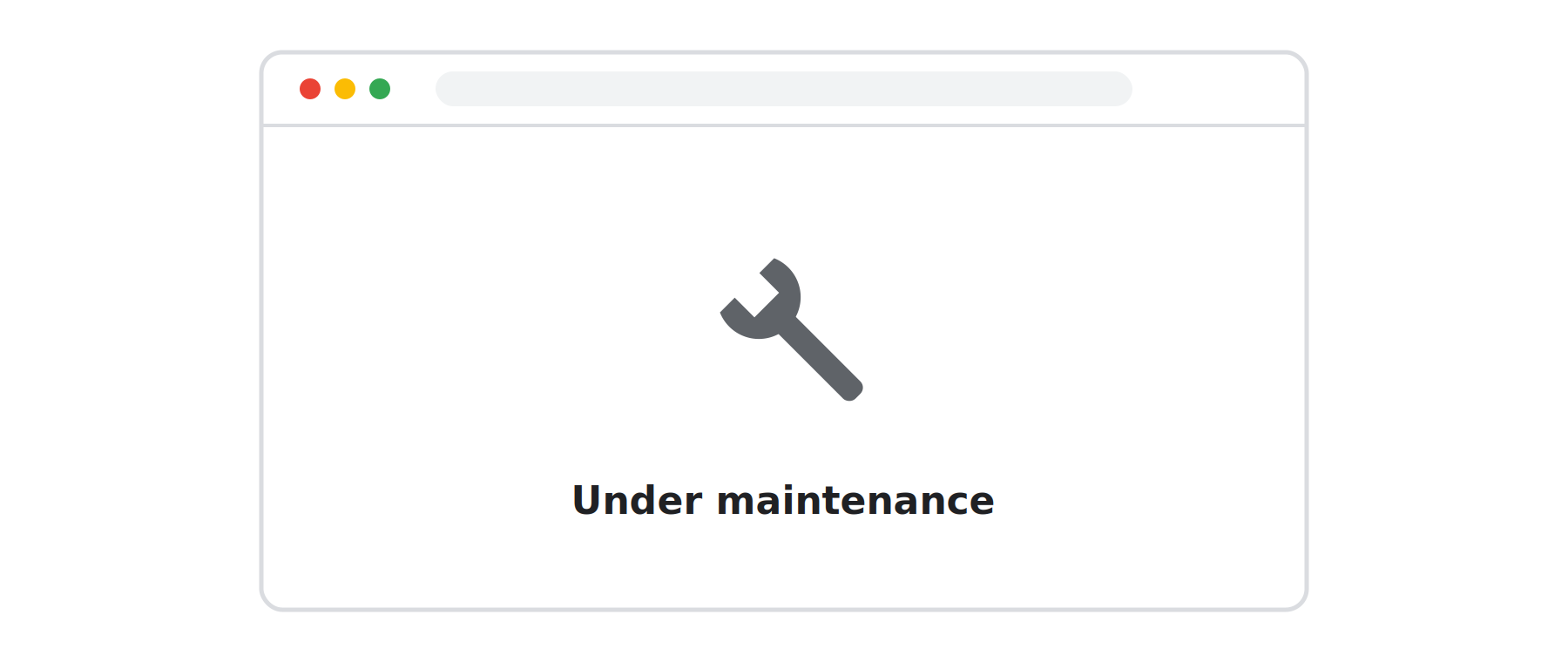
The process was simple and worked well most of the time. But no engineer on the team could guarantee that every future release would always land in the "happy case" like that.
2.Problems with the old release method
2.1 Weaknesses
- Every release means downtime. The maintenance screen blocks users for the entire release, whether it is a new feature or a tiny change.
- Releases get pushed outside working hours. To limit the impact of downtime, updates are batched and released in a fixed time slot, which makes each release bigger and riskier. On top of that, the team's partners work across several time zones, so coordination is harder too.
- Rollback means rerunning the whole process. When the new version has a bug, there is no way to undo it right away. The team has to keep the maintenance screen up, revert the code on the release branch, and rerun the Cloud Build pipeline. Every failed release means users wait even longer.
2.2 What we need
From the problems above, here is what we wanted to improve:
- Zero downtime. Users are not blocked by a maintenance page while the team releases.
- Testing in the real environment before end users use it.
- Rollback as fast as possible, without rerunning the whole pipeline.
3.Introducing Blue-Green Deployment
Given how the example system above is deployed and the requirements we need to meet, blue-green deployment is one of the best solutions.
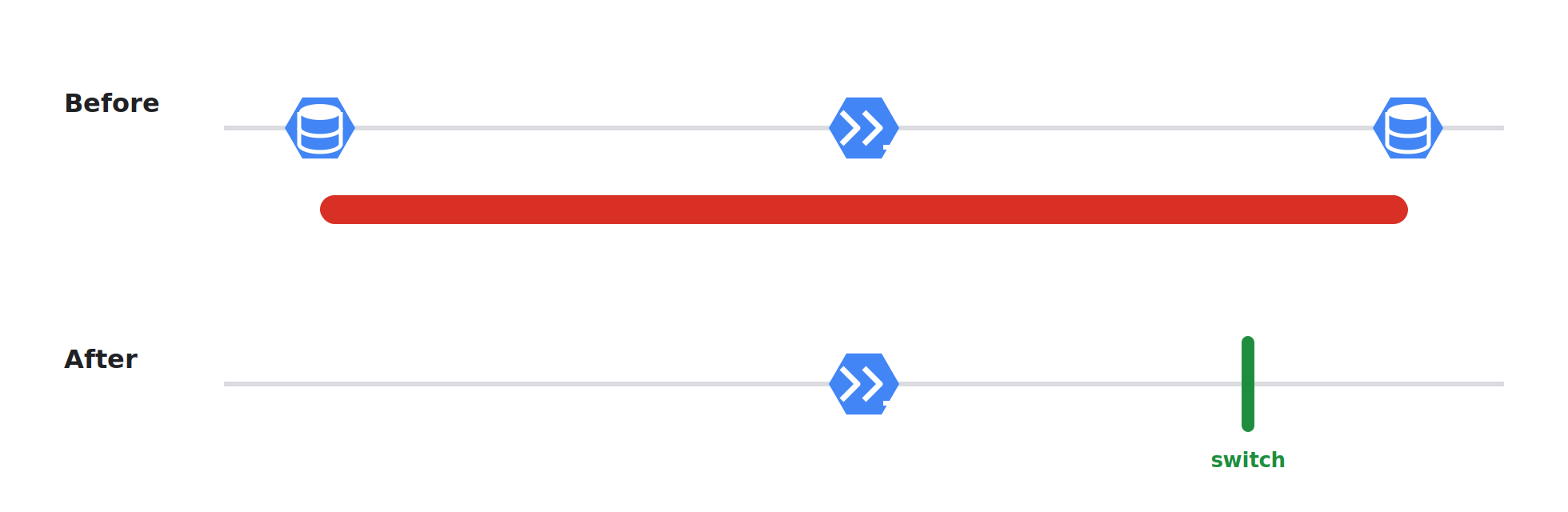
When releasing a new version, instead of replacing the running version directly, you maintain two separate environments:
Blue is the current version that end users are using.
Green is the new version, with no users yet.
A router (load balancer, reverse proxy, …) sits in front of both and decides where each request goes. The router is the "switch" that directs traffic.
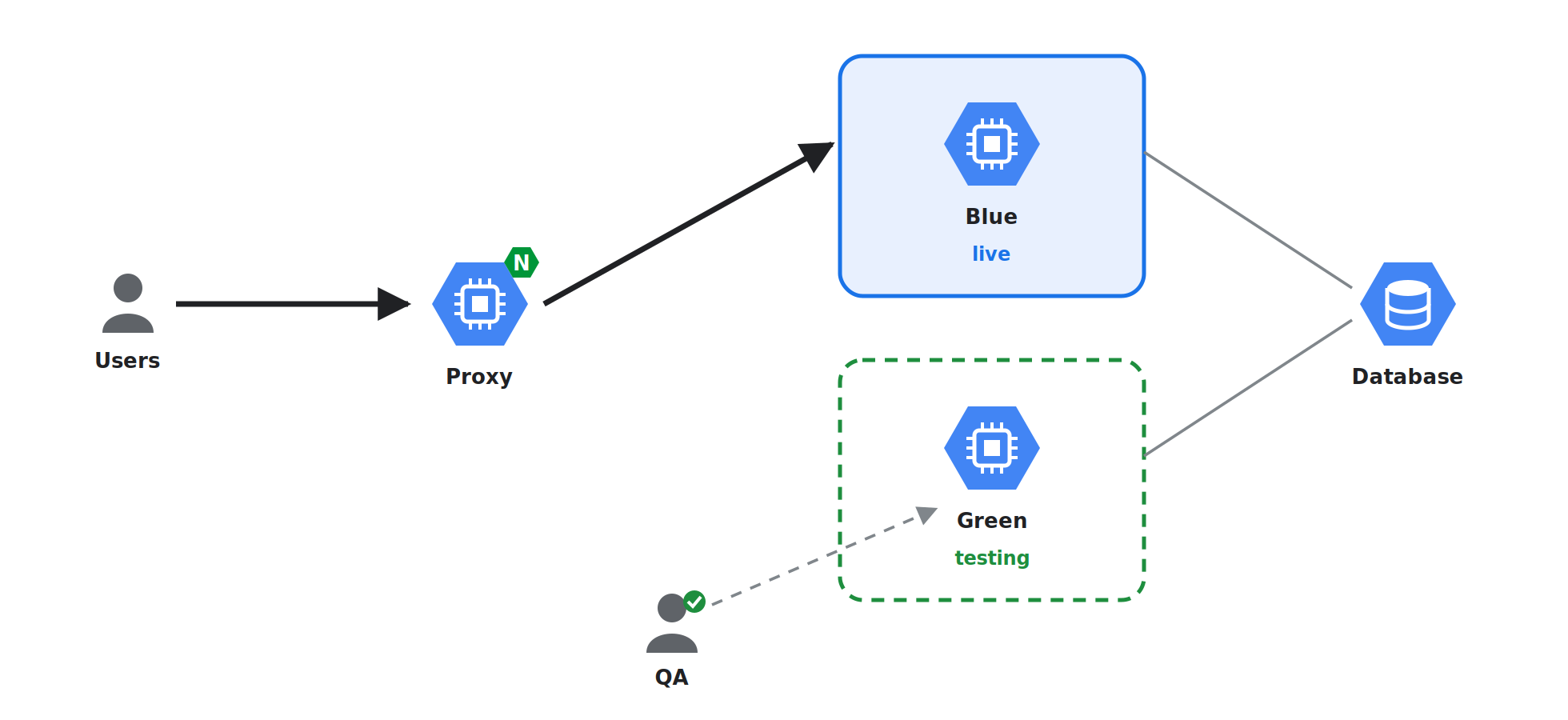
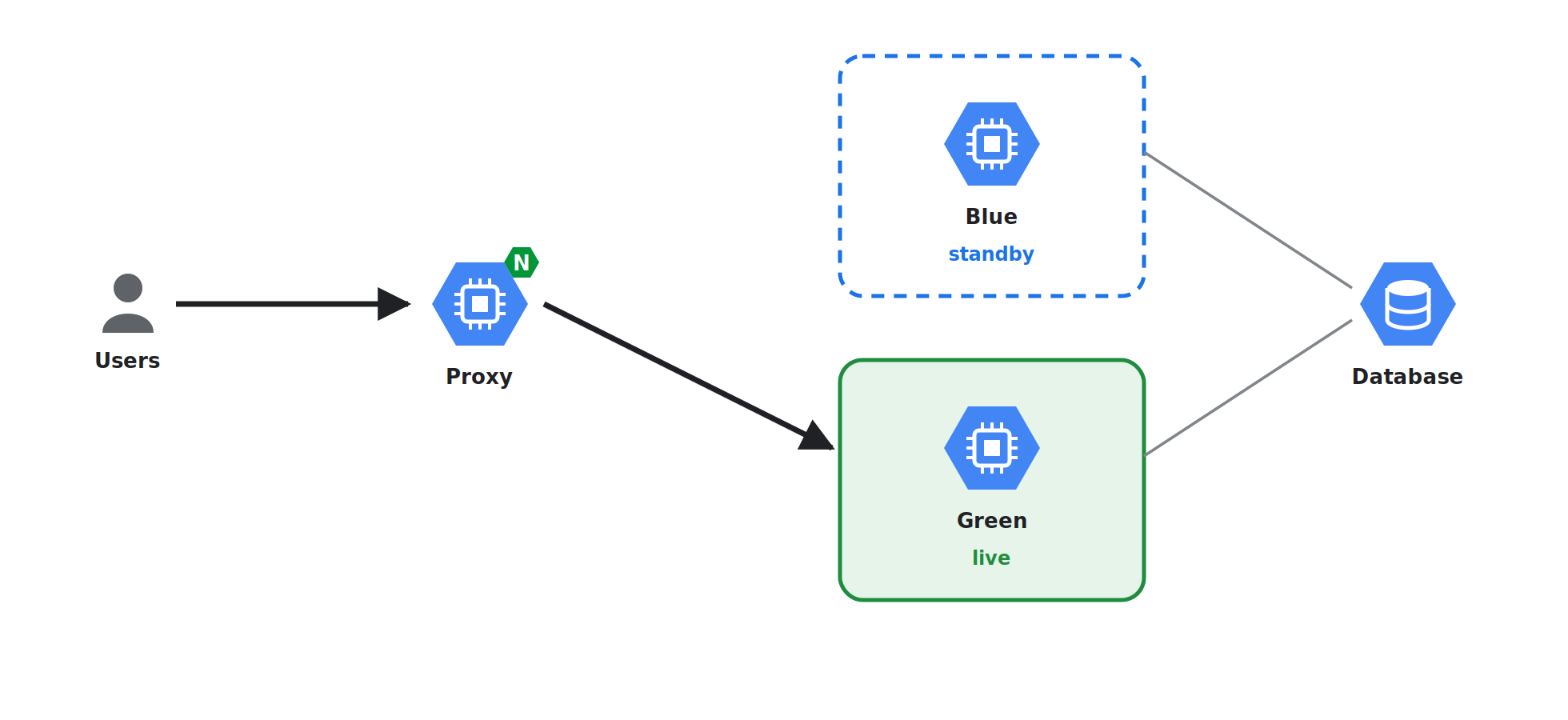
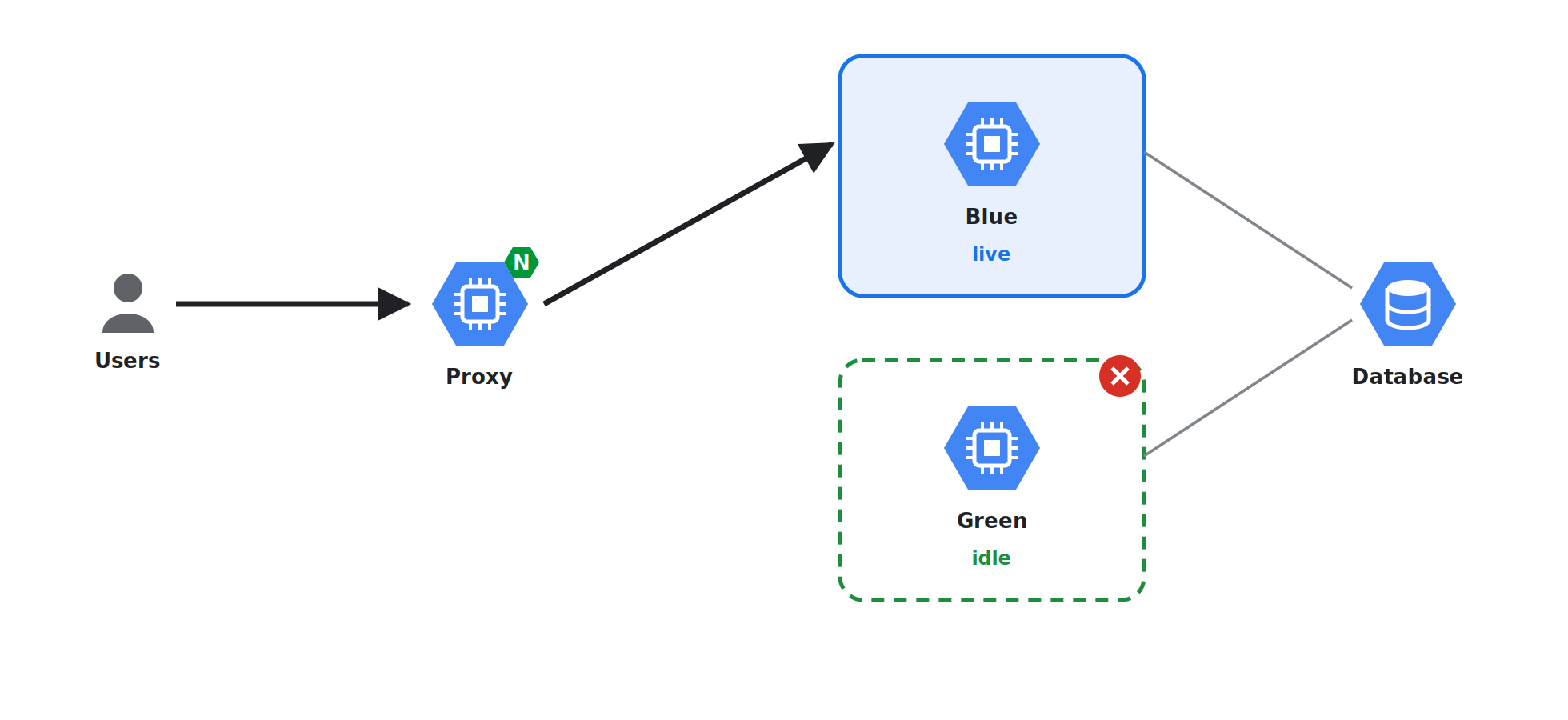
A release then looks like this:
- Deploy v2 to Green while Blue keeps serving users.
- Test Green directly through its own URL.
- Switch the router so all traffic goes to Green.
- Keep Blue running as an instant rollback.
- If the new version causes a problem, just switch back at the router. If it is stable, Blue becomes the environment for the next release.
Comparing the result with the list of requirements above:
| What the team needs | How blue-green delivers it |
|---|---|
| No downtime | Green is fully running before any user reaches it |
| Test before users see it | Green has its own address for direct testing |
| Rollback in seconds | Blue is still running; just switch traffic back to Blue |
4.How to implement Blue-Green Deployment
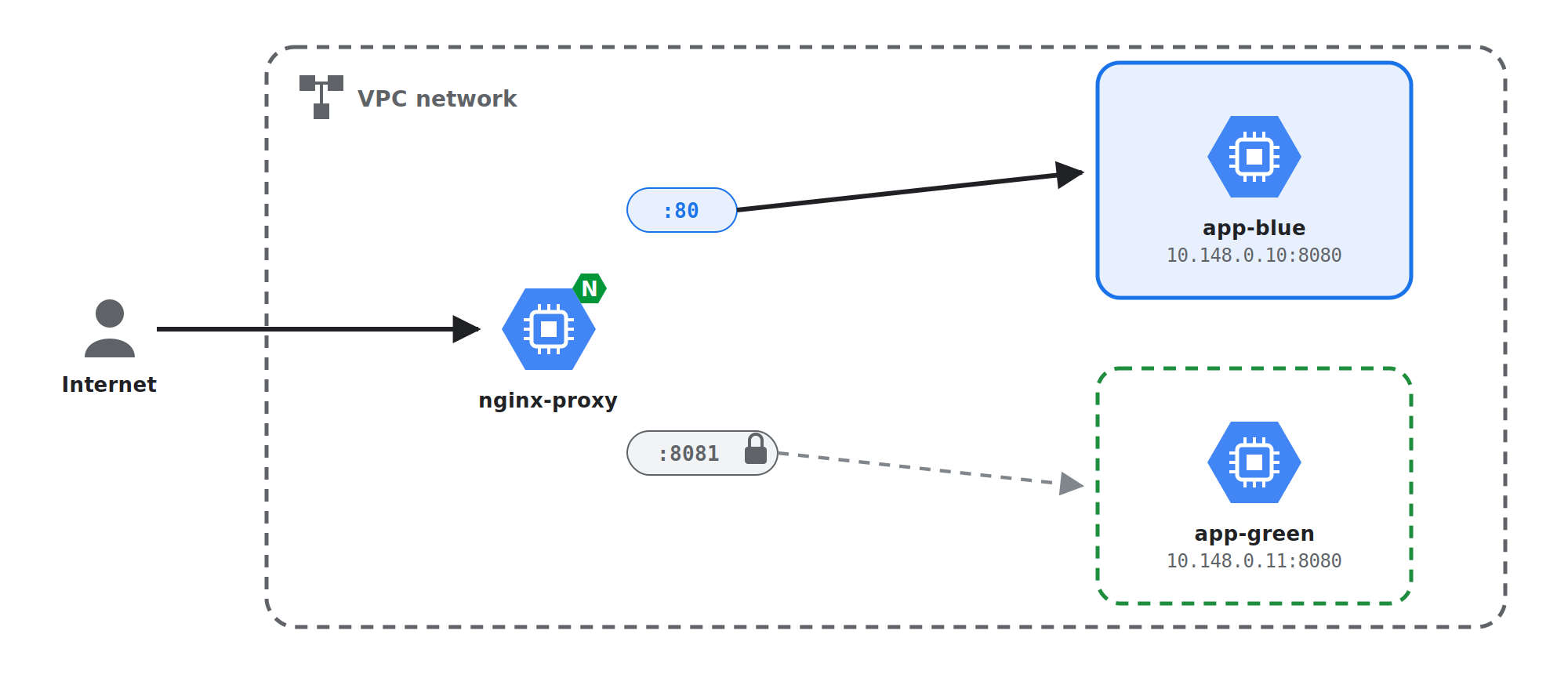
This idea works on any system with a router in front of the app. In the project I mentioned at the beginning of this article, the app ran on Compute Engine VMs behind an Nginx reverse proxy:
- Blue and Green are two VMs (
app-blueandapp-green), each running the app on port8080. - The router is Nginx on the proxy VM. It already sat in front of the app, so it became the team's switch.
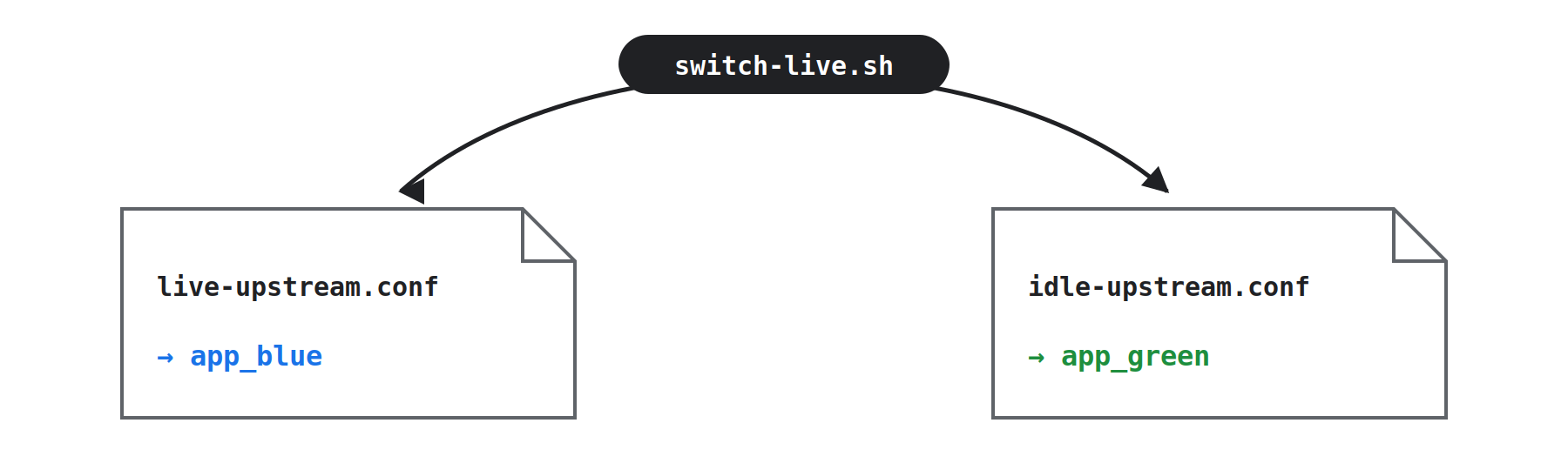
- The switch is a small Nginx config file that decides which VM receives live traffic. Changing that file and reloading Nginx is the traffic switch.
Step 1: Create two upstreams and a switch
On the proxy VM, declare both environments and two entrances: a public one that follows the switch, and an internal test one that always points at the idle color.
# /etc/nginx/conf.d/app.conf
upstream app_blue  { server 10.148.0.10:8080; }  # app-blue
upstream app_green { server 10.148.0.11:8080; }  # app-green
# Public traffic: follows the switch
server {
    listen 80;
    server_name api.example.com;
    location / {
        include /etc/nginx/live-upstream.conf;
    }
}
# Internal test entrance: always points at the idle color
server {
    listen 8081;
    location / {
        include /etc/nginx/idle-upstream.conf;
    }
}
Important: port 8081 is for the team only. Use a VPC firewall rule so that only internal IPs (or CI) can reach it.
# /etc/nginx/live-upstream.conf
proxy_pass http://app_blue;
# /etc/nginx/idle-upstream.conf
proxy_pass http://app_green;
Step 2: Turn the switch into a script
Put the traffic-switching logic into a small script on the proxy VM:
#!/usr/bin/env bash
# /usr/local/bin/switch-live.sh — usage: switch-live.sh blue|green
set -euo pipefail
TARGET="${1:?usage: switch-live.sh blue|green}"
case "$TARGET" in
  blue)  IDLE=green ;;
  green) IDLE=blue  ;;
  *) echo "target must be blue or green" >&2; exit 1 ;;
esac
echo "proxy_pass http://app_${TARGET};" | sudo tee /etc/nginx/live-upstream.conf >/dev/null
echo "proxy_pass http://app_${IDLE};"   | sudo tee /etc/nginx/idle-upstream.conf >/dev/null
# Validate first, then reload gracefully
sudo nginx -t && sudo nginx -s reload
echo "Live: ${TARGET} | Idle: ${IDLE}"
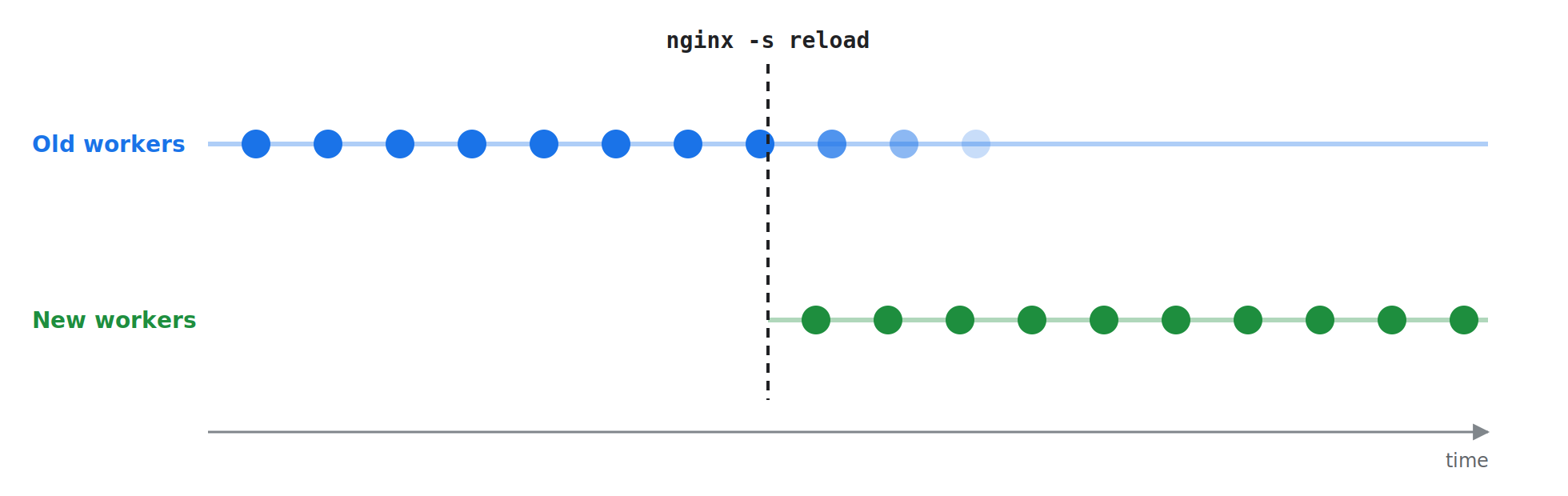
nginx -tchecks the configuration before anything changes. If it fails, the reload does not run and the old configuration keeps running.nginx -s reloadis a graceful reload. New worker processes pick up the new configuration, while the old workers finish the requests they are handling. No requests are lost during the switch.
Step 3: Deploy to the idle VM
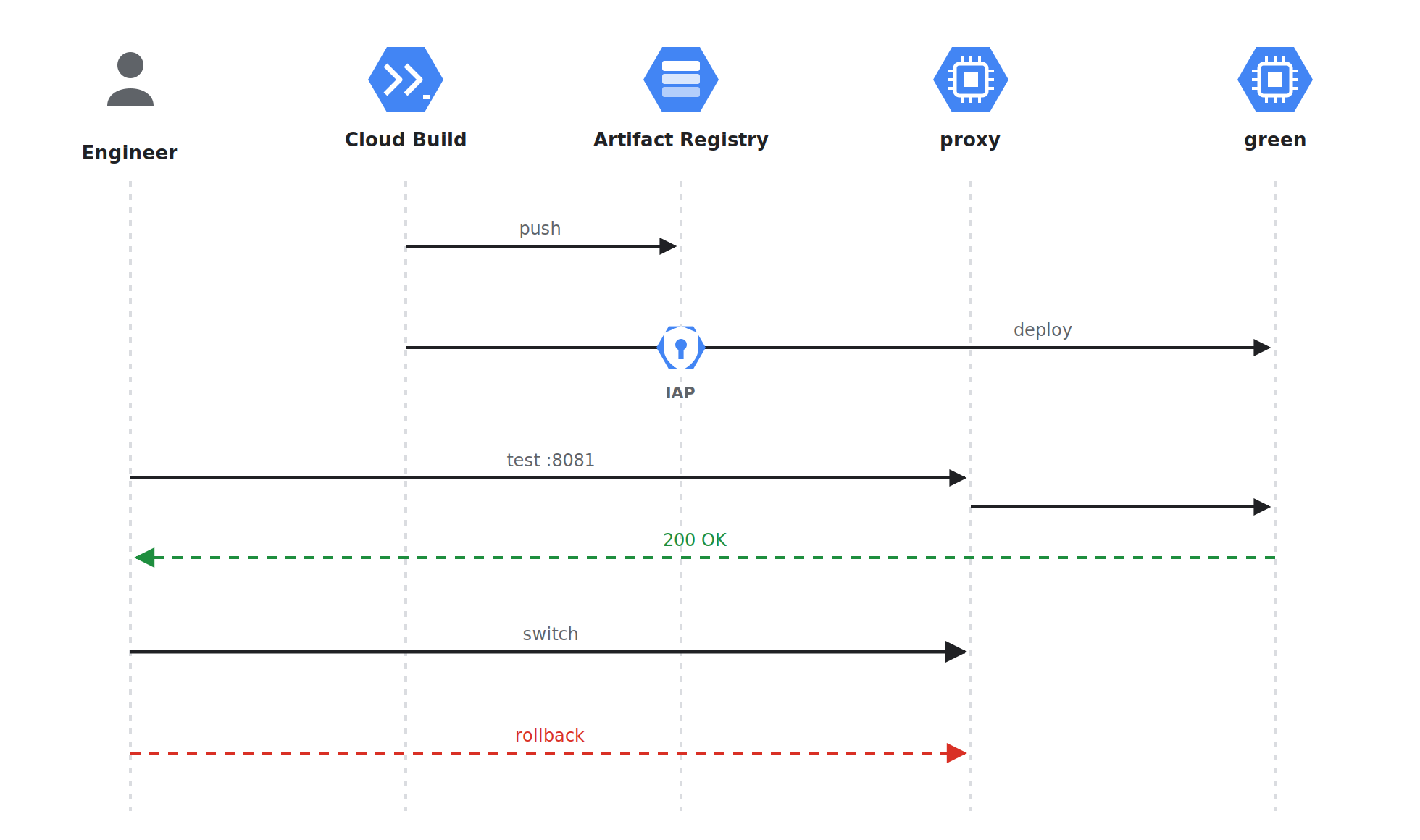
Cloud Build deploys to the idle VM while the live VM keeps serving users:
steps:
  - name: gcr.io/cloud-builders/docker
    args: ["build", "-t", "$_IMAGE", "."]
  - name: gcr.io/cloud-builders/docker
    args: ["push", "$_IMAGE"]
  - name: gcr.io/google.com/cloudsdktool/cloud-sdk
    entrypoint: bash
    args:
      - -c
      - |
        gcloud compute ssh app-${_TARGET} \
          --zone=asia-southeast1-b \
          --tunnel-through-iap \
          --command="docker pull $_IMAGE && (docker rm -f app || true) && docker run -d --name app --restart=always -p 8080:8080 $_IMAGE"
Here _TARGET is the idle color (green in this release).
Step 4: Test Green
Call the internal test URL, which points at Green:
curl -i http://<proxy-internal-ip>:8081/health
Run smoke tests, a quick manual check, or an automated test suite against it. This is exactly the step the maintenance-screen approach never had: trying the new version on a real VM, behind the real proxy, before any user sees it.
Step 5: Switch traffic
sudo /usr/local/bin/switch-live.sh green
From now on, every new request goes to app-green, and app-blue becomes the idle side. From the next release on, the two environments swap roles.
Step 6: Roll back if needed
sudo /usr/local/bin/switch-live.sh blue
Because Blue is always running, it can take traffic immediately.
What blue-green deployment solves
Now let's go back to each problem of the old approach:
| Old problem (maintenance screen) | With blue-green |
|---|---|
| Users are blocked for every Cloud Build run | Green is built and deployed in the background while Blue keeps serving |
| Releases pushed to late nights or weekends | The switch is instant, so you can release during working hours |
| Rollback = rerunning the whole pipeline, maintenance screen still up | Point traffic back to Blue in seconds |
isMaintenance flag in the DB |
No flag needed; the router decides where traffic goes |
| Real users are the first testers | Smoke test Green through its own URL before switching |
5.Things to watch out for when implementing
5.1 Database migrations
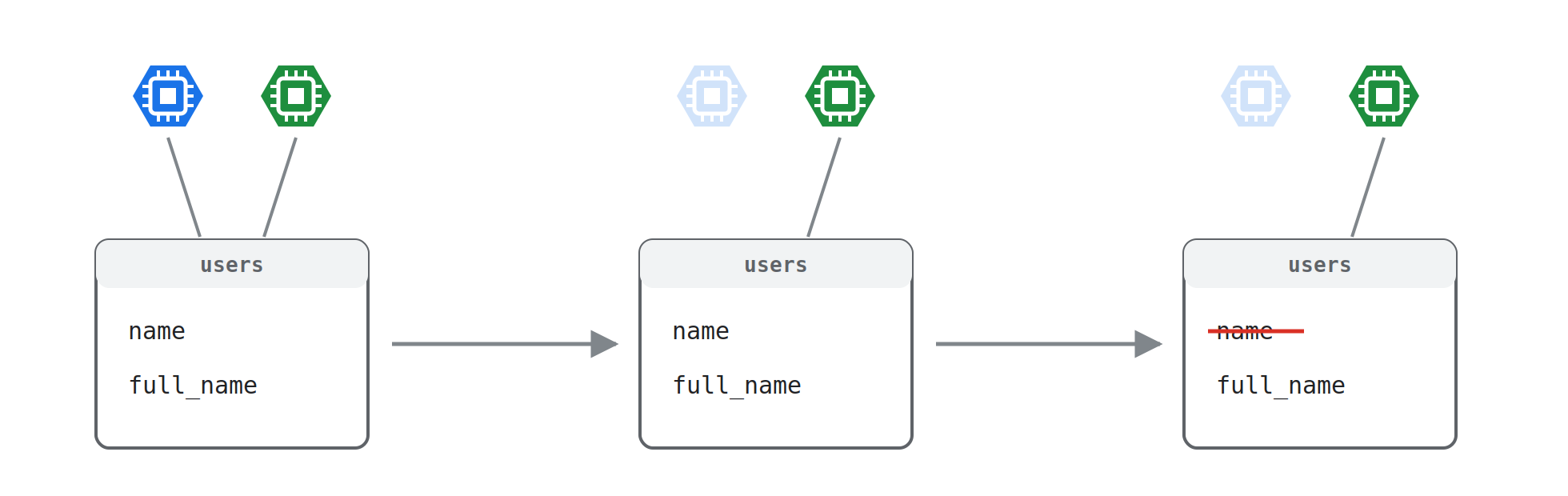
Blue and Green usually share one database, and for a while both versions run against it. A migration that drops or renames a column will break Blue, and with it your rollback path. The solution is the expand/contract pattern:
- Expand: add new columns or tables in a backward-compatible way, so both v1 and v2 work.
- Release v2 and check that it is stable.
- Contract: remove the old columns in a later release, once no running version needs them.
5.2 Background consumers
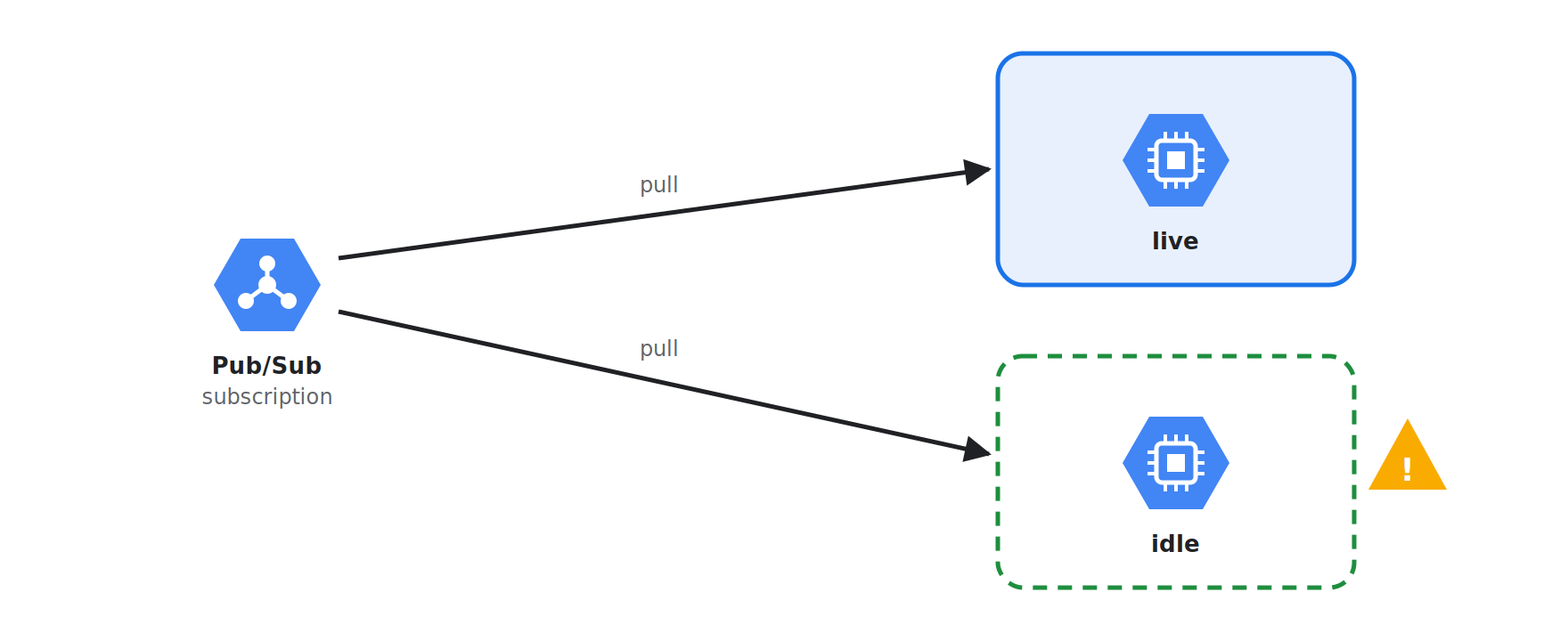
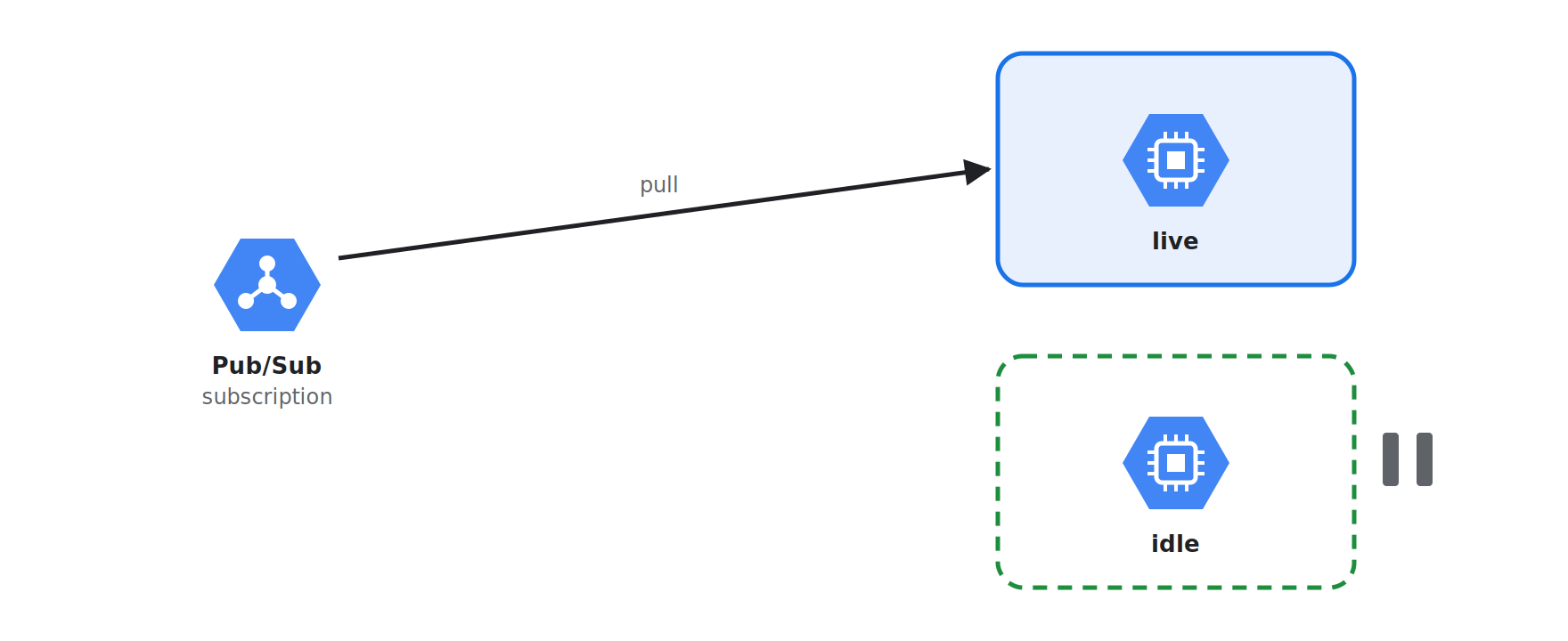
Nginx only controls HTTP traffic. If the app on each VM also runs Pub/Sub pull subscribers, cron jobs, or other workers, the idle VM keeps doing that work too, sometimes with untested code, and both VMs pull from the same subscription. Only enable workers on the live VM (for example, turn them on as part of the switch script), or make sure both versions can safely handle the same messages.
5.3 Sessions and state
If user sessions are stored in the app's memory, switching environments will log users out. Store state in a shared place (database, Redis, Firestore) so that either version can serve any user.
5.4 Persistent connections
A graceful reload does not cut open connections: WebSocket and gRPC streams stay on the old Nginx workers, still talking to Blue, until they close. Plan for them to drain gradually, consider setting worker_shutdown_timeout so they do not hang forever, and do not shut Blue down right after the switch.
5.5 Cost
Because you run two environments side by side, cost can double. You can stop the idle VM between releases and start it again only when deploying, but that also means you lose instant rollback. In my experience, you should keep the idle VM running for a while after switching traffic, so you keep instant rollback during the riskiest part of the release. Once the new version is stable, you can stop the idle VM to save cost and start it again before the next deployment.
5.6 When is blue-green not the right choice?
- The system changes its database schema often, and backward compatibility is hard to keep.
- The budget cannot sustain two environments.
- The application depends heavily on in-memory state or persistent connections.
- You need to validate the new version with real traffic before opening it to all users. In that case, canary is a better fit.
Real-world examples:
- Netflix uses blue-green in Spinnaker, the continuous delivery platform it built and open-sourced. Netflix calls this strategy "red/black": according to the Netflix TechBlog, teams can deploy new server groups "using strategies like Blue-Green (or Red-Black as we call it at Netflix)".
- Waze (part of Google) promotes releases to its staging environment using a blue/green strategy in its Spinnaker pipelines.
Similar approaches: Rolling and Canary deployment
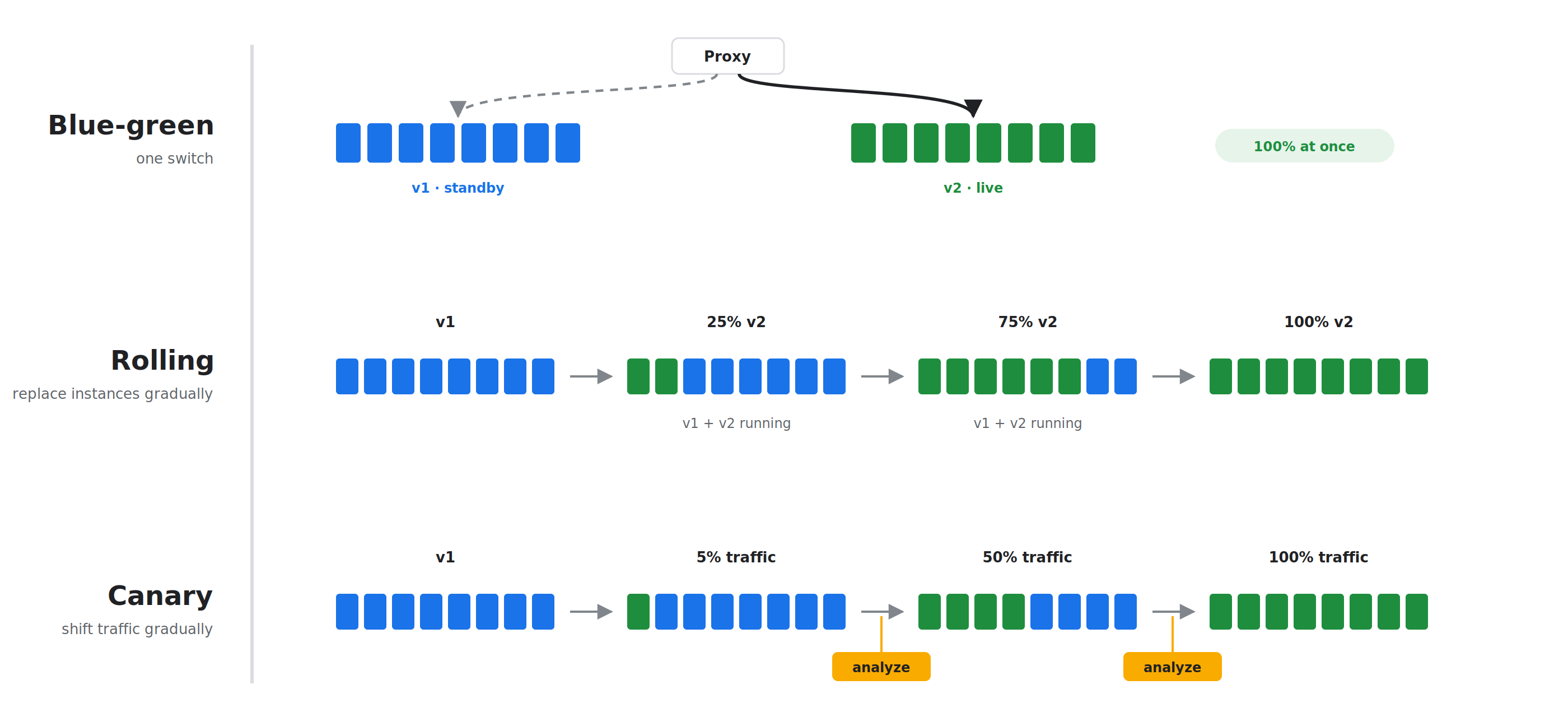
Blue-green is not the only way to release without a maintenance screen. Two approaches often mentioned alongside it are rolling deployment and canary deployment.
6.1 Rolling deployment
Instead of switching all traffic at once as blue-green deployment does, rolling deployment gradually replaces the app's v1 instances with v2 instances until v2 has replaced them all.
- Pros: no downtime, and no need to double infrastructure cost.
- Cons: during the rollout, v1 and v2 serve users at the same time, so the API and data must be backward compatible. Rollback is also another rollout, turning v2 back into v1, and is not instant like blue-green.
Example: Rolling update is the default strategy for Deployments in Kubernetes. On Google Cloud, Compute Engine managed instance groups also support rolling updates out of the box.
6.2 Canary deployment
Canary sends only a small share of traffic (for example 1–5%) to the new version, monitors the metrics (error rate, latency…), and only then increases it gradually to 100%. If something goes wrong, only a small group of users is affected.
- Pros: catches bugs with the least risk, based on real traffic.
- Cons: needs a monitoring system to know when it is safe to increase traffic, and the release takes longer.
Examples:
- Netflix and Google jointly developed and open-sourced Kayenta, an automated canary analysis tool. According to Netflix, automated canary analysis is "an essential part" of their production deployment process.
- Meta (Facebook) releases in tiers: first to internal employees, then to 2% of production, and only then to 100%.
6.3 Choosing the right approach for your project
Every release approach has its own strengths and trade-offs, depending on the scale and architecture of the system:
Quick comparison
| Blue-green | Rolling | Canary | |
|---|---|---|---|
| Downtime | None | None | None |
| Testing before reaching end users | Yes (idle environment) | No | Partial (small group of users) |
| Rollback speed | Instant | Medium | Fast (just pull back the small share of traffic) |
| Multiple versions running at once | No | Yes | Yes |
| Extra infrastructure | A second environment | Little | Little |
| Complexity | Medium | Low | High (needs monitoring) |
- Use Blue-Green when: you need instant rollback, want to test/smoke test the whole new version in the real environment before going public, and the application does not keep many persistent connections or much in-memory state.
- Use Rolling Deployment when: the application already runs on containers/Kubernetes or cloud instance groups, you want to save on infrastructure cost, and you can accept a slightly longer rollback.
- Use Canary Deployment when: the system has a very large user base, you need to minimize risk by testing on the real traffic of a small group of users, and you already have monitoring/alerting strong enough to evaluate metrics automatically.
7.Conclusion
Releasing the traditional way, with a release schedule and a maintenance screen, is not necessarily bad. It is simple and it works, but the price is the experience of the very users who pay for the product.
Blue-green deployment can improve that. The new version is deployed in parallel on Green, verified in the real environment, and traffic is switched over with a single command. If something goes wrong, one more command sends traffic back to Blue, and users never need to know a release happened.
References
- Netflix TechBlog – Global Continuous Delivery with Spinnaker (Netflix uses blue-green (red/black) in Spinnaker)
- Spinnaker Summit – How (and Why) Waze and Netflix Use Spinnaker to Breeze Through Deployments (Waze uses blue/green in its pipelines)
- Kubernetes Documentation – Deployments (Rolling Update is the default strategy)
- Google Cloud Documentation – Apply new VM configurations in a MIG (rolling updates for managed instance groups)
- Google Cloud Blog – Introducing Kayenta: An open automated canary analysis tool from Google and Netflix (canary analysis at Netflix and Google)
- Engineering at Meta – Rapid release at massive scale (Meta's tiered release process)
- nginx documentation – Controlling nginx (how graceful reload works)
- Martin Fowler – Parallel Change (the expand/contract pattern)
- Martin Fowler – BlueGreenDeployment (the blue-green deployment concept)
Struggling to turn ideas into reality? With a proven track record of over 1,000 clients, our agile and flexible team will accelerate your business growth.